1. Detailed Explanation of Constructors
1) BitmapShader (Image Rendering)
BitmapShader(Bitmap bitmap, Shader.TileMode tileX, Shader.TileMode tileY)
Uses a bitmap as a texture to fill a certain area. Parameters in order:
- bitmap: The bitmap used for filling;
- tileX: The tiling mode of the bitmap on the X-axis;
- tileY: The tiling mode of the bitmap on the Y-axis;
There are three types of Shader.TileMode:
- CLAMPThat is, if the renderer exceeds the original boundary, it copies the edge color to color the out-of-range area.
- REPEATIt repeats rendering in a tiled form.
- MIRRORIt repeats the bitmap in a mirrored way both horizontally and vertically.
2) ComposeShader (Blend Rendering)
ComposeShader(Shader shaderA, Shader shaderB, PorterDuff.Mode mode)
Overlay of rendering effects. Seeing PorterDuff, you know what it means, right? For example, the mixed rendering effect of BitmapShader and LinearGradient. Parameters in order:
- shaderA: First rendering effect
- shaderB: Second rendering effect
- mode: Overlay mode of the two rendering effects
3) LinearGradient (Linear Rendering)
LinearGradient(float x0, float y0, float x1, float y1, int[] colors, float[] positions, Shader.TileMode tile);
Produces a linear gradient effect of colors within a certain area. Parameters in order:
- x0: The x-coordinate of the gradient's starting point
- y0: The y-coordinate of the gradient's starting point
- x1: The x-coordinate of the gradient's ending point
- y1: The y-coordinate of the gradient's ending point
- colors: The gradient's color array
- positions: The relative positions of the color array
- tile: Tiling mode
4) RadialGradient (Radial Rendering)
public RadialGradient (float x, float y, float radius, int[] colors, float[] positions, Shader.TileMode tile);
Produces a radial gradient effect of colors within a certain area. Parameters in order:
- x: The x-coordinate of the radial center
- y: The y-coordinate of the radial center
- radius: The radius of the radial
- colors: The color array for the radial gradient
- positions: Specifies the relative positions of the color array
- tile: Tiling mode
5) SweepGradient (Gradient Rendering)
public SweepGradient (float cx, float cy, int[] colors, float[] positions)
Sweep rendering, that is, the effect formed by rotating 360 degrees around a point as the center! Parameters in order:
- cx: The x-coordinate of the sweep center
- cy: The y-coordinate of the sweep center
- colors: The color array for the gradient
- positions: Specifies the relative positions of the color array
From the text we may have a rough idea of what they do, but let's still write some code to verify their effects. After all, code (and images) speak the truth~
2. Code Examples:
Running Effect Screenshot:
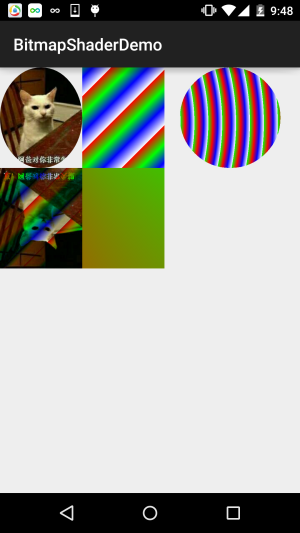
Implementation Code:
BitmapShaderView.java:
/**
 * Created by Jay on 2015/11/4 0030.
 */
public class BitmapShaderView extends View {


    private Bitmap mBitmap = null;
    private ShapeDrawable sDrawable = null;
    private Paint mPaint = null;
    private int bitW = 0, bitH = 0;     //Bitmap宽高

    private Shader mBitmapShader = null;   //Bitmap渲染
    private Shader mLinearGradient = null; //线性渐变渲染
    private Shader mComposeShader = null; //混合渲染
    private Shader mRadialGradient = null; //环形渐变渲染
    private Shader mSweepGradient = null; //梯度渲染


    public BitmapShaderView(Context context) {
        this(context, null);
    }

    public BitmapShaderView(Context context, AttributeSet attrs) {
        super(context, attrs);
        init();
    }

    public BitmapShaderView(Context context, AttributeSet attrs, int defStyleAttr) {
        super(context, attrs, defStyleAttr);
    }


    private void init() {

        mBitmap = BitmapFactory.decodeResource(getResources(), R.mipmap.img_cat);
        bitW = mBitmap.getWidth();
        bitH = mBitmap.getHeight();
        mPaint = new Paint();

        //创建BitmapShader
        mBitmapShader = new BitmapShader(mBitmap, Shader.TileMode.MIRROR, Shader.TileMode.MIRROR);

        //创建LinearGradient并设置渐变的颜色数组
        mLinearGradient = new LinearGradient(0, 0, 100, 100,
                new int[]{Color.RED, Color.GREEN, Color.BLUE, Color.WHITE},
                null, Shader.TileMode.REPEAT);

        //混合渲染,这里使用了BitmapShader和LinearGradient进行混合,可以试试其他~
        mComposeShader = new ComposeShader(mBitmapShader, mLinearGradient, PorterDuff.Mode.DARKEN);

        //环形渐变渲染
        mRadialGradient = new RadialGradient(50, 200, 50,
                new int[]{Color.GREEN, Color.RED, Color.BLUE, Color.WHITE},
                null, Shader.TileMode.REPEAT);

        //梯度渲染
        mSweepGradient = new SweepGradient(30, 30, new int[]{Color.GREEN, Color.RED,
                Color.BLUE, Color.WHITE}, null);

    }

    @Override
    protected void onDraw(Canvas canvas) {
        super.onDraw(canvas);

        //将图片裁剪为椭圆形
        sDrawable = new ShapeDrawable(new OvalShape());
        sDrawable.getPaint().setShader(mBitmapShader);
        sDrawable.setBounds(0, 0, bitW, bitH);
        sDrawable.draw(canvas);

        //绘制线性渐变的矩形
        mPaint.setShader(mLinearGradient);
        canvas.drawRect(bitW, 0, bitW * 2, bitH, mPaint);

        //绘制混合渲染效果
        mPaint.setShader(mComposeShader);
        canvas.drawRect(0, bitH, bitW , bitH * 2, mPaint);

        //绘制环形渐变
        mPaint.setShader(mRadialGradient);
        canvas.drawCircle(bitW * 2.8f, bitH / 2, bitH / 2, mPaint);

        //绘制梯度渐变
        mPaint.setShader(mSweepGradient);
        canvas.drawRect(bitW, bitH, bitW * 2, bitH * 2, mPaint);


    }
}
It's only about a hundred lines of code, so no need for explanation, right? If you have any doubts, just try it yourself~
3. Download Code for This Section:
BitmapShaderDemo.zip
Summary of This Section:
In this section, we introduced another API of Paint: Shader (Image Rendering), adding another option to our brush~ If you have doubts when looking at the code, just paste the code and tweak the parameters, and you'll understand~ Alright, that's all for this section, thank you~