Introduction to this section:
As one of the classic ListView problems, if you have tried customizing a ListView item with a CheckBox on it, then when the number of items exceeds one page, this problem will occur. Below we will analyze the cause of this problem and how to solve it!
1. Causes of the problem:
This is a diagram found online about the calling mechanism of the ListView getView method.
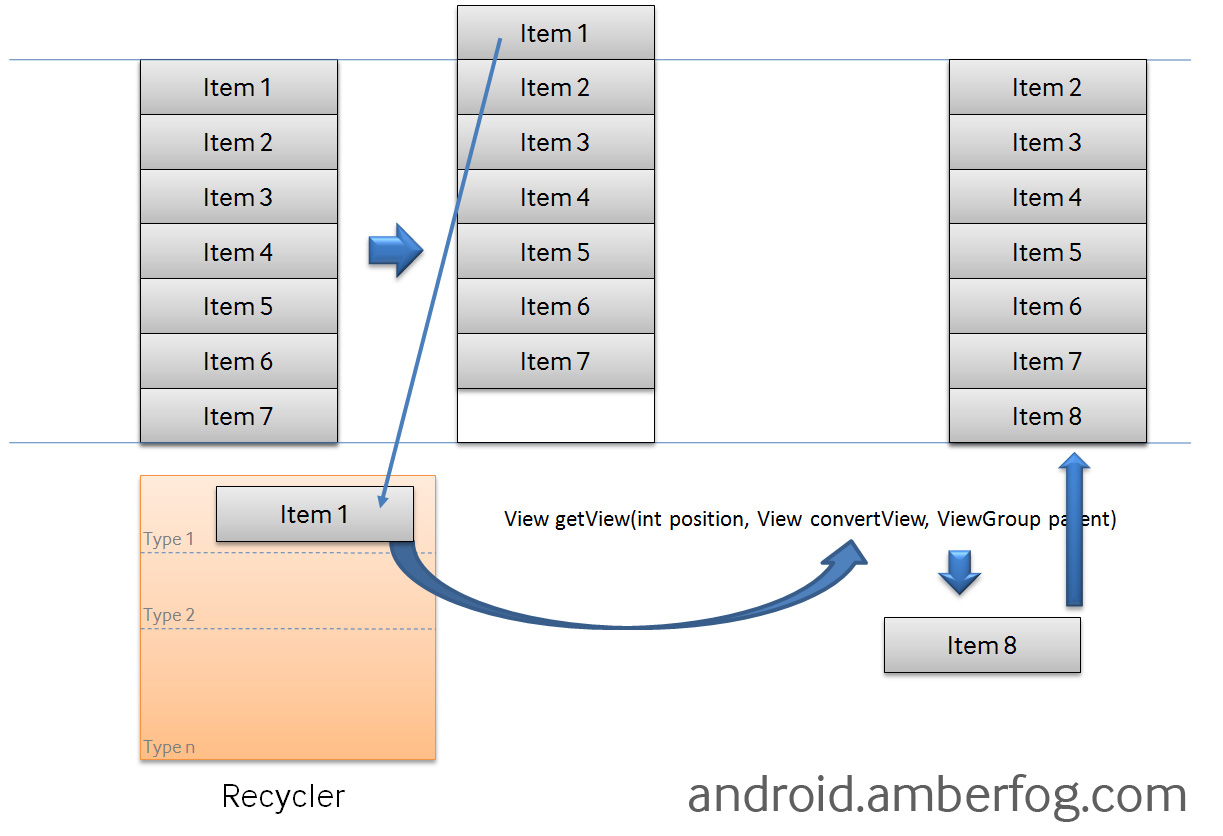
In the above figure there is aRecyclerthing. Normally the Items visible on our ListView are in memory, while the other Items are placed in this Recycler. When loading items for the first time, the convertView on the current page is NULL. When scrolled off the screen, at this time it is not null, so a new item will reuse this ConvertView!ConvertViewWe can write a simple example and follow the log. Below are some log diagrams after running!
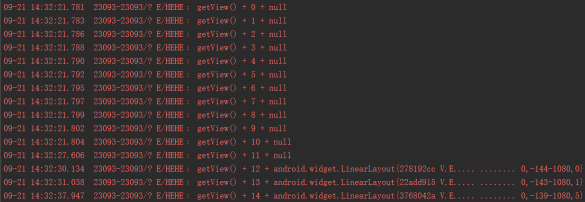
As can be seen from the figure, starting from Position 12, ConvertView is no longer null. As for what exactly this represents here, I don't know either; it seems we need to go into the source code... We just need to know that ConvertView is cached here. It is because of this reason that the CheckBox becomes misaligned. So the first solution is to not reuse this ConvertView, or to set this ConvertView to null every time in getView. However, if the number of Items to display is huge, this approach will seem very bloated. In actual development, we generally use the following solution:Find something to save the current Item CheckBox state, make a judgment during initialization, and set whether it is selected!
2. Example solutions:
Well, there are many ways to store this Checkbox. You can put it in a HashMap<Integer, Boolean>, and each time during initialization, retrieve the corresponding boolean value based on the position, then set the CheckBox state. My approach, however, is to add a boolean value to the entity class for judgment. Below is code extracted from one of my projects. The code is fairly simple; I believe you will understand it instantly after reading it~
Entity class:Person.java:
public class Person implements Serializable{
    private String name;
    private String number;
    private boolean checkStatus;

    public Person(String name, String number) {
        super();
        this.name = name;
        this.number = number;
        this.checkStatus = false;
    }

    public String getName() {
        return name;
    }

    public void setName(String name) {
        this.name = name;
    }

    public String getNumber() {
        return number;
    }

    public void setNumber(String number) {
        this.number = number;
    }

    public boolean getCheckStatus() {
        return checkStatus;
    }

    public void setCheckStatus(boolean checkStatus) {
        this.checkStatus = checkStatus;
    }

}
The implemented Adapter class:ContactListAdapter.java:
public class ContactListAdapter extends BaseAdapter implements CompoundButton.OnCheckedChangeListener{

    private List<Person> mData;
    private Context mContext;

    public ContactListAdapter(List<Person> data, Context context) {
        mData = data;
        mContext = context;
    }

    // 定义一个刷新数据的方法
    public void changeData(List<Person> data) {
        mData = data;
        notifyDataSetChanged();
    }

    @Override
    public int getCount() {
        return mData.size();
    }

    @Override
    public Person getItem(int position) {
        return mData.get(position);
    }

    @Override
    public long getItemId(int position) {
        return position;
    }

    @Override
    public View getView(int position, View convertView, ViewGroup parent) {
        final int index = position;
        ViewHolder viewHolder;
        if (convertView == null) {
            convertView = LayoutInflater.from(mContext).inflate(
                    R.layout.item_contact, parent, false);
            viewHolder = new ViewHolder();
            viewHolder.ly = (RelativeLayout) convertView
                    .findViewById(R.id.lyContactListItem);
            viewHolder.txtName = (TextView) convertView
                    .findViewById(R.id.txtName);
            viewHolder.txtNumber = (TextView) convertView
                    .findViewById(R.id.txtNumber);
            viewHolder.cbxStatus = (CheckBox) convertView
                    .findViewById(R.id.cbxStatus);
            convertView.setTag(viewHolder);
            viewHolder.cbxStatus.setTag(index);
        } else {
            viewHolder = (ViewHolder) convertView.getTag();
        }
        viewHolder.cbxStatus.setOnCheckedChangeListener(this);
        viewHolder.cbxStatus.setChecked(mData.get(position).getcheckStatus());
        viewHolder.txtName.setText(mData.get(index).getName());
        viewHolder.txtNumber.setText(mData.get(index).getNumber());
        return convertView;
    }

    @Override
    public void onCheckedChanged(CompoundButton buttonView, boolean isChecked) {
        int index = (int)buttonView.getTag();
        if (isChecked)
            mData.get(index).setCheckStatus(true);
        else
            mData.get(index).setCheckStatus(false);
    }


    private class ViewHolder {
        RelativeLayout ly;
        TextView txtName;
        TextView txtNumber;
        CheckBox cbxStatus;
    }
}
Hehe, it's very simple. Also, don't forget one point:The CheckBox listener method should be added before the code that initializes the CheckBox state~
Introduction to this section:
Alright, in this section we explained a classic ListView problem: solving the CheckBox misalignment in ListView. You just need to simply add a value to record the CheckBox selection state, and then when overriding the CheckBox click event, make a judgment first~ Thanks~