Section Introduction
Okay, in the previous chapter, we went through the four major components of Android: Activity, Service, BroadCastReceiver, ContentProvider, and the link between them: Intent. And in this chapter, we bring you something called Fragment (fragment). In this section, we will introduce some basic concepts and usage of this Fragment! Official documentation:Fragment
1. Basic Concepts
1) What the heck is it? What is it used for?
Answer: Fragment is a new API introduced after Android 3.0. Its original intention was to adapt to large-screen tablets. Of course, it is still the darling of tablet APP UI design, and our ordinary phone development also adds this Fragment. We can think of it as a small Activity, also called an Activity fragment! Think about it: if a very large interface has only one layout, how troublesome it would be to write the interface, and if there are many components, it is also very troublesome to manage! With Fragment, we can divide the screen into several blocks, then group them, and perform modular management! This makes it more convenient to dynamically update the Activity's user interface during runtime! In addition, Fragment cannot be used alone; it needs to be nested in an Activity. Although it has its own lifecycle, it is still affected by the lifecycle of the host Activity. For example, if the Activity is destroyed, it will also be destroyed!
The figure below is a diagram from the documentation showing how a Fragment corresponds to different situations between a phone and a tablet:
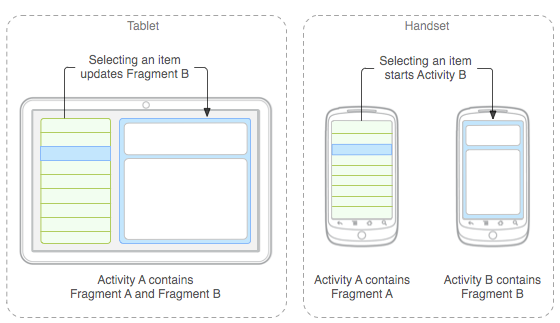
PS: A simple news browsing page uses two Fragments to display the news list and the news content, respectively;
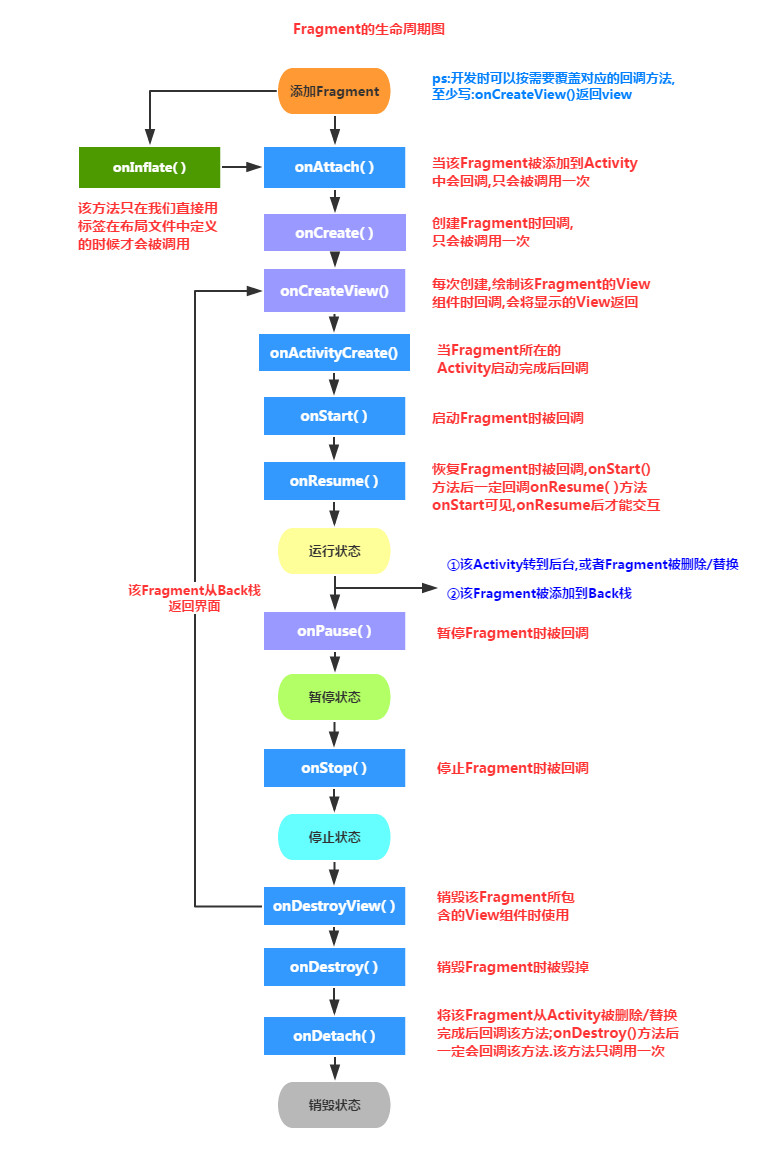
2) Fragment Lifecycle Diagram
3) Core Points:
The following are some key points for using Fragment:
- Introduced after version 3.0, i.e., minSdk must be greater than 11
- Fragment needs to be nested in an Activity for use. Of course, it can also be nested in another Fragment, but this nested Fragment also needs to be nested in an Activity. Indirectly, Fragment still needs to be nested in an Activity!! It is affected by the lifecycle of the host Activity, but of course it also has its own lifecycle! In addition, it is not recommended to nest Fragment inside Fragment because the lifecycle of the nested Fragment is uncontrollable!!!
- According to the official documentation, when creating a Fragment, you need to implement at least three methods: onCreate(), onCreateView(), and OnPause(); however, it seems that writing only onCreateView() is also acceptable...
- The lifecycle of Fragment is somewhat similar to Activity: three states:
Resumed: The running Fragment is visible
Paused: The Activity where it resides is visible, but it cannot get focus
Stopped: 1) Calling addToBackStack(), the Fragment is added to the Back stack 2) The Activity moves to the background, or the Fragment is replaced/removed
PS: A fragment in the stopped state is still alive (all states and member information are retained by the system), however, it is no longer visible to the user, and if the activity is killed, it will also be killed.
4) Several subclasses of Fragment:
PS: Most of the time we directly override Fragment and inflate layouts to implement the corresponding business. Subclasses are not used much. When needed, we can study them in depth!
- Dialog:DialogFragment
- List:ListFragment
- Preference Settings:PreferenceFragment
- WebView Interface:WebViewFragment
5) Should you use the Fragment under the App package or the v4 package:
Problem Overview:
I believe many friends will encounter the following situation when using Fragment:

So should we use the Fragment under android.app or the Fragment under the android.support.v4.app package?
Answer: Actually both are fine. As mentioned earlier, Fragment was introduced after Android 3.0 (API 11). What if the developed app needs to run on versions below 3.0? For example, 2.3 still has a little market share! So the v4 package came into being, and it can be compatible down to version 1.6! As for which package to use, it depends on your needs. Now the market share of phones below 3.0 is actually not much; everywhere you go there are phones above 4.0, and 6.0 was released in October. So what do you think? At this time, you can directly use the Fragment under the app package and then call related methods. Usually there will be no problem; if you use the app package's Fragment, then FragmentManager and FragmentTransaction also need to be from the app package! Either use all from app, or all from v4, otherwise you will get errors! Of course, if you want your app to be compatible with low-version phones, then you can choose the v4 package!
Things to note when using Fragment from the v4 package:
- 1) If you use Fragment from the v4 package, then the Activity where it resides must inherit FragmentActivity! Case: Today I statically loaded a fragment in an XML file, and then overrode Fragment, but an error was reported when loading the Activity. The error probably said something like Fragment error or not found. I changed the name attribute several times but it was still wrong! Finally, I found out that it was because of the v4 package. Just change your Activity to FragmentActivity!
- 2) I previously wrote the following code, and then it reported an error:
It's a bit confusing. Fragment, FragmentManager, and FragmentTransaction all use the v4 package, and Activity also inherits FragmentActivity, right? Changing everything to the app package would work, but doesn't that conflict with our premise of using the v4 package? Actually there is a solution, right?
Answer: You just need to changegetFragmentManager( ) togetSupportFragmentManager( ) and that's it.
2. Creating a Fragment
1) Statically Loading a Fragment
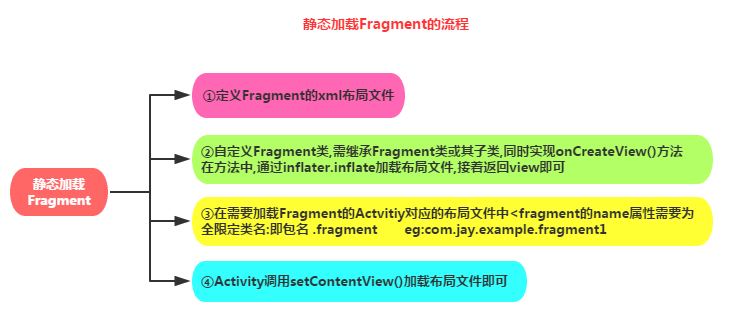
Implementation process:
Sample code:
Step 1:Define the layout of the Fragment, which is the content displayed by the fragment.
Step 2:Define a custom Fragment class that needs to inherit Fragment or its subclasses, override the onCreateView() method, and in this method call: inflater.inflate() method to load the Fragment's layout file, then return the loaded view object.
public class Fragmentone extends Fragment {
    @Override
    public View onCreateView(LayoutInflater inflater, ViewGroup container,
            Bundle savedInstanceState) {
        View view = inflater.inflate(R.layout.fragment1, container,false);
        return view;
    }
}
Step 3:In the layout file corresponding to the Activity that needs to load the Fragment, add the fragment tag. Remember, the name attribute is the fully qualified class name, that is, it must include the Fragment's package name, such as:
<fragment
    android:id="@+id/fragment1"
    android:name="com.jay.example.fragmentdemo.Fragmentone"
    android:layout_width="match_parent"
    android:layout_height="0dp"
    android:layout_weight="1" />
Step 4:The Activity can just call setContentView() in the onCreate() method to load the layout file!
2) Dynamically Loading a Fragment
Implementation process:
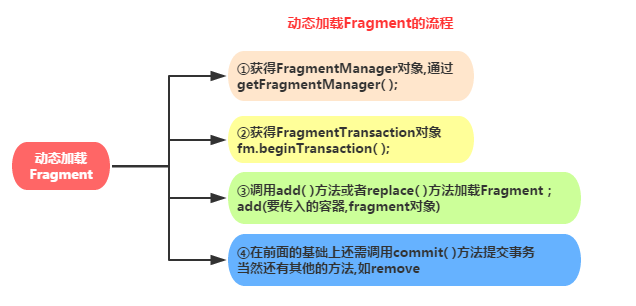
Sample code:This demonstrates switching Fragments when the screen orientation changes between portrait and landscape:

I won't paste the Fragment and layout code here; I'll directly paste the key code of MainActivity:
public class MainActivity extends Activity {

    @Override
    protected void onCreate(Bundle savedInstanceState) {
        super.onCreate(savedInstanceState);
        setContentView(R.layout.activity_main);
        Display dis = getWindowManager().getDefaultDisplay();
        if(dis.getWidth() > dis.getHeight())
        {
            Fragment1 f1 = new Fragment1();
            getFragmentManager().beginTransaction().replace(R.id.LinearLayout1, f1).commit();
        }

        else
        {
            Fragment2 f2 = new Fragment2();
            getFragmentManager().beginTransaction().replace(R.id.LinearLayout1, f2).commit();
        }
    }
}
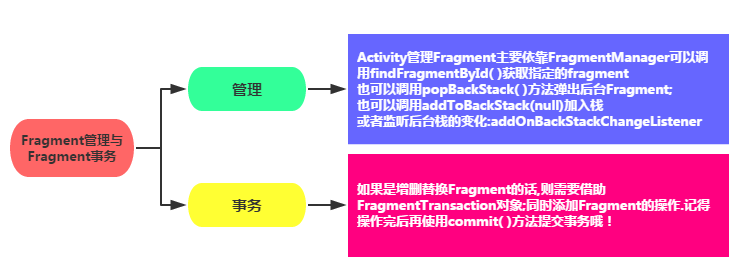
3. Fragment Management and Fragment Transactions
4. Interaction between Fragment and Activity
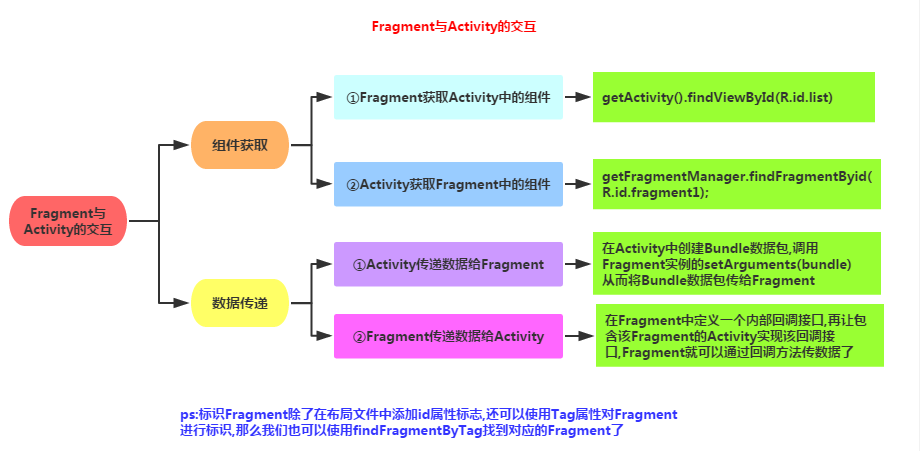
Some friends may not like looking at figures, so let me introduce it in text next:
1) Obtaining Components
Fragment obtains components in Activity:getActivity().findViewById(R.id.list);
Activity obtains components in Fragment (by id or tag both work):getFragmentManager.findFragmentByid(R.id.fragment1);
2) Data Passing
1) Activity passes data to Fragment:
In the Activity, create a Bundle data package, call the Fragment instance's setArguments(bundle) to pass the Bundle data package to the Fragment, then in the Fragment call getArguments to obtain the Bundle object, and then parse it.
② Fragment passes data to the Activity
In the Fragment, define an internal callback interface, and let the Activity that contains the Fragment implement the callback interface. The Fragment can then pass data through the callback interface. Callbacks — I believe many people know what they are, but can't write the code. When you search "fragment passes data to Activity" online, all you get is Li Gang's code, which is really frustrating. Forget it, let me write some partial code here. I believe readers will understand it at a glance:
Step 1: Define a callback interface (in the Fragment)
/*接口*/
public interface CallBack{
    /*定义一个获取信息的方法*/
    public void getResult(String result);
}
Step 2: Interface callback (in the Fragment)
/*接口回调*/
public void getData(CallBack callBack){
    /*获取文本框的信息,当然你也可以传其他类型的参数,看需求咯*/
    String msg = editText.getText().toString();
    callBack.getResult(msg);
}
Step 3: Use the interface callback method to read data (in the Activity)
/* 使用接口回调的方法获取数据 */
leftFragment.getData(new CallBack() {
 @Override
       public void getResult(String result) {              /*打印信息*/
            Toast.makeText(MainActivity.this, "-->>" + result, 1).show();
            }
        });
Summary of the method:
->In the Fragment, define an interface, and define abstract methods in the interface. Set the data parameter type to whatever type of data you want to pass;
->Next, you also need to write a method that calls the abstract method in the interface, passing the data to be delivered.
->Then comes the Activity. Call the method provided by the Fragment, and read the data when overriding the abstract method, that's all!!!
③ Data transfer between Fragments
Actually, this is very simple. Find the Fragment object that needs to receive the data, and directly call setArguments to pass the data in. Usually, data is passed during replace, that is, when navigating between Fragments. You just need to initialize the target Fragment and call its setArguments method to pass in the data!
If two Fragments need to pass data in real time, rather than during navigation, you need to first get the data passed from f1 in the Activity, and then pass it to f2. That is, using the Activity as a medium~
The sample code is as follows:
FragmentManager fManager = getSupportFragmentManager( );
FragmentTransaction fTransaction = fManager.beginTransaction();
Fragmentthree t1 = new Fragmentthree();
Fragmenttwo t2 = new Fragmenttwo();
Bundle bundle = new Bundle();
bundle.putString("key",id);
t2.setArguments(bundle);
fTransaction.add(R.id.fragmentRoot, t2, "~~~");
fTransaction.addToBackStack(t1);
fTransaction.commit();
5. Walk Through the Lifecycle Diagram:
After much deliberation, I decided to take everyone through the lifecycle diagram simply, to deepen your understanding of the Fragment lifecycle:
① When the Activity loads a Fragment, the following methods are called in sequence:onAttach -> onCreate -> onCreateView -> onActivityCreated -> onStart ->onResume
② When we create a floating dialog-style Activity, or something else, making the Activity containing the Fragment visible but not gaining focus:onPause
③ When the dialog closes and the Activity regains focus:onResume
④ When we replace the Fragment and call addToBackStack() to add it to the Back stackonPause -> onStop -> onDestoryView !!Note, the Fragment has not been destroyed at this point!!!
⑤ When we press the keyboard back key, the Fragment will be displayed again:onCreateView -> onActivityCreated -> onStart -> onResume
⑥ If after we replace, before the transaction commitswe don't call addToBackStack()to add the Fragment to the back stack; or if the Activity is exited, then the Fragment will be completely terminated, and the Fragment will enter the destroyed state.onPause -> onStop -> onDestoryView -> onDestory -> onDetach
Section Summary:
In this section, we explained some basic concepts and simple usage of Fragment. I believe you will gradually fall in love with Fragment. Due to space limitations, this section is only this much. In the next section, we will write some common examples about Fragment. Stay tuned, thank you~