Introduction to this section:
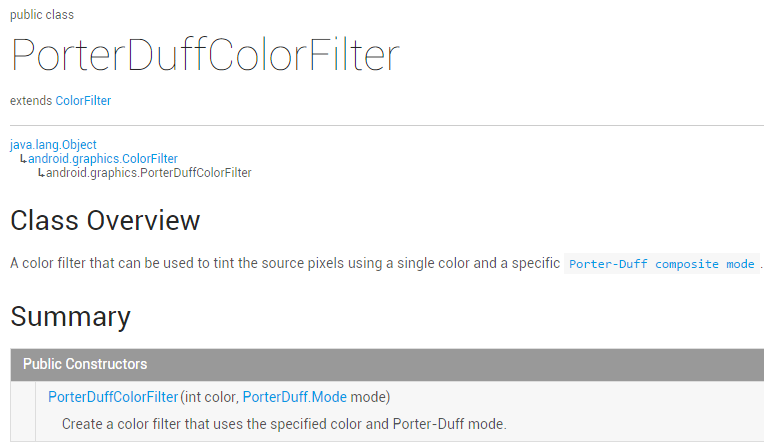
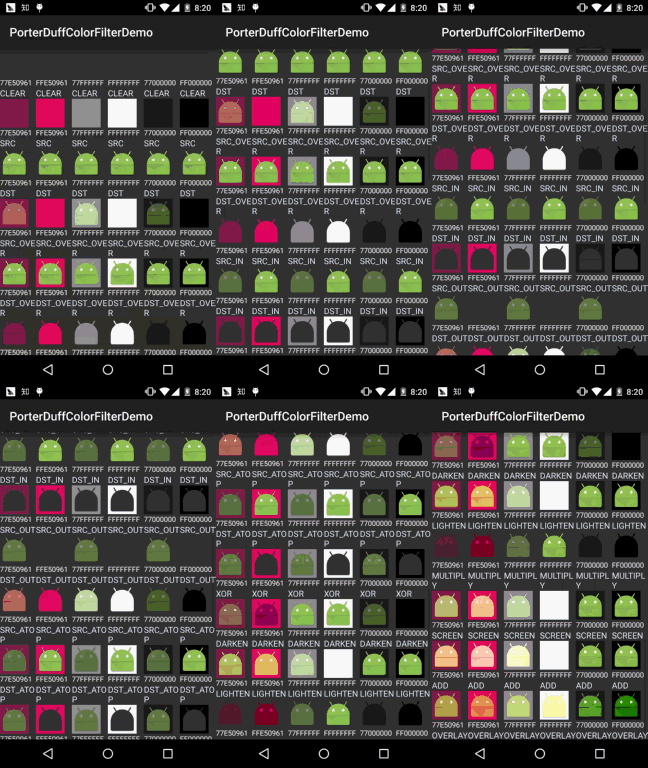
Well, I said I wouldn't write today, but I'll write anyway, after all, it's rare to have free time~. What this section brings to you is the third subclass of ColorFilter:PorterDuffColorFilter, seeingPorterDuffit must not be unfamiliar to everyone, if you have read the previousAndroid Basic Tutorial——8.3.5 Paint API—— Detailed Explanation of Xfermode and PorterDuff (2)Actually the effect is the same, except here it uses colors, and you can just set it directly. Below let's write a simple example. We take 6 different colors and test 18 modes! Official API documentation:PorterDuffColorFilterWe can see the key also lies in its constructor:
The front part is the color, the back part is the mode~, come on, let's write an example:
1. Test code example:
Effect screenshot:
Code implementation:
Here we use a GridView to hold them. Let's first write the layout for each item:view_item.xml:
<?xml version="1.0" encoding="utf-8"?>
<LinearLayout xmlns:android="http://schemas.android.com/apk/res/android"
    android:layout_width="match_parent"
    android:layout_height="match_parent"
    android:orientation="vertical">

    <ImageView
        android:id="@+id/img_show"
        android:layout_width="wrap_content"
        android:layout_height="wrap_content"
        android:src="@mipmap/ic_launcher.html" />

    <TextView
        android:id="@+id/tv_color"
        android:layout_width="wrap_content"
        android:layout_height="wrap_content"
        android:gravity="center_vertical"
        android:textSize="12sp"
        android:text="颜色"
        android:textColor="#FFFFFFFF" />

    <TextView
        android:id="@+id/tv_mode"
        android:layout_width="wrap_content"
        android:layout_height="wrap_content"
        android:textColor="#FFD9ECFF"
        android:text="模式"/>

</LinearLayout>
Next, we write a POJO business class:Data.java:
/**
 * Created by Jay on 2015/10/29 0029.
 */
public class Data {
    private int color;
    private PorterDuff.Mode mode;

    public Data() {
    }

    public Data(int color, PorterDuff.Mode mode) {
        this.color = color;
        this.mode = mode;
    }

    public int getColor() {
        return color;
    }

    public PorterDuff.Mode getMode() {
        return mode;
    }

    public void setColor(int color) {
        this.color = color;
    }

    public void setMode(PorterDuff.Mode mode) {
        this.mode = mode;
    }
}
As for the Adapter class, we use the reusable custom BaseAdapter class written before, so I won't paste it here, but we need to add a few methods:
/**
 * 设置ColorFilter
 * */
public ViewHolder setColorFilter(int id,int color,PorterDuff.Mode mode){
    View view = getView(id);
    if (view instanceof ImageView) {
        ((ImageView) view).setColorFilter(color,mode);
    }
    return this;
}
Then our main layout file:activity_main.xml:
<LinearLayout xmlns:android="http://schemas.android.com/apk/res/android"
    android:layout_width="match_parent"
    android:layout_height="match_parent"
    android:orientation="vertical">

    <GridView
        android:id="@+id/gd_show"
        android:background="#FF333333"
        android:numColumns="6"
        android:layout_width="match_parent"
        android:layout_height="wrap_content"/>

</LinearLayout>
Finally, ourMainActivity.javaclass, fill in the data, set the Adapter, it's very simple:
public class MainActivity extends AppCompatActivity {

    private GridView gd_show;
    private ArrayList<Data> items = null;
    private MyAdapter<Data> myAdapter = null;

    @Override
    protected void onCreate(Bundle savedInstanceState) {
        super.onCreate(savedInstanceState);
        setContentView(R.layout.activity_main);
        gd_show = (GridView) findViewById(R.id.gd_show);

        //填充数据,遍历Mode模式:
        items = new ArrayList<Data>();
        for (PorterDuff.Mode mode : PorterDuff.Mode.class.getEnumConstants()) {
            items.add(new Data(0x77E50961, mode));
            items.add(new Data(0xFFE50961, mode));
            items.add(new Data(0x77FFFFFF, mode));
            items.add(new Data(0xFFFFFFFF, mode));
            items.add(new Data(0x77000000, mode));
            items.add(new Data(0xFF000000, mode));
        }
        myAdapter = new MyAdapter<Data>(items, R.layout.view_item) {
            @Override
            public void bindView(ViewHolder holder, Data obj) {
                holder.setColorFilter(R.id.img_show, obj.getColor(), obj.getMode());
                holder.setText(R.id.tv_color, String.format("%08X", obj.getColor()));
                holder.setText(R.id.tv_mode, obj.getMode().toString());
            }
        };
        gd_show.setAdapter(myAdapter);
    }
}
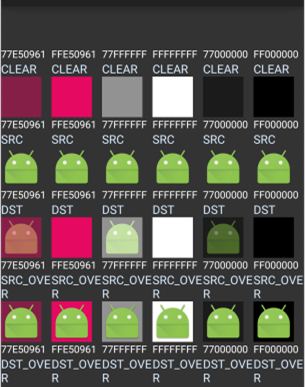
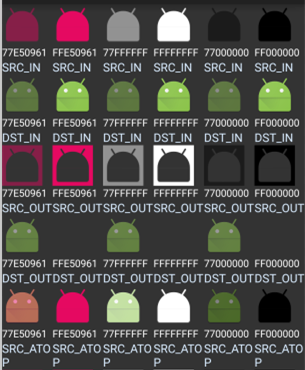
The GIF above may be too fast. Sometimes readers want to check it. Here I've taken separate screenshots. Because I couldn't find a good full-screen capture tool, I can only capture sections...
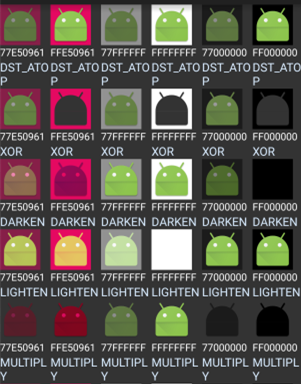
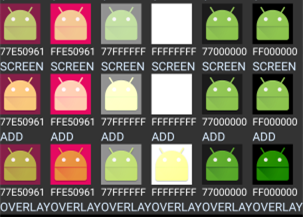
2. Download sample code for this section:
PorterDuffColorFilterDemo2.zip
Summary of this section:
This section is very short. The API documentation has just that one usage. Here we have also listed all 18 cases, and I believe it will be helpful for everyone learning image compositing. Thank you. Today I took a day off, went back to school, and experienced the feeling of being a student again. I went to the library, saw a wave of pretty girls, and then felt nice. I decided to temporarily stay at this company and be a good intern. Changing the environment may not necessarily change anything. Start by changing yourself~
PS: The example is taken from Github:ColorFilterTest