Section Introduction:
Originally, this section was going to introduce a Gallery control, but later I thought better of it, because it has been deprecated since Android 4.1. Although we can still use Gallery through compatibility, I still decided to skip it, because Gallery needs to recreate views every time it switches images, which undoubtedly causes a huge waste of resources! We can achieve the Gallery effect through other methods, such as using HorizontalScrollView to implement horizontal scrolling effects, or writing a horizontal ListView. If you are interested, Google it yourself!
In this section, we learn an Adapter control called Spinner! Application scenario: When our app needs user input, besides letting users type themselves, there is a more user-friendly design: listing a set of options for users to choose from, thus making it more convenient for our users! Without further ado, let's start learning the basic usage of Spinner~
1. Related Attributes
- android:dropDownHorizontalOffset: Set the horizontal offset distance of the list box
- android:dropDownVerticalOffset: Set the vertical distance of the list box
- android:dropDownSelector: The background of the list box when selected
- android:dropDownWidth: Set the width of the drop-down list box
- android:gravity: Set the alignment method of the components inside
- android:popupBackground: Set the background of the list box
- android:prompt: Set the prompt message (title) of the list box in dialog mode; it can only reference the resource ID in string.xml, not directly write a string
- android:spinnerMode: The mode of the list box, with two optional values:dialog: Dialog-style windowdropdown: Dropdown menu style window (default)
- Optional attributes:android:entries: Use an array resource to set the list items of the drop-down list box
2. Usage Examples:
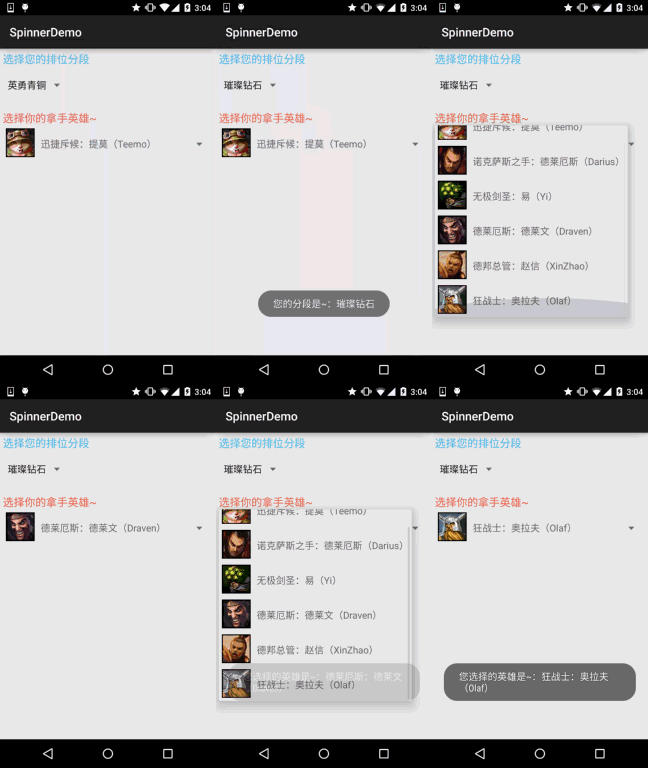
By the way, Spinner selects the first value by default, which means it calls spinner.setSection(0) by default. You can use this to set the default selected value. In addition, an OnItemSelectedListener event will be triggered once. I haven't found a solution yet. The compromise here is: add a boolean value, set it to false, and check it in onItemSelected. If it is false, it means it was triggered by default, so no operation is performed, and set the boolean to true; if it is true, the event is triggered normally! In the example, two different Spinners are written to compare the data sources, list box style, etc. Next, let's take a look
Effect screenshot:
Code Implementation:
Here, we still use our previous reusable BaseAdapter:
Data source code for the first Spinner:
Inres/valuesWrite one below:myarrays.xmlfile with the following content:
<?xml version="1.0" encoding="utf-8"?>
<resources>
    <string-array name="data">
        <item>英勇青铜</item>
        <item>不屈白银</item>
        <item>荣耀黄金</item>
        <item>华贵铂金</item>
        <item>璀璨钻石</item>
        <item>超凡大师</item>
        <item>最强王者</item>
    </string-array>
</resources>
Next is the layout of the second Spinner:item_spin_hero.xml:
<?xml version="1.0" encoding="utf-8"?>
<LinearLayout xmlns:android="http://schemas.android.com/apk/res/android"
    android:layout_width="match_parent"
    android:layout_height="match_parent"
    android:orientation="horizontal"
    android:padding="5dp">

    <ImageView
        android:id="@+id/img_icon"
        android:layout_width="48dp"
        android:layout_height="48dp"
        android:src="@mipmap/iv_lol_icon1.html" />

    <TextView
        android:id="@+id/txt_name"
        android:layout_width="wrap_content"
        android:layout_height="wrap_content"
        android:layout_marginLeft="10dp"
        android:layout_marginTop="15dp"
        android:text="德玛西亚"
        android:textSize="16sp" />

</LinearLayout>
Then, write an Entitiy entity class:Hero.java:
/**
 * Created by Jay on 2015/9/24 0024.
 */
public class Hero {

    private int hIcon;
    private String hName;

    public Hero() {
    }

    public Hero(int hIcon, String hName) {
        this.hIcon = hIcon;
        this.hName = hName;
    }

    public int gethIcon() {
        return hIcon;
    }

    public String gethName() {
        return hName;
    }

    public void sethIcon(int hIcon) {
        this.hIcon = hIcon;
    }

    public void sethName(String hName) {
        this.hName = hName;
    }
}
Finally, the layout and Java code parts of MainActivity:
Layout file:activity_main.xml:
<LinearLayout xmlns:android="http://schemas.android.com/apk/res/android"
    xmlns:tools="http://schemas.android.com/tools"
    android:layout_width="match_parent"
    android:layout_height="match_parent"
    android:orientation="vertical"
    android:padding="5dp"
    tools:context=".MainActivity">

    <TextView
        android:layout_width="wrap_content"
        android:layout_height="wrap_content"
        android:text="选择您的排位分段"
        android:textColor="#44BDED"
        android:textSize="18sp" />

    <Spinner
        android:id="@+id/spin_one"
        android:layout_width="100dp"
        android:layout_height="64dp"
        android:entries="@array/data"
        android:prompt="@string/spin_title"
        android:spinnerMode="dialog" />

    <TextView
        android:layout_width="wrap_content"
        android:layout_height="wrap_content"
        android:layout_marginTop="10dp"
        android:text="选择你的拿手英雄~"
        android:textColor="#F5684A"
        android:textSize="18sp" />

    <Spinner
        android:id="@+id/spin_two"
        android:layout_width="wrap_content"
        android:layout_height="64dp" />

</LinearLayout>
MainActivity.java:
public class MainActivity extends AppCompatActivity implements AdapterView.OnItemSelectedListener {

    private Spinner spin_one;
    private Spinner spin_two;
    private Context mContext;
    //判断是否为刚进去时触发onItemSelected的标志
    private boolean one_selected = false;
    private boolean two_selected = false;
    private ArrayList<Hero> mData = null;
    private BaseAdapter myAdadpter = null;

    @Override
    protected void onCreate(Bundle savedInstanceState) {
        super.onCreate(savedInstanceState);
        setContentView(R.layout.activity_main);
        mContext = MainActivity.this;
        mData = new ArrayList<Hero>();
        bindViews();
    }


    private void bindViews() {
        spin_one = (Spinner) findViewById(R.id.spin_one);
        spin_two = (Spinner) findViewById(R.id.spin_two);

        mData.add(new Hero(R.mipmap.iv_lol_icon1,"迅捷斥候:提莫(Teemo)"));
        mData.add(new Hero(R.mipmap.iv_lol_icon2,"诺克萨斯之手:德莱厄斯(Darius)"));
        mData.add(new Hero(R.mipmap.iv_lol_icon3,"无极剑圣:易(Yi)"));
        mData.add(new Hero(R.mipmap.iv_lol_icon4,"德莱厄斯:德莱文(Draven)"));
        mData.add(new Hero(R.mipmap.iv_lol_icon5,"德邦总管:赵信(XinZhao)"));
        mData.add(new Hero(R.mipmap.iv_lol_icon6,"狂战士:奥拉夫(Olaf)"));

        myAdadpter = new MyAdapter<Hero>(mData,R.layout.item_spin_hero) {
            @Override
            public void bindView(ViewHolder holder, Hero obj) {
                holder.setImageResource(R.id.img_icon,obj.gethIcon());
                holder.setText(R.id.txt_name, obj.gethName());
            }
        };
        spin_two.setAdapter(myAdadpter);
        spin_one.setOnItemSelectedListener(this);
        spin_two.setOnItemSelectedListener(this);

    }


    @Override
    public void onItemSelected(AdapterView<?> parent, View view, int position, long id) {
        switch (parent.getId()){
            case R.id.spin_one:
                if(one_selected){
                    Toast.makeText(mContext,"您的分段是~:" + parent.getItemAtPosition(position).toString(),
                            Toast.LENGTH_SHORT).show();
                }else one_selected = true;
                break;
            case R.id.spin_two:
                if(two_selected){
                    TextView txt_name = (TextView) view.findViewById(R.id.txt_name);
                    Toast.makeText(mContext,"您选择的英雄是~:" + txt_name.getText().toString(),
                            Toast.LENGTH_SHORT).show();
                }else two_selected = true;
                break;
        }
    }

    @Override
    public void onNothingSelected(AdapterView<?> parent) {

    }
}
In addition, regarding Spinner's OnItemSelectedListener, and how to get the value of the selected item, just look at the code above~
3. Code Example Download:
SpinnerDemo.zip
Section Summary
Alright, this section introduced the usage of Spinner (drop-down option box). The examples are quite interesting, haha~! Don't ask me which server or rank I am. I am the little prince of bot matches, but unfortunately I have been struggling in Bronze tier~ You know why.
, well, that's all for this section~