Problem Description
I believe everyone encounters the problem of being unable to update the SDK when updating it, and also being unable to open Google Search. This is because the Great Firewall has blocked Google, so you can only access it and update the SDK either through circumvention tools or by modifying HOSTS. This section introduces two methods for updating the SDK!
1. Modify the hosts file
Just search Baidu for "Google hosts 2015" and you'll find a bunch. The one the author commonly uses is:google hosts 2015, continuously updated - 360 Knowledge BaseAfter entering the pageCopy all the content below the dividing line:
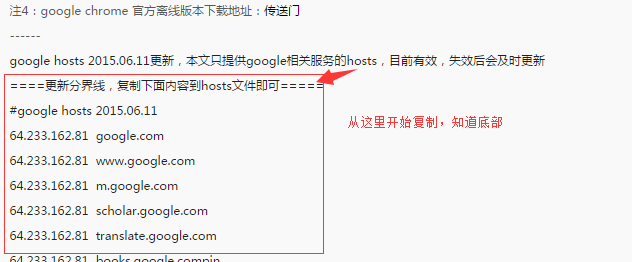
Then open this path on your computer:
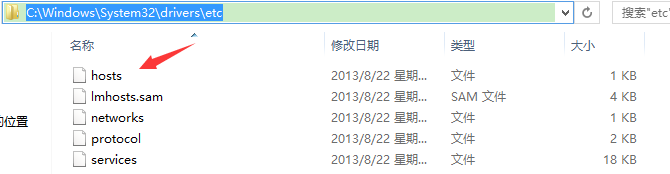
Open it with Notepad and paste the copied content!
Then enter:https://www.google.com.hk/
It appears: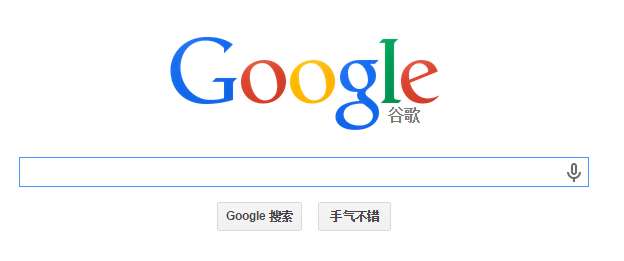 Indicates that modifying Hosts was successful
Then open SDK and make the following settings:
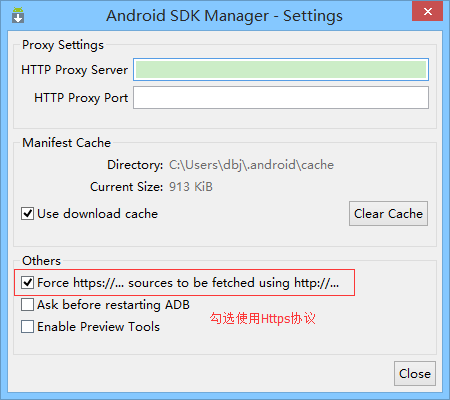
Then you'll magically find that the SDK can be updated, and you can also access Google. But it's a bit slow, right? Let's introduce another method for updating the SDK, which is much faster!
2. Update using a domestic mirror server
Remember the tool introduced earlier that is essential for Android developmentAndroidDevTools? Open this website and we can see
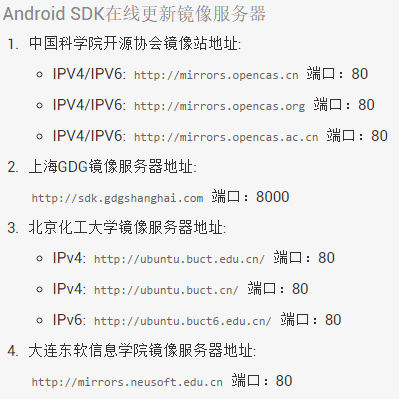
Next, we just need to choose any one of the above, then open our Android SDK Manager and make the following settings:Tools -> Option, fill in the mirror source address and port number,Check Force https:// Use Https protocol
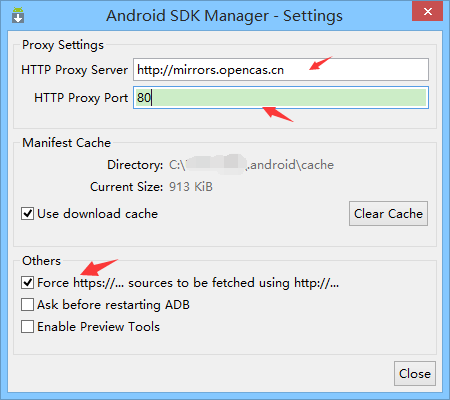
Then click close to return to the main interface, and select Packages -> Reload in sequence. You'll see the progress bar moving. We can also choose the corresponding version of the SDK to download, and the speed is very fast~
3. Summary of this section
This section introduces two ways to solve the problem of being unable to update the SDK. Modifying hosts is relatively troublesome, as it may need to be updated every few days. If you just want to update the SDK, it is recommended to use a domestic mirror for updating!