Introduction to This Section:
The Adapter class control to be explained in this section is ExpandableListView, which is a collapsible list and a subclass of ListView. On the basis of ListView, it divides the list items in the application into several groups, and each group can contain multiple list items. As for its appearance, it is similar to the QQ contact list. Its usage is very similar to ListView, except that the list items displayed by ExpandableListView need to be provided by ExpandableAdapter. Now let's learn the basic usage of this control! Official API:ExpandableListView
1. Related Attributes
- android:childDivider: Specifies the divider between child list items in each group; the image will not be fully displayed, and the separator between child list items is a straight line
- android:childIndicator: A Drawable object displayed next to the child list, can be an image
- android:childIndicatorEnd: End constraint position of the child list item indicator
- android:childIndicatorLeft: Left constraint position of the child list item indicator
- android:childIndicatorRight: Right constraint position of the child list item indicator
- android:childIndicatorStart: Start constraint position of the child list item indicator
- android:groupIndicator: A Drawable object displayed next to the group list, can be an image
- android:indicatorEnd: End constraint position of the group list item indicator
- android:indicatorLeft: Left constraint position of the group list item indicator
- android:indicatorRight: Right constraint position of the group list item indicator
- android:indicatorStart: Start constraint position of the group list item indicator
2. Three Ways to Implement ExpandableAdapter
1.ExtendBaseExpandableListAdpterImplement ExpandableAdapter.
2.UseSimpleExpandableListAdpaterWrap two List collections into an ExpandableAdapter
3.UsesimpleCursorTreeAdapterWrap the data in a Cursor into a SimpleCursorTreeAdapter
3. Code Examples
Let's take a look at the implementation'sEffect diagram:
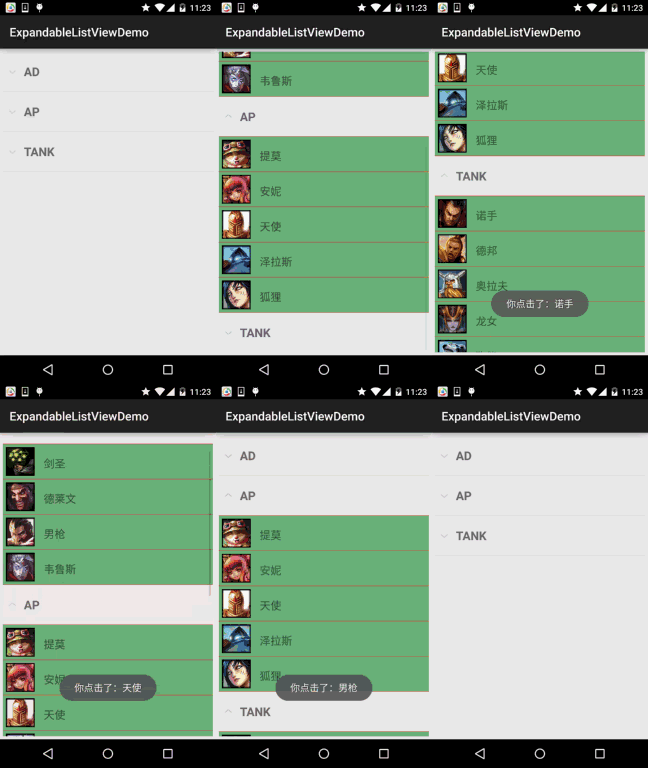
Now let's implement the effect shown in the above figure:
The core is to overrideBaseExpandableListAdpterwhich is actually similar to the ordinary BaseAdapter we wrote before, but BaseExpandableListAdapter is divided into two parts: groups and child lists. You'll know when you look at the code!
In addition, one thing to note is that overridingisChildSelectable()method needs to return true, otherwise the click event of the child item will not be triggered! Let's write it now:
First, the layouts of the group and child list:
item_exlist_group.xml:
<?xml version="1.0" encoding="utf-8"?>
<LinearLayout xmlns:android="http://schemas.android.com/apk/res/android"
    android:layout_width="match_parent"
    android:layout_height="match_parent"
    android:orientation="horizontal"
    android:padding="5dp">

    <TextView
        android:id="@+id/tv_group_name"
        android:layout_width="match_parent"
        android:layout_height="56dp"
        android:gravity="center_vertical"
        android:paddingLeft="30dp"
        android:text="AP"
        android:textStyle="bold"
        android:textSize="20sp" />

</LinearLayout>
item_exlist_item.xml:
<?xml version="1.0" encoding="utf-8"?>
<LinearLayout xmlns:android="http://schemas.android.com/apk/res/android"
    android:layout_width="match_parent"
    android:layout_height="match_parent"
    android:orientation="horizontal"
    android:padding="5dp"
    android:background="#6690BA">

    <ImageView
        android:id="@+id/img_icon"
        android:layout_width="48dp"
        android:layout_height="48dp"
        android:src="@mipmap/iv_lol_icon1.html"
        android:focusable="false"/>

    <TextView
        android:id="@+id/tv_name"
        android:layout_width="wrap_content"
        android:layout_height="wrap_content"
        android:layout_marginLeft="15dp"
        android:layout_marginTop="15dp"
        android:focusable="false"
        android:text="提莫"
        android:textSize="18sp" />

</LinearLayout>
Next, the custom Adapter class:
MyBaseExpandableListAdapter.java:
/**
 * Created by Jay on 2015/9/25 0025.
 */
public class MyBaseExpandableListAdapter extends BaseExpandableListAdapter {

    private ArrayList<Group> gData;
    private ArrayList<ArrayList<Item>> iData;
    private Context mContext;

    public MyBaseExpandableListAdapter(ArrayList<Group> gData,ArrayList<ArrayList<Item>> iData, Context mContext) {
        this.gData = gData;
        this.iData = iData;
        this.mContext = mContext;
    }

    @Override
    public int getGroupCount() {
        return gData.size();
    }

    @Override
    public int getChildrenCount(int groupPosition) {
        return iData.get(groupPosition).size();
    }

    @Override
    public Group getGroup(int groupPosition) {
        return gData.get(groupPosition);
    }

    @Override
    public Item getChild(int groupPosition, int childPosition) {
        return iData.get(groupPosition).get(childPosition);
    }

    @Override
    public long getGroupId(int groupPosition) {
        return groupPosition;
    }

    @Override
    public long getChildId(int groupPosition, int childPosition) {
        return childPosition;
    }

    @Override
    public boolean hasStableIds() {
        return false;
    }

    //取得用于显示给定分组的视图. 这个方法仅返回分组的视图对象
    @Override
    public View getGroupView(int groupPosition, boolean isExpanded, View convertView, ViewGroup parent) {

        ViewHolderGroup groupHolder;
        if(convertView == null){
            convertView = LayoutInflater.from(mContext).inflate(
                    R.layout.item_exlist_group, parent, false);
            groupHolder = new ViewHolderGroup();
            groupHolder.tv_group_name = (TextView) convertView.findViewById(R.id.tv_group_name);
            convertView.setTag(groupHolder);
        }else{
            groupHolder = (ViewHolderGroup) convertView.getTag();
        }
        groupHolder.tv_group_name.setText(gData.get(groupPosition).getgName());
        return convertView;
    }

    //取得显示给定分组给定子位置的数据用的视图
    @Override
    public View getChildView(int groupPosition, int childPosition, boolean isLastChild, View convertView, ViewGroup parent) {
        ViewHolderItem itemHolder;
        if(convertView == null){
            convertView = LayoutInflater.from(mContext).inflate(
                    R.layout.item_exlist_item, parent, false);
            itemHolder = new ViewHolderItem();
            itemHolder.img_icon = (ImageView) convertView.findViewById(R.id.img_icon);
            itemHolder.tv_name = (TextView) convertView.findViewById(R.id.tv_name);
            convertView.setTag(itemHolder);
        }else{
            itemHolder = (ViewHolderItem) convertView.getTag();
        }
        itemHolder.img_icon.setImageResource(iData.get(groupPosition).get(childPosition).getiId());
        itemHolder.tv_name.setText(iData.get(groupPosition).get(childPosition).getiName());
        return convertView;
    }

    //设置子列表是否可选中
    @Override
    public boolean isChildSelectable(int groupPosition, int childPosition) {
        return true;
    }


    private static class ViewHolderGroup{
        private TextView tv_group_name;
    }

    private static class ViewHolderItem{
        private ImageView img_icon;
        private TextView tv_name;
    }

}
PS: The data for storing child lists does not necessarily have to use ArrayList<ArrayList
Finally, the layout of MainActivity and the Java code:
Layout file:activity_main.xml:
<RelativeLayout xmlns:android="http://schemas.android.com/apk/res/android"
    xmlns:tools="http://schemas.android.com/tools"
    android:layout_width="match_parent"
    android:layout_height="match_parent"
    android:padding="5dp"
    tools:context=".MainActivity">

    <ExpandableListView
        android:id="@+id/exlist_lol"
        android:layout_width="match_parent"
        android:layout_height="match_parent"
        android:childDivider="#E02D2F"/>

</RelativeLayout>
MainActivity.java:
public class MainActivity extends AppCompatActivity {

    private ArrayList<Group> gData = null;
    private ArrayList<ArrayList<Item>> iData = null;
    private ArrayList<Item> lData = null;
    private Context mContext;
    private ExpandableListView exlist_lol;
    private MyBaseExpandableListAdapter myAdapter = null;


    @Override
    protected void onCreate(Bundle savedInstanceState) {
        super.onCreate(savedInstanceState);
        setContentView(R.layout.activity_main);
        mContext = MainActivity.this;
        exlist_lol = (ExpandableListView) findViewById(R.id.exlist_lol);


        //数据准备
        gData = new ArrayList<Group>();
        iData = new ArrayList<ArrayList<Item>>();
        gData.add(new Group("AD"));
        gData.add(new Group("AP"));
        gData.add(new Group("TANK"));

        lData = new ArrayList<Item>();

        //AD组
        lData.add(new Item(R.mipmap.iv_lol_icon3,"剑圣"));
        lData.add(new Item(R.mipmap.iv_lol_icon4,"德莱文"));
        lData.add(new Item(R.mipmap.iv_lol_icon13,"男枪"));
        lData.add(new Item(R.mipmap.iv_lol_icon14,"韦鲁斯"));
        iData.add(lData);
        //AP组
        lData = new ArrayList<Item>();
        lData.add(new Item(R.mipmap.iv_lol_icon1, "提莫"));
        lData.add(new Item(R.mipmap.iv_lol_icon7, "安妮"));
        lData.add(new Item(R.mipmap.iv_lol_icon8, "天使"));
        lData.add(new Item(R.mipmap.iv_lol_icon9, "泽拉斯"));
        lData.add(new Item(R.mipmap.iv_lol_icon11, "狐狸"));
        iData.add(lData);
        //TANK组
        lData = new ArrayList<Item>();
        lData.add(new Item(R.mipmap.iv_lol_icon2, "诺手"));
        lData.add(new Item(R.mipmap.iv_lol_icon5, "德邦"));
        lData.add(new Item(R.mipmap.iv_lol_icon6, "奥拉夫"));
        lData.add(new Item(R.mipmap.iv_lol_icon10, "龙女"));
        lData.add(new Item(R.mipmap.iv_lol_icon12, "狗熊"));
        iData.add(lData);

        myAdapter = new MyBaseExpandableListAdapter(gData,iData,mContext);
        exlist_lol.setAdapter(myAdapter);

        //为列表设置点击事件
        exlist_lol.setOnChildClickListener(new ExpandableListView.OnChildClickListener() {
            @Override
            public boolean onChildClick(ExpandableListView parent, View v, int groupPosition, int childPosition, long id) {
                Toast.makeText(mContext, "你点击了:" + iData.get(groupPosition).get(childPosition).getiName(), Toast.LENGTH_SHORT).show();
                return true;
            }
        });


    }
}
4. Code Download:
ExpandableListViewDemo.zip
Summary of This Section:
Alright, this section introduced the basic usage of ExpandableListView. Hehe, quite interesting~ This is just an example; for other cases, extend it by yourself according to your needs. Thanks