Introduction to This Section
Farewell to the first chapter, and welcome to the second chapter—a detailed explanation of the UI (User Interface) components in Android. In this section, we are going to learn about View and ViewGroup, the parent classes of all controls! On a whim, let me directly translate the official documentation's introduction to these two. Oh, right, due to reasons in the Great Celestial Empire, Google is inaccessible and Android Developer is inaccessible. We can modify the hosts file or use a VPN (scientific Internet access), or of course, like the author, use a domestic API mirror. Here's one to share:http://androiddoc.qiniudn.com/guide/topics/ui/overview.htmlThis mirror is for the 5.0 API!
UI Overview
In an Android app, all user interface elements are composed of View and ViewGroup objects. A View is an object drawn on the screen that the user can interact with. A ViewGroup, on the other hand, is a layout container used to hold other View (and ViewGroup) objects! Android provides us with a collection of View and ViewGroup subclasses, which includes some common input controls (such as buttons and text fields) and various layout modes (such as linear or relative layouts).
User Interface Layout
Every component on your app's user interface is built using a hierarchy of View and ViewGroup objects, as shown in Figure 1. Each ViewGroup is an invisible container used to organize child Views, and its child Views may be input controls or widgets that draw a certain area on the UI. With the hierarchy tree, you can design simple or complex layouts according to your needs (the simpler the layout, the better the performance).
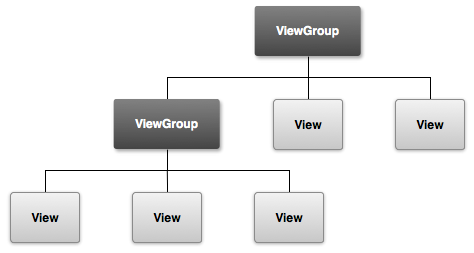 Figure 1. An illustration of the hierarchy of a UI layout
To define your layout, you can instantiate View objects in code and start building your tree, but the easiest and most efficient way to define your layout is to use an XML file. Building layouts with XML is more in line with people's reading habits, and XML is similar to HTML. You use the name of an XML element to represent a View. So a `<TextView>` element will create a TextView control in your interface, and a `<LinearLayout>` will create a LinearLayout container! For example, a simple vertical layout with a text view and a button on top looks like this:
<?xml version="1.0" encoding="utf-8"?>
<LinearLayout xmlns:android="http://schemas.android.com/apk/res/android"
              android:layout_width="fill_parent"
              android:layout_height="fill_parent"
              android:orientation="vertical" >
    <TextView android:id="@+id/text"
              android:layout_width="wrap_content"
              android:layout_height="wrap_content"
              android:text="I am a TextView" />
    <Button android:id="@+id/button"
            android:layout_width="wrap_content"
            android:layout_height="wrap_content"
            android:text="I am a Button" />
</LinearLayout>
When your app loads the above layout resource, Android instantiates each node in the layout into individual objects. Then you can define some additional behaviors for these, query the state of the objects, or modify the layout. For complete guidance on creating UI layouts, please refer toXML Layouts
User Interface Components
You do not need to create your UI layout entirely with View and ViewGroup objects. Android provides us with some app widgets and standard UI layouts; you only need to define the content. These UI components all have API documentation introducing their properties, such as the action bar, dialogs, and status notification bar, etc.
Section Summary
Well, the translation may be a bit awkward. Sigh, I've done my best despite being English-blind. Let me briefly summarize the above content:
The graphical interface in Android is composed of View, ViewGroup, and their subclasses:View:The parent class of all visual controls, providing component drawing and event handling methods.ViewGroup:A subclass of View that can have child controls and can be regarded as a container. The controls in the Android UI are stacked according to this hierarchical tree structure. There are two ways to create UI layouts: writing code in Java yourself, or defining layouts through XML. The latter is more convenient and easier to understand! It is also our most commonly used method! In addition, we rarely directly use View and ViewGroup to write layouts; more often we use their subclass controls or containers to build layouts!
Yeah, it's enough to have a rough understanding of View and ViewGroup. Normally we don't use them directly; we only use these two when customizing a View!