Introduction to This Section
In 3.1, we learned about one event handling mechanism in Android — the listener-based event handling mechanism. Simply put, it adds a listener to our event source (component). When the user triggers an event, it is handed over to the listener for processing, and different operations are performed according to different events. So what is the principle of the callback-based event handling mechanism? Well, there is also another question: do you know what amethod callbackis? Do you know? I believe many friends understand it but can't really explain it! Alright, with these questions, let's analyze the callback event handling mechanism in Android's event handling system!
1. What is a method callback?
Text description:
Answer: It is a means of separating function definition from function implementation, a decoupling design idea; in Java, callbacks are implemented through interfaces. As a system architecture, it must have its own operating environment and needs to provide interfaces for users to implement; the implementation depends on the client, so that the interface can be unified while implementations differ. The system "calls back" our implementation class under different states, thereby achieving the separation of interface and implementation!
A simple example:
For instance:You come home from school on Friday afternoon and ask your mom if dinner is ready. She says it's not ready yet. Then you tell her: "Mom, I'm going to watch Pleasant Goat. Call me when dinner is ready!"Analysis:You and your mom agreed on an interface. Through this interface, you ask your mom to cook. When the meal is ready, your mom uses this interface to give you feedback: "Dinner is ready!"
2. Detailed Explanation of Android's Callback-Based Event Handling Mechanism:
In Android, there are two scenarios where the callback-based event handling mechanism is used:
1) Custom View
When a user triggers an event on a GUI component, the component has its own specific methods responsible for handling that event. Common usage: inherit a basic GUI component and override its event handling methods, i.e., create a custom view. Note: When using a custom view in an XML layout, you need to use the "fully qualified class name".
Common callback methods of View components:
Android provides some callback methods for event handling on GUI components. Taking View as an example, there are the following methods:
① Triggering a screen event on this component: booleanonTouchEvent(MotionEvent event);
② Pressing a button on this component: booleanonKeyDown(int keyCode,KeyEvent event);
③ Releasing a button on this component: booleanonKeyUp(int keyCode,KeyEvent event);
④ Long-pressing a button on this component: booleanonKeyLongPress(int keyCode,KeyEvent event);
⑤ A keyboard shortcut event occurs: booleanonKeyShortcut(int keyCode,KeyEvent event);
⑥ Triggering a trackball screen event on this component: booleanonTrackballEvent(MotionEvent event);
*⑦ When the component's focus changes — unlike the previous six methods, this method can only be overridden in View! protected voidonFocusChanged(boolean gainFocus, int direction, Rect previously FocusedRect)
Additionally, let me explain what a trackball is. It's not very useful though; it could be seen on old BlackBerry phones. When we browse web pages, we can think of the trackball as a mouse. However, for such operations, we can handle them with onTouchEvent, and it's not very elegant, so it's rarely used now. If you're interested in seeing it, you can press F6 on the original Android emulator!
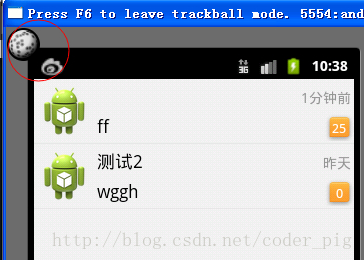
Code example:We define a custom MyButton class that inherits from the Button class, then override the onKeyLongPress method. Then, in the XML file, we call the custom view using its fully qualified class name.
The effect is shown below:
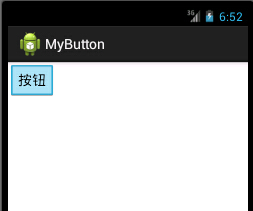
A simple button. Clicking the button triggers the onTouchEvent event. When we press a key on the emulator keyboard, pressing triggers onKeyDown, and releasing the key triggers the onKeyUp event. We view this through Logcat!

Implementation code: MyButton.java
public class MyButton extends Button{
    private static String TAG = "呵呵";
    public MyButton(Context context, AttributeSet attrs) {
        super(context, attrs);
    }

    //重写键盘按下触发的事件
    @Override
    public boolean onKeyDown(int keyCode, KeyEvent event) {
        super.onKeyDown(keyCode,event);
        Log.i(TAG, "onKeyDown方法被调用");
        return true;
    }

    //重写弹起键盘触发的事件
    @Override
    public boolean onKeyUp(int keyCode, KeyEvent event) {
        super.onKeyUp(keyCode,event);
        Log.i(TAG,"onKeyUp方法被调用");
        return true;
    }

    //组件被触摸了
    @Override
    public boolean onTouchEvent(MotionEvent event) {
        super.onTouchEvent(event);
        Log.i(TAG,"onTouchEvent方法被调用");
        return true;
    }
}
Layout file:
<RelativeLayout xmlns:android="http://schemas.android.com/apk/res/android"
    xmlns:tools="http://schemas.android.com/tools"
    android:layout_width="match_parent"
    android:layout_height="match_parent"
    tools:context=".MyActivity">

    <example.jay.com.mybutton.MyButton
        android:layout_width="wrap_content"
        android:layout_height="wrap_content"
        android:text="按钮"/>
Code analysis:
Because we directly overrode the three callback methods of Button, when a click event occurs, we don't need to bind an event listener in the Java file to complete the callback. That is, the component handles the corresponding event itself — the event is handled by the event source (component) itself!
2) Callback-Based Event Propagation:

In summary, whether the event propagates outward depends on whether the method's return value is true or false;
Code example:
public class MyButton extends Button{
    private static String TAG = "呵呵";
    public MyButton(Context context, AttributeSet attrs) {
        super(context, attrs);
    }

    //重写键盘按下触发的事件
    @Override
    public boolean onKeyDown(int keyCode, KeyEvent event) {
        super.onKeyDown(keyCode,event);
        Log.i(TAG, "自定义按钮的onKeyDown方法被调用");
        return false;
    }
}
main.xml:
<LinearLayout xmlns:android="http://schemas.android.com/apk/res/android"
    xmlns:tools="http://schemas.android.com/tools"
    android:layout_width="match_parent"
    android:layout_height="match_parent"
    tools:context=".MyActivity">

    <example.jay.com.mybutton.MyButton
        android:layout_width="wrap_content"
        android:layout_height="wrap_content"
        android:text="自定义按钮"
        android:id="@+id/btn_my"/>
</LinearLayout>
MainActivity.java:
public class MyActivity extends ActionBarActivity {
    @Override
    protected void onCreate(Bundle savedInstanceState) {
        super.onCreate(savedInstanceState);
        setContentView(R.layout.activity_my);

        Button btn = (Button)findViewById(R.id.btn_my);
        btn.setOnKeyListener(new View.OnKeyListener() {
            @Override
            public boolean onKey(View v, int keyCode, KeyEvent event) {
                if(event.getAction() == KeyEvent.ACTION_DOWN)
                {
                    Log.i("呵呵","监听器的onKeyDown方法被调用");
                }
                return false;
            }
        });
    }

    @Override
    public boolean onKeyDown(int keyCode, KeyEvent event) {
        super.onKeyDown(keyCode, event);
        Log.i("呵呵","Activity的onKeyDown方法被调用");
        return false;
    }
}
Running screenshot:

Result analysis: From the running results above, we can see that the propagation order is:Listener--->View component's callback method--->Activity's callback method;
Summary of This Section
This section explained the callback-based event handling mechanism in Android's event handling system! The core is the order of event propagation: the listener has priority, then the View component itself, and finally the Activity; a return value of false continues propagation, while true terminates it~!