Introduction to this section:
This section introduces the second way to store user data: using SharedPreferences (saving user preference parameters) to save data. When our app wants to save some user preference parameters, such as whether to log in automatically, whether to remember account and password, whether to connect to the network only under Wi-Fi, etc., using a database would be overkill! We call the above configuration information user preference settings, that is, settings that users prefer, and this configuration information is usually saved in specific files! For example, Windows uses ini files, while J2SE uses properties files and xml files to save software configuration information; but in Android we usually use a lightweight storage class—SharedPreferences to save user preference parameters! SharedPreferences also uses xml files, and then like a Map collection, stores data in the form of key-value pairs; we only need to call SharedPreferences' getXxx(name) to get the corresponding value based on the key! It is very convenient to use!
1. SharedPreferences usage example:
Usage flow chart:
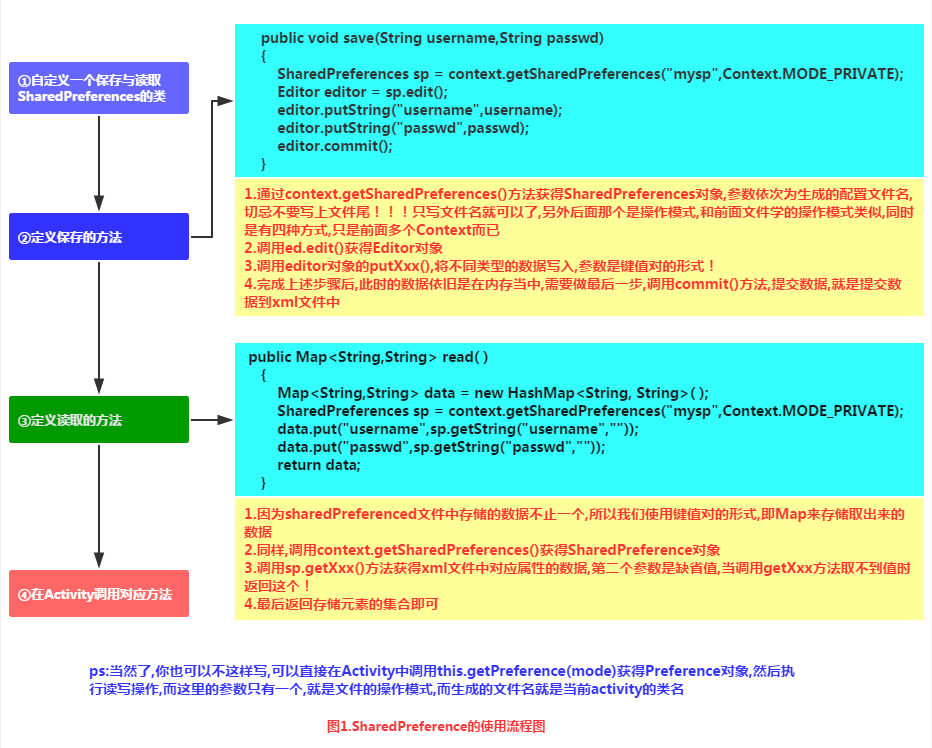
Implementation code example:
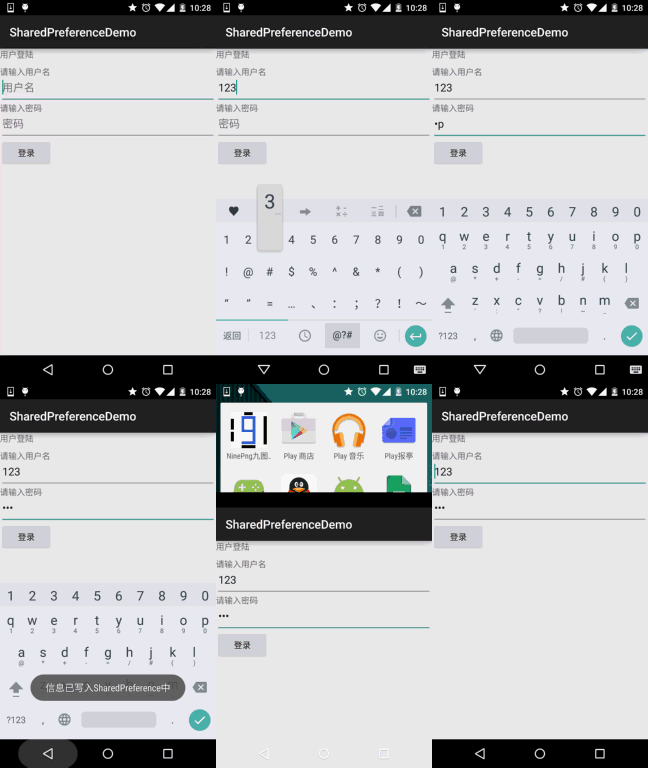
Running effect screenshot:
The process is: enter the account and password, click login, save the information to the SharedPreference file, then restart the app, and see that the data is already displayed in the text box.
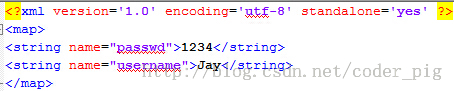
In addition, after saving, we can open data/data/<package name> in File Explorer and see that an xml file has been generated in the shared_prefs directory (because the N5 is not rooted, I found the previous screenshot here):

Click export to desktop to see the contents inside:
Code implementation:
Layout fileactivity_main.xmlwriting:
<LinearLayout xmlns:android="http://schemas.android.com/apk/res/android"
    xmlns:tools="http://schemas.android.com/tools"
    android:layout_width="match_parent"
    android:layout_height="match_parent"
    android:orientation="vertical"
    tools:context=".MyActivity">

    <TextView
        android:layout_width="wrap_content"
        android:layout_height="wrap_content"
        android:text="用户登陆" />

    <TextView
        android:layout_width="wrap_content"
        android:layout_height="wrap_content"
        android:layout_marginTop="10dp"
        android:text="请输入用户名" />

    <EditText
        android:id="@+id/editname"
        android:layout_width="match_parent"
        android:layout_height="wrap_content"
        android:hint="用户名" />

    <TextView
        android:layout_width="wrap_content"
        android:layout_height="wrap_content"
        android:text="请输入密码" />

    <EditText
        android:id="@+id/editpasswd"
        android:layout_width="match_parent"
        android:layout_height="wrap_content"
        android:hint="密码"
        android:inputType="textPassword" />

    <Button
        android:id="@+id/btnlogin"
        android:layout_width="wrap_content"
        android:layout_height="wrap_content"
        android:text="登录" />
</LinearLayout>
Write a simple SP utility class:SharedHelper.java:
/**
 * Created by Jay on 2015/9/2 0002.
 */
public class SharedHelper {

    private Context mContext;

    public SharedHelper() {
    }

    public SharedHelper(Context mContext) {
        this.mContext = mContext;
    }


    //定义一个保存数据的方法
    public void save(String username, String passwd) {
        SharedPreferences sp = mContext.getSharedPreferences("mysp", Context.MODE_PRIVATE);
        SharedPreferences.Editor editor = sp.edit();
        editor.putString("username", username);
        editor.putString("passwd", passwd);
        editor.commit();
        Toast.makeText(mContext, "信息已写入SharedPreference中", Toast.LENGTH_SHORT).show();
    }

    //定义一个读取SP文件的方法
    public Map<String, String> read() {
        Map<String, String> data = new HashMap<String, String>();
        SharedPreferences sp = mContext.getSharedPreferences("mysp", Context.MODE_PRIVATE);
        data.put("username", sp.getString("username", ""));
        data.put("passwd", sp.getString("passwd", ""));
        return data;
    }
}
FinallyMainActivity.javaimplement related logic:
public class MainActivity extends AppCompatActivity {

    private EditText editname;
    private EditText editpasswd;
    private Button btnlogin;
    private String strname;
    private String strpasswd;
    private SharedHelper sh;
    private Context mContext;

    @Override
    protected void onCreate(Bundle savedInstanceState) {
        super.onCreate(savedInstanceState);
        setContentView(R.layout.activity_main);
        mContext = getApplicationContext();
        sh = new SharedHelper(mContext);
        bindViews();
    }

    private void bindViews() {
        editname = (EditText)findViewById(R.id.editname);
        editpasswd = (EditText)findViewById(R.id.editpasswd);
        btnlogin = (Button)findViewById(R.id.btnlogin);
        btnlogin.setOnClickListener(new View.OnClickListener() {
            @Override
            public void onClick(View v) {
                strname = editname.getText().toString();
                strpasswd = editpasswd.getText().toString();
                sh.save(strname,strpasswd);
            }
        });
    }

    @Override
    protected void onStart() {
        super.onStart();
        Map<String,String> data = sh.read();
        editname.setText(data.get("username"));
        editpasswd.setText(data.get("passwd"));
    }
}
2. Reading SharedPreferences of other applications
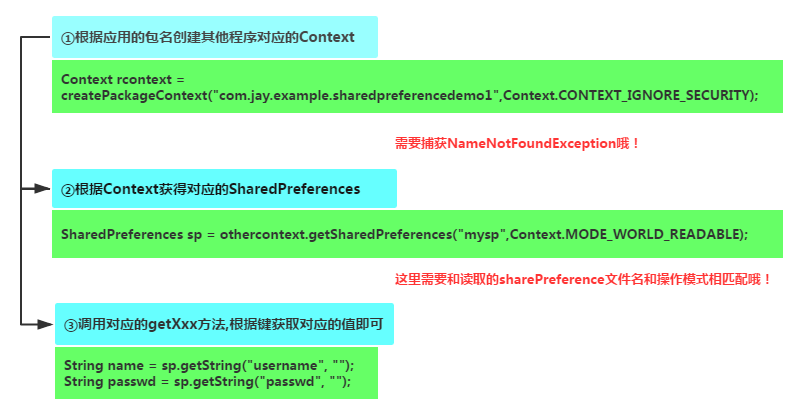
Core:Get the Context of other apps, and this Context represents the interface to access the global information of that app, and the unique identifier that determines an app is its package name, so we can get the corresponding app's Context by the package name. Another thing to note is: the premise of whether other applications' SP files can be read or written is whether the SP file has specified readable or writable permissions. The one we created above with MODE_PRIVATE cannot be read or written~ So reading data from others' SP is very difficult. In addition, some key information, such as passwords saved in SP, is usually encrypted, so you can only write and use it yourself~ Later we will talk about the commonly used MD5 encryption method!
Implementation flow chart:
Code example:
Running effect screenshot:
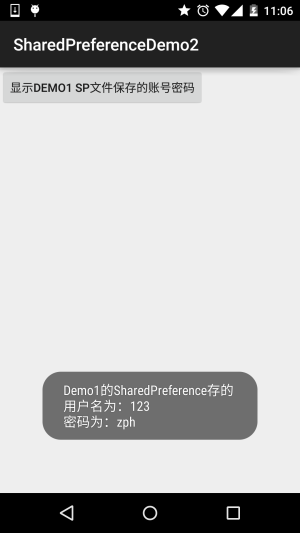
Code implementation:
We put the operation of reading SP in MainActivity.java. After clicking the button, it reads SP and displays it via Toast:
public class MainActivity extends AppCompatActivity {

    private Context othercontext;
    private SharedPreferences sp;

    @Override
    protected void onCreate(Bundle savedInstanceState) {
        super.onCreate(savedInstanceState);
        setContentView(R.layout.activity_main);
        Button btnshow = (Button) findViewById(R.id.btnshow);
        btnshow.setOnClickListener(new View.OnClickListener() {
            @Override
            public void onClick(View v) {
                //获得第一个应用的包名,从而获得对应的Context,需要对异常进行捕获
                try {
                    othercontext = createPackageContext("com.jay.sharedpreferencedemo", Context.CONTEXT_IGNORE_SECURITY);
                } catch (PackageManager.NameNotFoundException e) {
                    e.printStackTrace();
                }
                //根据Context取得对应的SharedPreferences
                sp = othercontext.getSharedPreferences("mysp", Context.MODE_WORLD_READABLE);
                String name = sp.getString("username", "");
                String passwd = sp.getString("passwd", "");
                Toast.makeText(getApplicationContext(), "Demo1的SharedPreference存的\n用户名为:" + name + "\n密码为:" + passwd, Toast.LENGTH_SHORT).show();
            }
        });
    }
}
3. Using MD5 to encrypt important data in SharedPreference
Hehe, above we directly saved the account and password to SP like this. If the phone is not rooted, other applications cannot access it. If it is rooted, the data can be obtained by other applications, and then it causes some consequences... that's not our fault, haha, who told you to root~ We won't take the blame. Indeed it is! But as a responsible APP developer, we can't just leave it like that, right? We can use some encryption algorithms to encrypt user passwords. Also, what we usually encrypt is the user's password! Below, let me draw a simple diagram to help everyone understand the encryption processing flow:
1. Simple encryption processing flow
The flow chart is as follows:
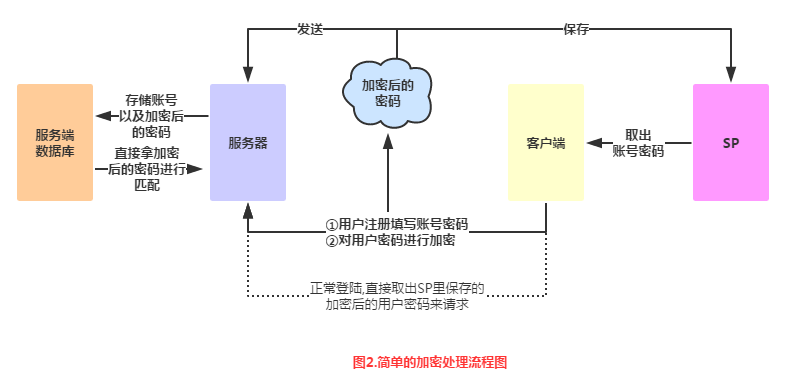
Flow chart analysis:
- Step 11. The user registers an account and password. After the account and password are validated (whether the account is duplicate, password length > 6, etc.), the account and password are valid. After successful registration, we submit the account to the server, along with the locally encrypted password!
- Step 22. The server side saves the account submitted by the user and the encrypted password into the server-side database, that is, the server does not save our plaintext (original) password!
- Step 33. Back to the client side. If registration or login succeeds, and you want to save the account and password to SP, the saved password also needs to go through an encryption process! That is, plaintext password -> encrypt, then save! If you don't save it, every time you make a request, the plaintext password also has to go through an encryption process, and then use the encrypted password to request the server!
- Step 44. The server verifies the account and encrypted password. If successful, it assigns a session identifier to the client. Later, the client can use this session to access related services provided by the server!
Hehe, got it? There are many encryption methods. Xiaozhu is not an expert in this area either. The encryption method I used before is MD5 encryption. This section will briefly introduce MD5 encryption and demonstrate its usage~
2. Brief introduction to MD5:
1) What the heck is MD5?:
Answer: Message Digest Algorithm MD5 (Chinese name: Message-Digest Algorithm Fifth Edition) is a hash function widely used in the field of computer security to provide integrity protection of messages — quoted from Baidu Baike. Simply put, it is an encryption algorithm. After a string, file, or compressed package is processed with MD5 encryption, a string with a fixed length of 128 bits is produced! This string is basically unique! Also, we all know that a hexadecimal digit requires 4 bits to represent, so the corresponding MD5 string length is: 128 / 4 = 32 characters! In addition, you may see some MD5 hashes are 16 characters, which are just the 32-character MD5 code with the first eight and last eight characters removed! Don't believe it? Let's try searching Baidu: md5 online decryption, the first one:http://www.cmd5.com/
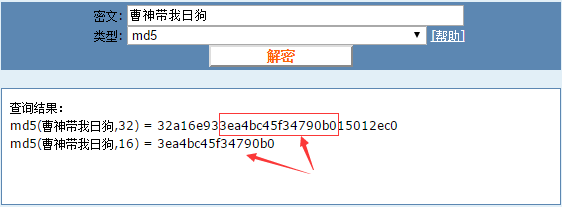
2) Can MD5 be cracked?
Answer: MD5 is irreversible, meaning there is no corresponding algorithm to reverse the generated MD5 value to obtain the original data! Of course, except for brute-force cracking. After simple MD5 encryption, one can look up MD5 databases~
3) Is the MD5 value unique?
Answer: Not unique. One original data corresponds to only one MD5 value, but one MD5 value may correspond to multiple original data!
3. Example of MD5 encryption implementation:
Actually, there are many ready-made MD5 examples online. Baidu or Google search will yield a bunch. Here I provide the MD5 encryption utility class that Xiaozhu uses!
Md5Util.java:
/**
 * Created by Jay on 2015/9/2 0002.
 */
public class MD5 {
    public static String getMD5(String content) {
        try {
            MessageDigest digest = MessageDigest.getInstance("MD5");
            digest.update(content.getBytes());
            return getHashString(digest);
        } catch (NoSuchAlgorithmException e) {
            e.printStackTrace();
        }
        return null;
    }

    private static String getHashString(MessageDigest digest) {
        StringBuilder builder = new StringBuilder();
        for (byte b : digest.digest()) {
            builder.append(Integer.toHexString((b >> 4) & 0xf));
            builder.append(Integer.toHexString(b & 0xf));
        }
        return builder.toString();
    }
}
MainActivity.javaDirectly call the static method getMD5:
Log.e("HeHe", MD5.getMD5("呵呵"));
We can see printed on Logcat:

This is the encrypted "hehe". We can copy this ciphertext to the md5 online decryption website above:
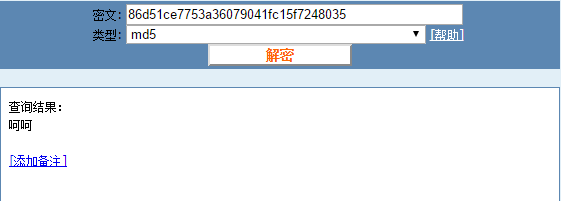
Hehe, indeed, encrypting only once is directly cracked. That seems a bit unsafe. Then let's encrypt 100 times. That is, encrypt the encrypted string again, repeated 100 times. On the original basis, we add a method to encrypt 100 times:
public static String getMD5x100(String content){
    String s1 = content;
    for(int i = 0;i < 100;i++){
        s1 = getMD5(s1);
    }
    return s1;
}
Then call it, and find that the Log prints this:

Copy it to the website:
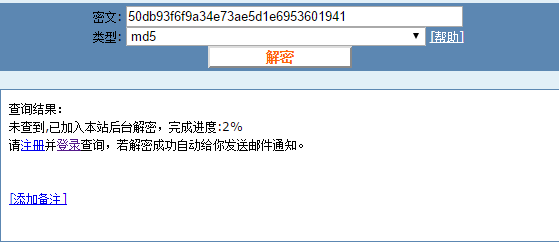
Alright, successful show-off~
4. SharedPreference utility class:
Every time we have to instantiate SP-related classes ourselves, which is definitely troublesome. Here is an SP utility class. Everyone can paste it into their own projects. This utility class comes from the blog of the master Hongyang~
SPUtils.java
package com.jay.sharedpreferencedemo3;

import android.content.Context;
import android.content.SharedPreferences;

import java.util.Map;

/**
 * Created by Jay on 2015/9/2 0002.
 */
public class SPUtils {
    /**
     * 保存在手机里的SP文件名
     */
    public static final String FILE_NAME = "my_sp";

    /**
     * 保存数据
     */
    public static void put(Context context, String key, Object obj) {
        SharedPreferences sp = context.getSharedPreferences(FILE_NAME, context.MODE_PRIVATE);
        SharedPreferences.Editor editor = sp.edit();
        if (obj instanceof Boolean) {
            editor.putBoolean(key, (Boolean) obj);
        } else if (obj instanceof Float) {
            editor.putFloat(key, (Float) obj);
        } else if (obj instanceof Integer) {
            editor.putInt(key, (Integer) obj);
        } else if (obj instanceof Long) {
            editor.putLong(key, (Long) obj);
        } else {
            editor.putString(key, (String) obj);
        }
        editor.commit();
    }


    /**
     * 获取指定数据
     */
    public static Object get(Context context, String key, Object defaultObj) {
        SharedPreferences sp = context.getSharedPreferences(FILE_NAME, context.MODE_PRIVATE);
        if (defaultObj instanceof Boolean) {
            return sp.getBoolean(key, (Boolean) defaultObj);
        } else if (defaultObj instanceof Float) {
            return sp.getFloat(key, (Float) defaultObj);
        } else if (defaultObj instanceof Integer) {
            return sp.getInt(key, (Integer) defaultObj);
        } else if (defaultObj instanceof Long) {
            return sp.getLong(key, (Long) defaultObj);
        } else if (defaultObj instanceof String) {
            return sp.getString(key, (String) defaultObj);
        }
        return null;
    }

    /**
     * 删除指定数据
     */
    public static void remove(Context context, String key) {
        SharedPreferences sp = context.getSharedPreferences(FILE_NAME, context.MODE_PRIVATE);
        SharedPreferences.Editor editor = sp.edit();
        editor.remove(key);
        editor.commit();
    }


    /**
     * 返回所有键值对
     */
    public static Map<String, ?> getAll(Context context) {
        SharedPreferences sp = context.getSharedPreferences(FILE_NAME, context.MODE_PRIVATE);
        Map<String, ?> map = sp.getAll();
        return map;
    }

    /**
     * 删除所有数据
     */
    public static void clear(Context context) {
        SharedPreferences sp = context.getSharedPreferences(FILE_NAME, context.MODE_PRIVATE);
        SharedPreferences.Editor editor = sp.edit();
        editor.clear();
        editor.commit();
    }

    /**
     * 检查key对应的数据是否存在
     */
    public static boolean contains(Context context, String key) {
        SharedPreferences sp = context.getSharedPreferences(FILE_NAME, context.MODE_PRIVATE);
        return sp.contains(key);
    }

}
5. Code download:
SharedPreferenceDemo.zip:Download SharedPreferenceDemo.zip SharedPreferenceDemo2.zip:Download SharedPreferenceDemo2.zip SharedPreferenceDemo3.zip:Download SharedPreferenceDemo3.zip
Summary of this section:
Alright, that's all about the second way to store data in Android: SharedPreference saving user preference parameters. It should meet your daily development needs for using SP. If there is anything missing, feel free to point it out. Thanks~