Introduction to this section:
I believe everyone is definitely familiar with JSON, right? The data transfer method we commonly use when interacting with the server is usually in the form of JSON strings. For saving objects, we can also write them as JSON strings and then store them! For parsing JSON, I don't know whether you use Gson, Fastjson, jackson, etc., but in this section we will not use these third-party parsing libraries; instead, we will use Android's built-in JSON parser to parse JSON! Alright, let's begin this section!
1. JSON concept and comparison with XML
1) What is JSON?
Answer: JavaScript Object Notation, a lightweight data exchange format. Like XML, it is a widely adopted solution for client-server interaction! It has good readability and the characteristics of being easy to write quickly.
2) Comparison between JSON and XML:
- The data readability of JSON and XML is basically the same;
- JSON and XML both have rich parsing methods
- Compared with XML, JSON has a smaller data volume
- JSON interacts more conveniently with JavaScript
- JSON is less descriptive of data than XML
- JSON is much faster than XML
PS: The above comes from Baidu~ Simply put, the advantages of JSON: small size, saves traffic, just not as intuitive as XML, and the readability is slightly worse!
3) JSON format specification:
Just like a protocol, there must be a set of specifications. After all, both parties transmit data through JSON strings. The syntax rules are as follows:Data is in name/value pairs;Data is separated by commas;Braces hold objects;Square brackets hold arraysAnd the writing format of JSON data:Name/value pairFor example:"person":"coder-pig"For example, a simple JSON string:
[
    { "id":"1","name":"基神","age":"18" },
    { "id":"2","name":"B神","age":"18"  },
    { "id":"3","name":"曹神","age":"18" }
]
Besides parsing JSON, we can also concatenate JSON ourselves. Of course, if you have put together a JSON string and don't know whether it's correct, you can use Baidu to find a validation tool, for example:http://www.example.com/jsontoolJust paste the JSON string in and validate it!
2. JSON parsing classes provided by Android
These APIs all exist under the org.json package, and the classes we use are the following:
- JSONObjectJSON object, which can convert between JSON strings and Java objects
- JSONArrayJSON array, which can convert between JSON strings and Java collections or objects
- JSONStringerJSON text building class, this class can help quickly and conveniently create JSON text; each JSONStringer entity can only create one JSON text
- JSONTokenerJSON parsing class
- JSONExceptionJSON exception
3. Code example: Parsing a JSON string:
PS: Here we won't write a servlet or request a website; we will just write JSON into a string to parse it, simulating it!
1) Simple JSON string parsing example:
We are parsing the simple JSON above. First, let's write a POJO class:
Person.java:
/**
 * Created by Jay on 2015/9/8 0008.
 */
public class Person {
    private String id;
    private String name;
    private String age;
    public void setId(String id){
        this.id = id;
    }
    public String getId(){
        return this.id;
    }
    public void setName(String name){
        this.name = name;
    }
    public String getName(){
        return this.name;
    }
    public void setAge(String age){
        this.age = age;
    }
    public String getAge(){
        return this.age;
    }
    @Override
    public String toString() {
        return this.name + "~年方:" + this.age;
    }
}
Write a method to parse the above JSON string:
private void parseEasyJson(String json){
    persons = new ArrayList<Person>();
    try{
        JSONArray jsonArray = new JSONArray(json);
        for(int i = 0;i < jsonArray.length();i++){
            JSONObject jsonObject = (JSONObject) jsonArray.get(i);
            Person person = new Person();
            person.setId(i+"");
            person.setName(jsonObject.getString("name"));
            person.setAge(jsonObject.getString("age"));
            persons.add(person);
        }
    }catch (Exception e){e.printStackTrace();}
}
Screenshot of the running result:
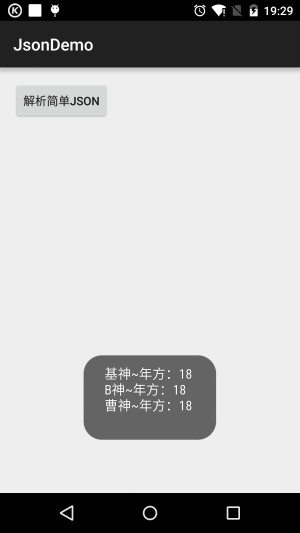
Hehe, it's very simple, right? Next, let's find a more complex one!
2) Complex JSON string parsing example:
What if it is a JSON string like this?

Hehe, then we need to extract the data step by step:
The parsing code is as follows:
private void parseDiffJson(String json) {
    try {
        JSONObject jsonObject1 = new JSONObject(json);
        Log.e("Json", json);
        JSONArray jsonArray = jsonObject1.getJSONArray("ch");
        for (int i = 0; i < jsonArray.length(); i++) {
            JSONObject jsonObject = (JSONObject) jsonArray.get(i);
            //取出name
            String sname = jsonObject.getString("names");
            JSONArray jarray1 = jsonObject.getJSONArray("data");
            JSONArray jarray2 = jsonObject.getJSONArray("times");
            Log.e("Json", sname);
            Log.e("Json", jarray1.toString());
            Log.e("Json", jarray2.toString());
        }
    } catch (Exception e) {
        e.printStackTrace();
    }

}
Look at the printed Log:
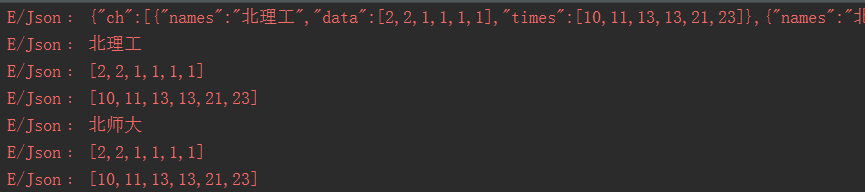
Of course, there is another layer; if you are interested, you can extract it yourself...
Summary of this section:
OK, using the low-level JSON parsing classes provided by Android indeed requires step-by-step extraction. Of course, you can also reverse the parsing process and concatenate JSON yourself. Due to time constraints, we will just concatenate it slowly here, haha. Of course, in the advanced part, after learning some third-party JSON parsing libraries, it will be much easier. ~Alright, this section ends here, thank you~