1. The relationship between Activity, Window, and View
Well, I originally just wanted to understand the relationship between them, but then I got restless and started looking at their calling process... In the end, I spent two hours on it and only understood a very very small part. Indeed, those who dig into the source code at the bottom level are all masters, such as Lao Luo; I'm not at that level yet. Below is a summary based on my own research and a brief look at the source code. If anything is written incorrectly, feel free to point it out! Here is the summary diagram:
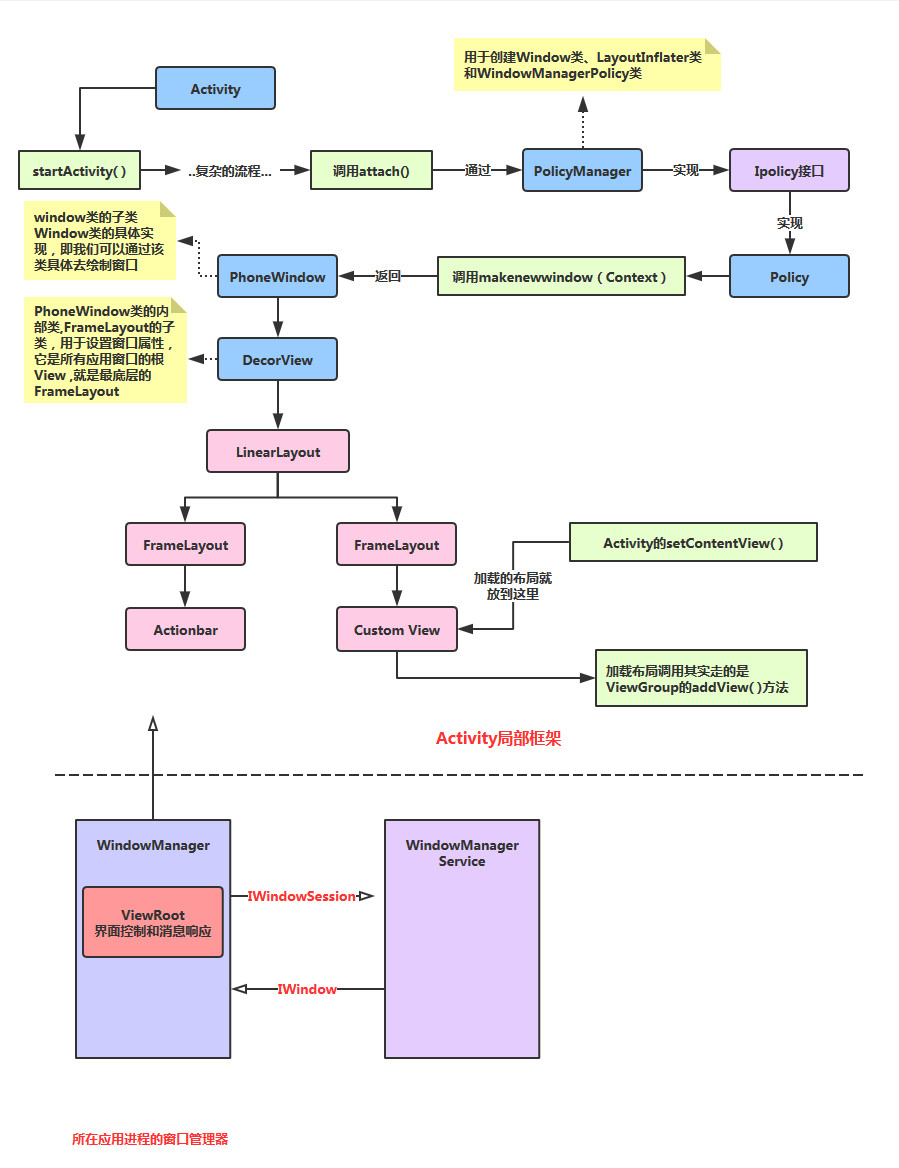
Process analysis:After Activity calls startActivity, it will eventually call the attach method. Then an Ipolicy interface is implemented in PolicyManager, followed by a Policy object. Then the makenewwindow(Context) method is called, which returns a PhoneWindow object. PhoneWindow is a subclass of Window. In this PhoneWindow there is an inner class, DecorView, which is the root View of all application windows, that is, the boss of Views, directly controlling whether the Activity is displayed (quoting the old driver's original words..). Okay, then inside it there is a LinearLayout, and inside that there are two FrameLayouts, which are used to hold ActionBar and CustomView respectively. The layout we load with setContentView() is placed into this CustomView!
Let me summarize the relationship among these three:Let me make a far-fetched analogy: we can regard these three classes respectively as: a painter, a canvas, and the things painted by the brush; the painter uses a brush (LayoutInflater.infalte) to draw a pattern, and then paints it on the canvas (addView)! Finally it is displayed (setContentView)
2. Some concepts of Activity, Task, and Back Stack
Next, let's understand the management mechanism of Activity in Android. This involves two terms: Task and Back Stack!
Concept analysis:
Our apps are generally composed of multiple Activities, and in Android, we are provided with aTask (task)concept, which is to collect multiple related Activities together, and then perform Activity navigation and return! Of course, this Task is only a concept at the framework layer, and the data structure that implements Task in Android isBack StackI believe everyone is familiar with the stack data structure. There is also a Stack collection class in Java! The stack has the following characteristics:
Last In, First Out (LIFO). Common operations are push (onto the stack) and pop (from the stack). The one at the very top is called the top of the stack, and the one at the very bottom is called the bottom of the stack.
And the Back Stack in Android also has the above characteristics. This is how it manages Activities:
When switching to a new Activity, that Activity is pushed onto the stack and becomes the top of the stack! When the user presses the Back key, the Activity at the top of the stack is popped off, and the Activity immediately following it comes to the top of the stack!
Let's look at a flowchart given in the official documentation:
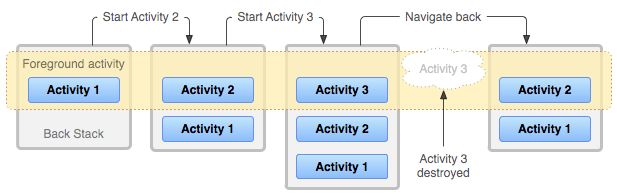
Process analysis:
In the application, there are three activities: A1, A2, and A3. When the user clicks the application icon on the Launcher or Home Screen, the main A1 starts. Then A1 opens A2, and A2 opens A3. At this point, there are three Activities in the stack, and these three Activities are by default in the same task (Task). When the user presses Back, A3 is popped, leaving only A1 and A2 in the stack. Pressing Back again pops A2, leaving only A1 in the stack. Continuing to press Back pops A1, the task is removed, and the program exits!
Then in the official documentation, I saw two other diagrams. Out of curiosity, I read the explanation again and then discussed it with the people in the group:
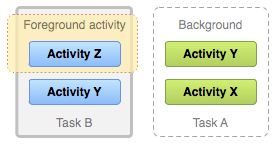
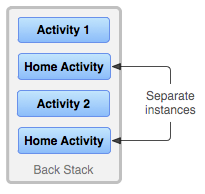
And then there is this explanation:

Then I summarized and drew a conclusion:
A Task is a collection of Activities; it is a concept. In practice, the Back Stack is used to store Activities. There can be multiple Tasks, but at the same time only one stack is in the foreground, and the others are in the background! So how is the stack created?
Answer: When we tap an icon on the home screen to open a new app, a new Task is created at that time! For example:
We open the Contacts app by tapping its icon. At this time, a new Stack 1 is created, and then newly created Activities are added to it. Perhaps we open the SMS app's page from within the Contacts app, but at this time a new stack is not created; instead, it continues to be added to Stack 1. This is a user experience approach advocated by Android, where switching between different applications can make users feel as if they are in the same application—a very seamless user experience. The official term for this is 'seamless' (seamless connection).
—————— At this time, if we press the Home key and return to the home screen, Stack 1 enters the background. We may then have the following two operations:
1) Press the menu key (the square button), click to open the program just now, and Stack 1 returns to the foreground! Or we tap the Contacts icon on the home screen to open the app; at this time, a new stack is not created either, and Stack 1 returns to the foreground!
2) If we tap another icon to open a new app at this time, then a new Stack 2 will be created, Stack 2 will come to the foreground, and Stack 1 will continue to stay in the background;
3. Task management
1) Document translation:
1) Document translation:
1) Document translation
1) Document translation
Continuing with the documentation, starting from 'Managing Tasks' in the docs, the translation is as follows:
As described above, Android adds newly successfully started Activities to the same Task and manages multiple Tasks and Back Stacks in a 'first-in-first-out' manner. Users do not need to worry about how Activities interact with Tasks or how they exist in the Back Stack! Perhaps you want to change this normal management approach. For example, you may want one of your Activities to be managed in a new Task; or you may want to instantiate a certain Activity only; or you may want to clear all Activities in the Task except the root Activity when the user leaves the task. You can do these things or more by simply modifying the relevant attribute values of <activity> in AndroidManifest.xml, or by passing an Intent with special flags to startActivity() in the code, easily managing Activities.
- taskAffinity
- launchMode
- allowTaskReparenting
- clearTaskOnLaunch
- alwaysRetainTaskState
- finishOnTaskLaunch
The attributes we can use in <activity> are as follows:
- FLAG_ACTIVITY_NEW_TASK
- FLAG_ACTIVITY_CLEAR_TOP
- FLAG_ACTIVITY_SINGLE_TOP
The main Intent flags you can use are:
2) taskAffinity and allowTaskReparenting
2) taskAffinity and allowTaskReparentingBy default, in an application,all activities have an Affinity
, which makes them belong to the same Task. You can think of it as a flag for whether they are in the same Task. However, each Activity can set a separate Affinity through the taskAffinity attribute in <activity>. Activities from different applications can share the same Affinity, and different Activities in the same application can also be set to different Affinities. The Affinity attribute takes effect in two cases:FLAG_ACTIVITY_NEW_TASK1) When the Intent object that starts an Activity contains
2)allowTaskReparentingproperty set to true. If an activity's allowTaskReparenting property is set to true, it can move from one Task (Task1) to another Task (Task2) with the same Affinity (when Task2 is brought to the foreground). If an .apk file contains multiple "applications" from the user's perspective, you may need to assign different Affinity values to those activities.
3)launchMode:
Four optional values. Launch modes are the core of our research; we'll discuss them in detail below! They are:standard(default),singleTop,singleTask,singleInstance
4) Clearing the stack
When the user leaves a Task for a long time (the current task is moved to the background), the system clears all activities in the task except the Activity at the bottom of the stack. Thus, when the user returns to the Task, only the initial Activity of that task remains. We can change this behavior by modifying the following properties!
alwaysRetainTaskState: If this property of the bottom Activity is set to true, the above situation will not occur. All activities in the Task will be preserved for a long time.
clearTaskOnLaunchIf this property of the bottom activity is set to true, once the user leaves the Task, the activities in the Task stack will be cleared until only the bottom activity remains. This is exactly the opposite of alwaysRetainTaskState. Even if the user leaves only briefly, the task will return to its initial state (only the bottom activity remains).
finishOnTaskLaunchSimilar to clearTaskOnLaunch, but it operates on an individual activity, not the entire Task. It can finish any Activity, including the activity at the bottom of the stack. When set to true, the current Activity exists as part of the Task only for the current session; when the user exits the Activity and returns, it will no longer exist.
4. Detailed explanation of the four launch modes of Activity:
Next, let's explain the four loading modes in detail: They are:standard(default),singleTop,singleTask,singleInstanceI saw a well-illustrated article about launch modes on "Paozai Wangshang de Rizi" (a website), it's great and perhaps easier to understand. I'll reference it here:
Original link:Detailed illustrated explanation of Activity launch modes: standard, singleTop, singleTask, and singleInstance
Original English article:Understand Android Activity's launchMode: standard, singleTop, singleTask and singleInstanceIn addition, there is another article explaining loading modes in detail:Detailed explanation of the four launch modes and taskAffinity attribute of Activity in Android
First, let's look at the summary diagram:
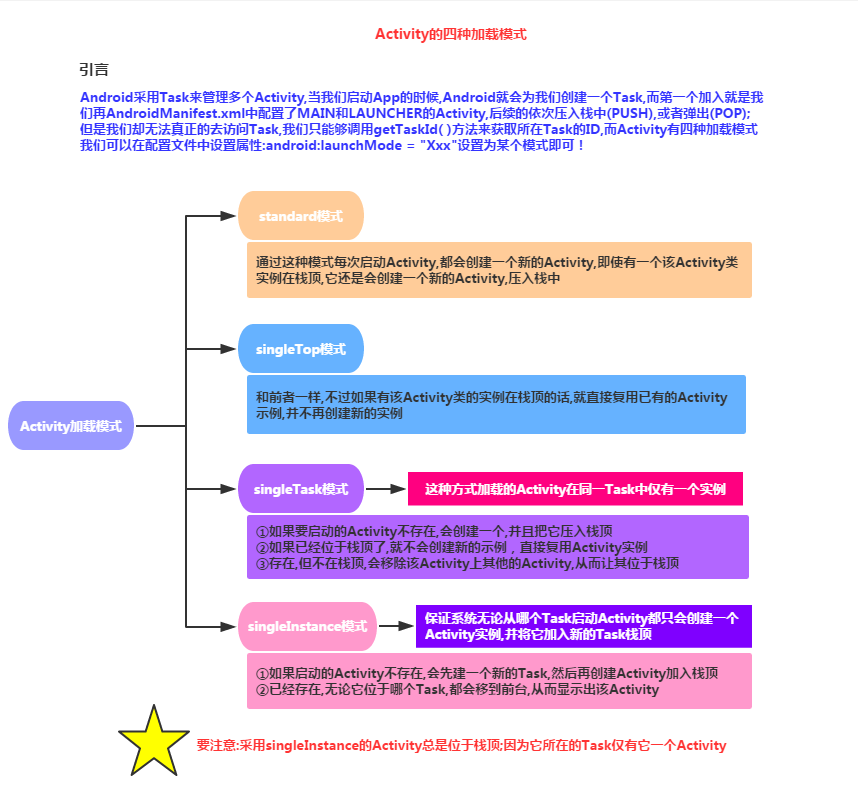
Mode details:
standard mode:
Standard launch mode, also the default launch mode for activities. An activity started in this mode can be instantiated multiple times, that is, multiple instances of the same activity can exist in the same task, and each instance will handle one Intent object. If Activity A's launch mode is standard and A has already been started, starting Activity A again from within A, i.e., calling startActivity(new Intent(this, A.class)), will launch another instance of A on top of A, so the current stack state is A-->A.


singleTop mode:
If an instance of an Activity started in singleTop mode already exists at the top of the task stack, then when starting this Activity again, a new instance will not be created; instead, the instance at the top of the stack will be reused, and itsonNewIntent()method will be called to pass the Intent object to this instance. For example, if A's launch mode is singleTop and an instance of A already exists at the top of the stack, then calling startActivity(new Intent(this, A.class)) to start A again will not create another instance of A; instead, it will reuse the original instance and call the original instance's onNewIntent() method. At this point, there is still only one instance of A in the task stack. If an instance of an activity started in singleTop mode already exists in the task stack but is not at the top, its behavior is the same as standard mode, and multiple instances will be created.

singleTask mode:
Only one Activity instance is allowed in the system. If an instance already exists in the system, the task holding this instance will be moved to the top, and the intent will be sent via onNewIntent(). If not, a new Activity will be created and placed in an appropriate task.

An issue mentioned in the official documentation:
The system will create a new task and instantiate this Activity as the root of the new task. This requires us to set taskAffinity. The result after using taskAffinity is:


singleInstance mode
It guarantees that no matter which Task the Activity is started from, the system will only create one Activity instance and add it to the top of a new Task stack. That is, other activities started by this instance will automatically run in another Task. When the instance of this activity is started again, the existing task and instance will be reused. And the instance's onNewIntent() method will be called to pass the Intent instance to this instance. Same as singleTask, at any given time there will only be one such Activity instance in the system.

5. Activity Addendum
There may be some things about Activity that haven't been covered yet, so I've reserved a spot here; anything missed will be added here! First, following the suggestion of group member Zhuhai-Kun, I'll also post the Activity management class from OSChina (Open Source China). Yeah, I'll post it right away. Everyone can use it directly in their projects~
1) OSChina client Activity management class:
package net.oschina.app;

import java.util.Stack;

import android.app.Activity;
import android.app.ActivityManager;
import android.content.Context;


public class AppManager {

    private static Stack<Activity> activityStack;
    private static AppManager instance;

    private AppManager(){}
    /**
     * 单一实例
     */
    public static AppManager getAppManager(){
        if(instance==null){
            instance=new AppManager();
        }
        return instance;
    }
    /**
     * 添加Activity到堆栈
     */
    public void addActivity(Activity activity){
        if(activityStack==null){
            activityStack=new Stack<Activity>();
        }
        activityStack.add(activity);
    }
    /**
     * 获取当前Activity(堆栈中最后一个压入的)
     */
    public Activity currentActivity(){
        Activity activity=activityStack.lastElement();
        return activity;
    }
    /**
     * 结束当前Activity(堆栈中最后一个压入的)
     */
    public void finishActivity(){
        Activity activity=activityStack.lastElement();
        finishActivity(activity);
    }
    /**
     * 结束指定的Activity
     */
    public void finishActivity(Activity activity){
        if(activity!=null){
            activityStack.remove(activity);
            activity.finish();
            activity=null;
        }
    }
    /**
     * 结束指定类名的Activity
     */
    public void finishActivity(Class<?> cls){
        for (Activity activity : activityStack) {
            if(activity.getClass().equals(cls) ){
                finishActivity(activity);
            }
        }
    }
    /**
     * 结束所有Activity
     */
    public void finishAllActivity(){
        for (int i = 0, size = activityStack.size(); i < size; i++){
            if (null != activityStack.get(i)){
                activityStack.get(i).finish();
            }
        }
        activityStack.clear();
    }
    /**
     * 退出应用程序
     */
    public void AppExit(Context context) {
        try {
            finishAllActivity();
            ActivityManager activityMgr= (ActivityManager) context.getSystemService(Context.ACTIVITY_SERVICE);
            activityMgr.restartPackage(context.getPackageName());
            System.exit(0);
        } catch (Exception e) {    }
    }
}
Summary of this section:
Alright, that's all for this section. The content is quite obscure and hard to understand; just be aware of it for now. Let's summarize the related operations of Task overall scheduling:
- Press the Home button to switch the previous Task to the background.
- Long press the Home button to display the list of recently executed Tasks.
- Tap an app icon on the Launcher or Home Screen to start a new Task, or bring an existing Task to the foreground.
- When starting an Activity in singleTask mode, the system searches for whether a suitable Task already exists. If it exists, the Task is brought to the foreground to reuse it. If an instance of the Activity to be started already exists in this Task, all activities above this instance are cleared and the instance is shown to the user. If no instance of the Activity to be started exists in this existing Task, an instance is started at the top of this Task. If this Task does not exist, a new Task is started, and an instance of the singleTask-mode Activity is launched in this new Task.
- When starting an Activity in singleInstance mode, the system searches for whether an instance of this Activity already exists. If it exists, the Task where this instance resides is brought to the foreground and the Activity instance is reused (this Task contains only this one Activity). If it does not exist, a new Task is created, and an instance of the singleInstance-mode Activity is launched in this new Task.
Alright, that's all for this section. The content about Task and Activity loading modes is quite complex. Below I'll post some references used when writing this article; you can take a look by yourself~
References:
- 1.Tasks and Back Stack
- 2.Understanding the relationship between Activity and Task in Android
- 3.Detailed illustrated explanation of Activity launch modes: standard, singleTop, singleTask, and singleInstance
- 4.Understand Android Activity's launchMode: standard, singleTop, singleTask and singleInstance
- 5.Detailed explanation of the four launch modes and taskAffinity attribute of Activity in Android
- 6.Detailed explanation of Android Activities and Tasks
- 7.The four launch modes of Activity and onNewIntent()
- 8.Translation: Complete analysis of Android tasks and back stack, detailing the details you didn't know