Introduction de cette section :
Dans la section précédente, nous avons présenté quelques concepts de base de Socket et comment l'utiliser, puis nous avons écrit une simple démo Piggy Chat Room. Nous pensons que tout le monde a acquis une première maîtrise de Socket. Dans cette section, nous allons apprendre à utiliser Socket pour implémenter le transfert de gros fichiers avec reprise après interruption ! Ce que nous expliquons ici est un exemple de téléversement de gros fichiers via Socket écrit par quelqu'un d'autre. Nous ne vous demandons pas de pouvoir l'écrire vous-même ; il suffit de savoir comment l'utiliser en cas de besoin !
1. Captures d'écran du résultat d'exécution :
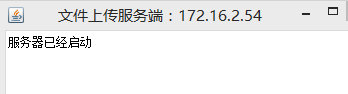
1. Tout d'abord, exécutez notre serveur Socket compilé :
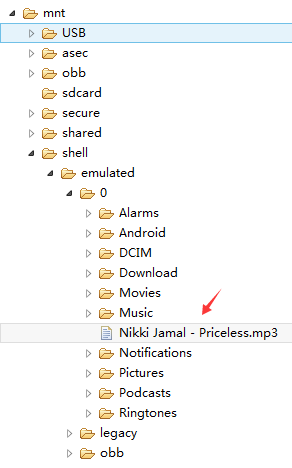
2. Placez un fichier audio dans le répertoire racine de la carte SD :
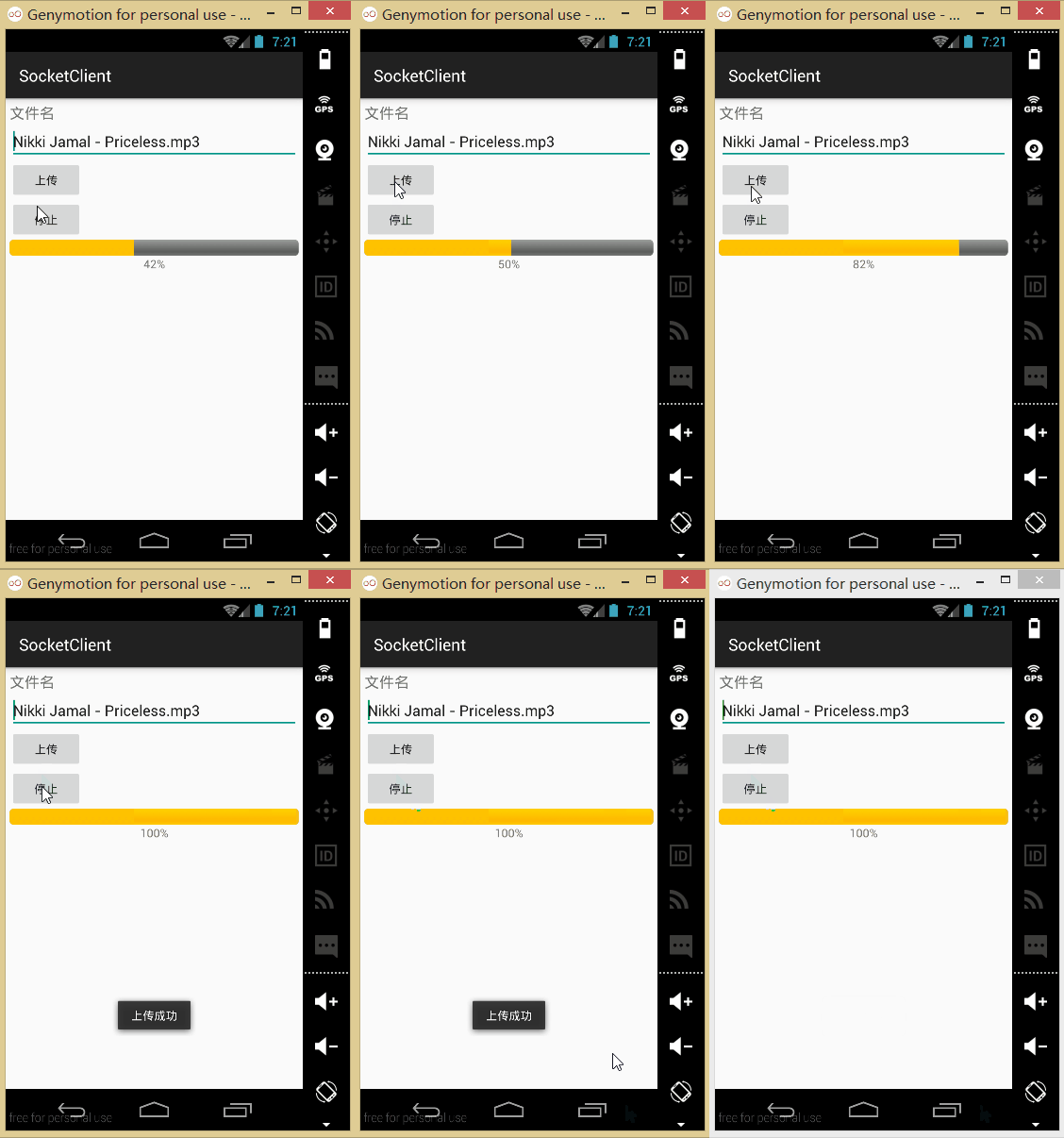
3. Exécutez notre client :
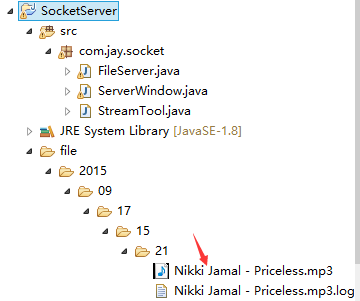
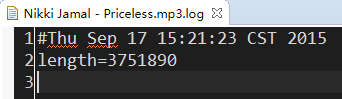
4. Après un téléversement réussi, vous pouvez voir qu'un dossier "file" est généré sous notre projet côté serveur. Nous pouvons trouver le fichier téléversé ici : celui en .log est notre fichier de log.
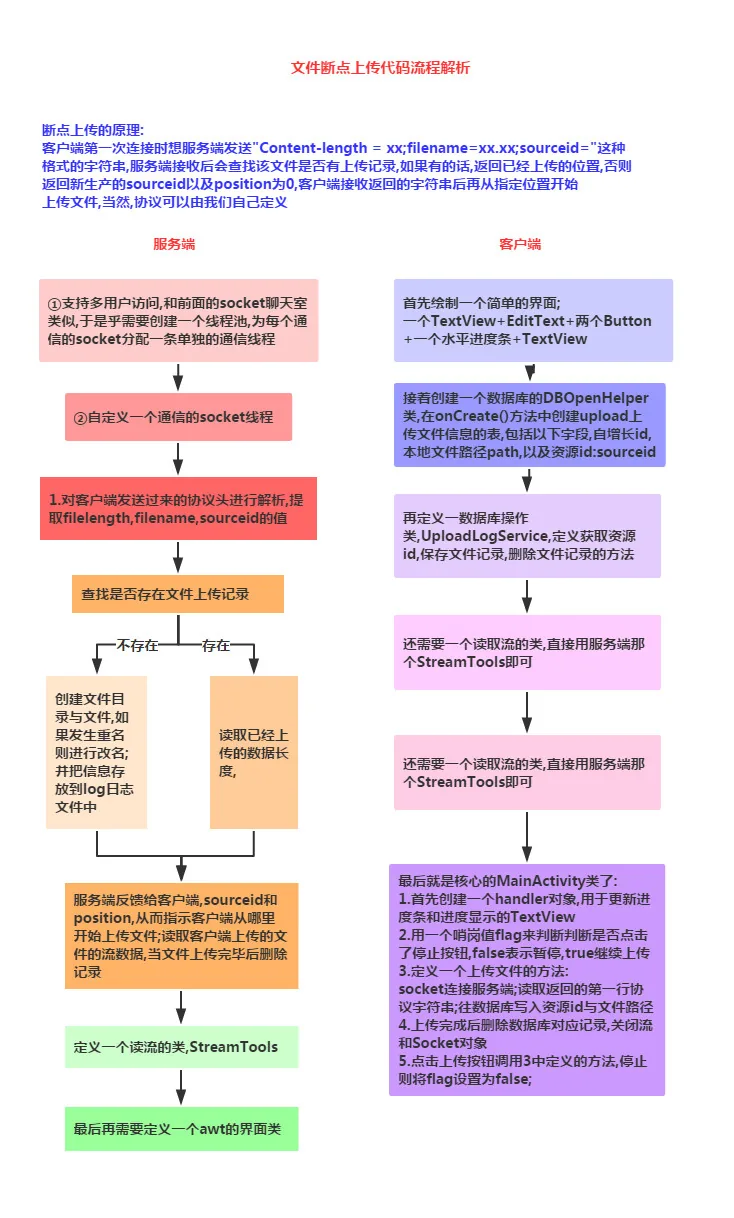
2. Organigramme de l'implémentation :
3. Exemples de code :
Tout d'abord, écrivez une classe d'analyse de flux qui sera utilisée à la fois par le serveur et le client :
StreamTool.java:
public class StreamTool {

    public static void save(File file, byte[] data) throws Exception {
        FileOutputStream outStream = new FileOutputStream(file);
        outStream.write(data);
        outStream.close();
    }

    public static String readLine(PushbackInputStream in) throws IOException {
        char buf[] = new char[128];
        int room = buf.length;
        int offset = 0;
        int c;
        loop:       while (true) {
            switch (c = in.read()) {
                case -1:
                case '\n':
                    break loop;
                case '\r':
                    int c2 = in.read();
                    if ((c2 != '\n') && (c2 != -1)) in.unread(c2);
                    break loop;
                default:
                    if (--room < 0) {
                        char[] lineBuffer = buf;
                        buf = new char[offset + 128];
                        room = buf.length - offset - 1;
                        System.arraycopy(lineBuffer, 0, buf, 0, offset);

                    }
                    buf[offset++] = (char) c;
                    break;
            }
        }
        if ((c == -1) && (offset == 0)) return null;
        return String.copyValueOf(buf, 0, offset);
    }

    /**
     * 读取流
     * @param inStream
     * @return 字节数组
     * @throws Exception
     */
    public static byte[] readStream(InputStream inStream) throws Exception{
        ByteArrayOutputStream outSteam = new ByteArrayOutputStream();
        byte[] buffer = new byte[1024];
        int len = -1;
        while( (len=inStream.read(buffer)) != -1){
            outSteam.write(buffer, 0, len);
        }
        outSteam.close();
        inStream.close();
        return outSteam.toByteArray();
    }
}
1) Implémentation côté serveur :
Classe de gestion de Socket et de multithreading :
FileServer.java:
public class FileServer {

    private ExecutorService executorService;//线程池
    private int port;//监听端口
    private boolean quit = false;//退出
    private ServerSocket server;
    private Map<Long, FileLog> datas = new HashMap<Long, FileLog>();//存放断点数据

    public FileServer(int port){
        this.port = port;
        //创建线程池,池中具有(cpu个数*50)条线程
        executorService = Executors.newFixedThreadPool(Runtime.getRuntime().availableProcessors() * 50);
    }
    /**
     * 退出
     */
    public void quit(){
       this.quit = true;
       try {
           server.close();
       } catch (IOException e) {
       }
    }
    /**
     * 启动服务
     * @throws Exception
     */
    public void start() throws Exception{
        server = new ServerSocket(port);
        while(!quit){
            try {
              Socket socket = server.accept();
              //为支持多用户并发访问,采用线程池管理每一个用户的连接请求
              executorService.execute(new SocketTask(socket));
            } catch (Exception e) {
              //  e.printStackTrace();
            }
        }
    }

    private final class SocketTask implements Runnable{
       private Socket socket = null;
       public SocketTask(Socket socket) {
           this.socket = socket;
       }

       public void run() {
           try {
               System.out.println("accepted connection "+ socket.getInetAddress()+ ":"+ socket.getPort());
               PushbackInputStream inStream = new PushbackInputStream(socket.getInputStream());
               //得到客户端发来的第一行协议数据:Content-Length=143253434;filename=xxx.3gp;sourceid=
               //如果用户初次上传文件,sourceid的值为空。
               String head = StreamTool.readLine(inStream);
               System.out.println(head);
               if(head!=null){
                   //下面从协议数据中提取各项参数值
                   String[] items = head.split(";");
                   String filelength = items[0].substring(items[0].indexOf("=")+1);
                   String filename = items[1].substring(items[1].indexOf("=")+1);
                   String sourceid = items[2].substring(items[2].indexOf("=")+1);
                   long id = System.currentTimeMillis();//生产资源id,如果需要唯一性,可以采用UUID
                   FileLog log = null;
                   if(sourceid!=null && !"".equals(sourceid)){
                       id = Long.valueOf(sourceid);
                       log = find(id);//查找上传的文件是否存在上传记录
                   }
                   File file = null;
                   int position = 0;
                   if(log==null){//如果不存在上传记录,为文件添加跟踪记录
                       String path = new SimpleDateFormat("yyyy/MM/dd/HH/mm").format(new Date());
                       File dir = new File("file/"+ path);
                       if(!dir.exists()) dir.mkdirs();
                       file = new File(dir, filename);
                       if(file.exists()){//如果上传的文件发生重名,然后进行改名
                           filename = filename.substring(0, filename.indexOf(".")-1)+ dir.listFiles().length+ filename.substring(filename.indexOf("."));
                           file = new File(dir, filename);
                       }
                       save(id, file);
                   }else{// 如果存在上传记录,读取已经上传的数据长度
                       file = new File(log.getPath());//从上传记录中得到文件的路径
                       if(file.exists()){
                           File logFile = new File(file.getParentFile(), file.getName()+".log");
                           if(logFile.exists()){
                               Properties properties = new Properties();
                               properties.load(new FileInputStream(logFile));
                               position = Integer.valueOf(properties.getProperty("length"));//读取已经上传的数据长度
                           }
                       }
                   }

                   OutputStream outStream = socket.getOutputStream();
                   String response = "sourceid="+ id+ ";position="+ position+ "\r\n";
                   //服务器收到客户端的请求信息后,给客户端返回响应信息:sourceid=1274773833264;position=0
                   //sourceid由服务器端生成,唯一标识上传的文件,position指示客户端从文件的什么位置开始上传
                   outStream.write(response.getBytes());

                   RandomAccessFile fileOutStream = new RandomAccessFile(file, "rwd");
                   if(position==0) fileOutStream.setLength(Integer.valueOf(filelength));//设置文件长度
                   fileOutStream.seek(position);//指定从文件的特定位置开始写入数据
                   byte[] buffer = new byte[1024];
                   int len = -1;
                   int length = position;
                   while( (len=inStream.read(buffer)) != -1){//从输入流中读取数据写入到文件中
                       fileOutStream.write(buffer, 0, len);
                       length += len;
                       Properties properties = new Properties();
                       properties.put("length", String.valueOf(length));
                       FileOutputStream logFile = new FileOutputStream(new File(file.getParentFile(), file.getName()+".log"));
                       properties.store(logFile, null);//实时记录已经接收的文件长度
                       logFile.close();
                   }
                   if(length==fileOutStream.length()) delete(id);
                   fileOutStream.close();
                   inStream.close();
                   outStream.close();
                   file = null;

               }
           } catch (Exception e) {
               e.printStackTrace();
           }finally{
               try {
                   if(socket!=null && !socket.isClosed()) socket.close();
               } catch (IOException e) {}
           }
       }
    }

    public FileLog find(Long sourceid){
        return datas.get(sourceid);
    }
    //保存上传记录
    public void save(Long id, File saveFile){
        //日后可以改成通过数据库存放
        datas.put(id, new FileLog(id, saveFile.getAbsolutePath()));
    }
    //当文件上传完毕,删除记录
    public void delete(long sourceid){
        if(datas.containsKey(sourceid)) datas.remove(sourceid);
    }

    private class FileLog{
       private Long id;
       private String path;
       public Long getId() {
           return id;
       }
       public void setId(Long id) {
           this.id = id;
       }
       public String getPath() {
           return path;
       }
       public void setPath(String path) {
           this.path = path;
       }
       public FileLog(Long id, String path) {
           this.id = id;
           this.path = path;
       }
    }

}
Classe d'interface serveur :ServerWindow.java:
public class ServerWindow extends Frame {
    private FileServer s = new FileServer(12345);
    private Label label;

    public ServerWindow(String title) {
        super(title);
        label = new Label();
        add(label, BorderLayout.PAGE_START);
        label.setText("服务器已经启动");
        this.addWindowListener(new WindowListener() {
            public void windowOpened(WindowEvent e) {
                new Thread(new Runnable() {
                    public void run() {
                        try {
                            s.start();
                        } catch (Exception e) {
                            // e.printStackTrace();
                        }
                    }
                }).start();
            }

            public void windowIconified(WindowEvent e) {
            }

            public void windowDeiconified(WindowEvent e) {
            }

            public void windowDeactivated(WindowEvent e) {
            }

            public void windowClosing(WindowEvent e) {
                s.quit();
                System.exit(0);
            }

            public void windowClosed(WindowEvent e) {
            }

            public void windowActivated(WindowEvent e) {
            }
        });
    }

    /**
     * @param args
     */
    public static void main(String[] args) throws IOException {
        InetAddress address = InetAddress.getLocalHost();
        ServerWindow window = new ServerWindow("文件上传服务端:" + address.getHostAddress());
        window.setSize(400, 300);
        window.setVisible(true);

    }

}
2) Client (côté Android)
D'abord, le fichier de mise en page :activity_main.xml:
<?xml version="1.0" encoding="utf-8"?>
<LinearLayout xmlns:android="http://schemas.android.com/apk/res/android"
    android:layout_width="fill_parent"
    android:layout_height="fill_parent"
    android:orientation="vertical"
    android:padding="5dp">

    <TextView
        android:layout_width="fill_parent"
        android:layout_height="wrap_content"
        android:text="文件名"
        android:textSize="18sp" />

    <EditText
        android:id="@+id/edit_fname"
        android:layout_width="fill_parent"
        android:layout_height="wrap_content"
        android:text="Nikki Jamal - Priceless.mp3" />

    <Button
        android:id="@+id/btn_upload"
        android:layout_width="wrap_content"
        android:layout_height="wrap_content"
        android:text="上传" />

    <Button
        android:id="@+id/btn_stop"
        android:layout_width="wrap_content"
        android:layout_height="wrap_content"
        android:text="停止" />

    <ProgressBar
        android:id="@+id/pgbar"
        style="@android:style/Widget.ProgressBar.Horizontal"
        android:layout_width="fill_parent"
        android:layout_height="40px" />

    <TextView
        android:id="@+id/txt_result"
        android:layout_width="fill_parent"
        android:layout_height="wrap_content"
        android:gravity="center" />
</LinearLayout>
En raison de la reprise après interruption, nous devons enregistrer la progression du téléversement. Nous devons utiliser une base de données. Ici, nous définissons une classe de gestion de base de données :DBOpenHelper.java::
/**
 * Created by Jay on 2015/9/17 0017.
 */
public class DBOpenHelper extends SQLiteOpenHelper {

    public DBOpenHelper(Context context) {
        super(context, "jay.db", null, 1);
    }

    @Override
    public void onCreate(SQLiteDatabase db) {
        db.execSQL("CREATE TABLE IF NOT EXISTS uploadlog (_id integer primary key autoincrement, path varchar(20), sourceid varchar(20))");
    }

    @Override
    public void onUpgrade(SQLiteDatabase db, int oldVersion, int newVersion) {

    }
}
Ensuite, la classe d'opérations sur la base de données :UploadHelper.java:
/**
 * Created by Jay on 2015/9/17 0017.
 */
public class UploadHelper {
    private DBOpenHelper dbOpenHelper;

    public UploadHelper(Context context) {
        dbOpenHelper = new DBOpenHelper(context);
    }

    public String getBindId(File file) {
        SQLiteDatabase db = dbOpenHelper.getReadableDatabase();
        Cursor cursor = db.rawQuery("select sourceid from uploadlog where path=?", new String[]{file.getAbsolutePath()});
        if (cursor.moveToFirst()) {
            return cursor.getString(0);
        }
        return null;
    }

    public void save(String sourceid, File file) {
        SQLiteDatabase db = dbOpenHelper.getWritableDatabase();
        db.execSQL("insert into uploadlog(path,sourceid) values(?,?)",
                new Object[]{file.getAbsolutePath(), sourceid});
    }

    public void delete(File file) {
        SQLiteDatabase db = dbOpenHelper.getWritableDatabase();
        db.execSQL("delete from uploadlog where path=?", new Object[]{file.getAbsolutePath()});
    }
}
Au fait, n'oubliez pas que le client doit aussi inclure cette classe d'analyse de flux. Enfin, voici notreMainActivity.java:
public class MainActivity extends AppCompatActivity implements View.OnClickListener {

    private EditText edit_fname;
    private Button btn_upload;
    private Button btn_stop;
    private ProgressBar pgbar;
    private TextView txt_result;

    private UploadHelper upHelper;
    private boolean flag = true;


    private Handler handler = new Handler() {
        @Override
        public void handleMessage(Message msg) {
            pgbar.setProgress(msg.getData().getInt("length"));
            float num = (float) pgbar.getProgress() / (float) pgbar.getMax();
            int result = (int) (num * 100);
            txt_result.setText(result + "%");
            if (pgbar.getProgress() == pgbar.getMax()) {
                Toast.makeText(MainActivity.this, "上传成功", Toast.LENGTH_SHORT).show();
            }
        }
    };

    @Override
    public void onCreate(Bundle savedInstanceState) {
        super.onCreate(savedInstanceState);
        setContentView(R.layout.activity_main);
        bindViews();
        upHelper = new UploadHelper(this);
    }

    private void bindViews() {
        edit_fname = (EditText) findViewById(R.id.edit_fname);
        btn_upload = (Button) findViewById(R.id.btn_upload);
        btn_stop = (Button) findViewById(R.id.btn_stop);
        pgbar = (ProgressBar) findViewById(R.id.pgbar);
        txt_result = (TextView) findViewById(R.id.txt_result);

        btn_upload.setOnClickListener(this);
        btn_stop.setOnClickListener(this);
    }

    @Override
    public void onClick(View v) {
        switch (v.getId()) {
            case R.id.btn_upload:
                String filename = edit_fname.getText().toString();
                flag = true;
                if (Environment.getExternalStorageState().equals(Environment.MEDIA_MOUNTED)) {
                    File file = new File(Environment.getExternalStorageDirectory(), filename);
                    if (file.exists()) {
                        pgbar.setMax((int) file.length());
                        uploadFile(file);
                    } else {
                        Toast.makeText(MainActivity.this, "文件并不存在~", Toast.LENGTH_SHORT).show();
                    }
                } else {
                    Toast.makeText(MainActivity.this, "SD卡不存在或者不可用", Toast.LENGTH_SHORT).show();
                }
                break;
            case R.id.btn_stop:
                flag = false;
                break;
        }
    }

    private void uploadFile(final File file) {
        new Thread(new Runnable() {
            public void run() {
                try {
                    String sourceid = upHelper.getBindId(file);
                    Socket socket = new Socket("172.16.2.54", 12345);
                    OutputStream outStream = socket.getOutputStream();
                    String head = "Content-Length=" + file.length() + ";filename=" + file.getName()
                            + ";sourceid=" + (sourceid != null ? sourceid : "") + "\r\n";
                    outStream.write(head.getBytes());

                    PushbackInputStream inStream = new PushbackInputStream(socket.getInputStream());
                    String response = StreamTool.readLine(inStream);
                    String[] items = response.split(";");
                    String responseSourceid = items[0].substring(items[0].indexOf("=") + 1);
                    String position = items[1].substring(items[1].indexOf("=") + 1);
                    if (sourceid == null) {//如果是第一次上传文件,在数据库中不存在该文件所绑定的资源id
                        upHelper.save(responseSourceid, file);
                    }
                    RandomAccessFile fileOutStream = new RandomAccessFile(file, "r");
                    fileOutStream.seek(Integer.valueOf(position));
                    byte[] buffer = new byte[1024];
                    int len = -1;
                    int length = Integer.valueOf(position);
                    while (flag && (len = fileOutStream.read(buffer)) != -1) {
                        outStream.write(buffer, 0, len);
                        length += len;//累加已经上传的数据长度
                        Message msg = new Message();
                        msg.getData().putInt("length", length);
                        handler.sendMessage(msg);
                    }
                    if (length == file.length()) upHelper.delete(file);
                    fileOutStream.close();
                    outStream.close();
                    inStream.close();
                    socket.close();
                } catch (Exception e) {
                    Toast.makeText(MainActivity.this, "上传异常~", Toast.LENGTH_SHORT).show();
                }
            }
        }).start();
    }

}
Enfin, n'oubliez pas non plus d'écrire ces permissions dans **AndroidManifest.xml** !
<!-- 在SDCard中创建与删除文件权限 -->
<uses-permission android:name="android.permission.MOUNT_UNMOUNT_FILESYSTEMS"/>
<!-- 往SDCard写入数据权限 -->
<uses-permission android:name="android.permission.WRITE_EXTERNAL_STORAGE"/>
<!-- 访问internet权限 -->
<uses-permission android:name="android.permission.INTERNET"/>
4. Téléchargement du code :
Démo de téléversement de gros fichier avec Socket
5. Résumé de la section :
Dans cette section, nous avons présenté un autre exemple de Socket basé sur le protocole TCP : utiliser Socket pour réaliser le téléversement de gros fichiers avec reprise. Je pense que la compréhension de Socket de chacun a encore progressé. Eh bien, dans la section suivante, écrivons un autre exemple : un exemple de deux téléphones sur le même Wi-Fi qui s'échangent des données ! C'est tout pour le moment, merci~