jQuery EasyUI Form Plugin -Numberbox
 jQuery EasyUI Plugin
Extends from $.fn.validatebox.defaults. The default defaults can be overridden using $.fn.numberbox.defaults.
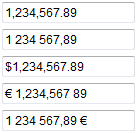
The numberbox is used to allow users to only input numeric values. It can convert input elements into different types of input (such as numeric, percentage, currency, etc.). More input types depend on the 'formatter' and 'parser' functions to be defined.
Dependencies
- validatebox
Usage
Create a numberbox from markup.
<input type="text" class="easyui-numberbox" value="100" data-options="min:0,precision:2">
Create a numberbox using JavaScript.
<input type="text" id="nn">
$('#nn').numberbox({
    min:0,
    precision:2
});
Properties
The properties extend from validatebox, the following are the properties added for numberbox.
| Name | Type | Description | Default |
|---|---|---|---|
| disabled | boolean | Defines whether to disable the field. | false |
| value | number | Default value. | |
| min | number | The minimum allowed value. | null |
| max | number | The maximum allowed value. | null |
| precision | number | The maximum precision displayed after the decimal point. | 0 |
| decimalSeparator | string | The separator character that separates the integer and decimal parts of numbers. | . |
| groupSeparator | string | The character that separates groups of integers. | |
| prefix | string | Prefix string. | |
| suffix | string | Suffix string. | |
| filter | function(e) | Defines how to filter the pressed keys; return true to accept the input character. This property is available since version 1.3.3. | |
| formatter | function(value) | A function used to format the numberbox value. Returns the string value displayed in the box. | |
| parser | function(s) | A function used to parse the string. Returns the numberbox value. |
Events
| Name | Parameters | Description |
|---|---|---|
| onChange | newValue,oldValue | Triggered when the field value changes. |
Methods
The methods extend from validatebox, the following are the methods added or overridden for numberbox.
| Name | Parameters | Description |
|---|---|---|
| options | none | Returns the options object. |
| destroy | none | Destroy the numberbox object. |
| disable | none | Disable the field. |
| enable | none | Enable the field. |
| fix | none | Fix the value to a valid value. |
| setValue | none | Set the value of the numberbox. Code example:
$('#nn').numberbox('setValue', 206.12);
|
| getValue | none | Get the value of the numberbox. Code example:
var v = $('#nn').numberbox('getValue');
alert(v);
|
| clear | none | Clear the value of the numberbox. |
| reset | none | Reset the value of the numberbox. This method is available since version 1.3.2. |
jQuery EasyUI Plugin Other Extensions