jQuery EasyUI Data Grid -Creating Column Groups
easyui's data grid (DataGrid) can create column groups, as shown below:
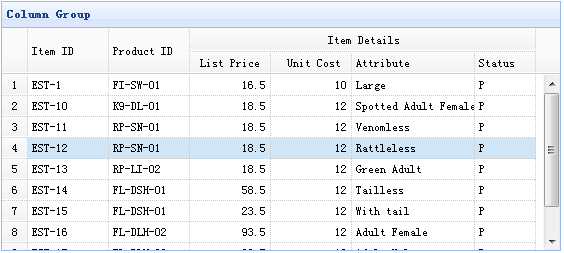
In this example, we use flat data to populate the data grid (DataGrid), and combine the listprice, unitcost, addr1, and status columns under a single column.
To create column groups, you should define the columns data of the data grid (datagrid) plugin. Each element of columns defines a group of cells that can be combined using the rowspan or colspan attributes.
The following code implements the above example:
    <table id="tt" title="Column Group" class="easyui-datagrid" style="width:550px;height:250px"
            url="data/datagrid_data.json"
            singleSelect="true" iconCls="icon-save" rownumbers="true">
        <thead>
            <tr>
                <th rowspan="2" field="itemid" width="80">Item ID</th>
                <th rowspan="2" field="productid" width="80">Product ID</th>
                <th colspan="4">Item Details</th>
            </tr>
            <tr>
                <th field="listprice" width="80" align="right">List Price</th>
                <th field="unitcost" width="80" align="right">Unit Cost</th>
                <th field="attr1" width="100">Attribute</th>
                <th field="status" width="60" align="center">Stauts</th>
            </tr>
        </thead>
    </table>
Download jQuery EasyUI Examples
jeasyui-datagrid-datagrid9.zip
Other Extensions