jQuery EasyUI Layout -Create Accordion
In this tutorial, you will learn about the EasyUI Accordion. The Accordion contains a series of panels. The headers of all panels are visible, but only one panel's body content is displayed at a time. When the user clicks a panel's header, that panel's body content becomes visible, while the body content of other panels becomes hidden.
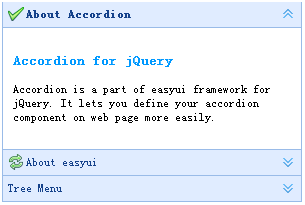
We will create three panels, and the third panel contains a tree menu.
    <div class="easyui-accordion" style="width:300px;height:200px;">
        <div title="About Accordion" iconCls="icon-ok" style="overflow:auto;padding:10px;">
            <h3 style="color:#0099FF;">Accordion for jQuery</h3>
            <p>Accordion is a part of easyui framework for jQuery. It lets you define your accordion component on web page more easily.</p>
        </div>
        <div title="About easyui" iconCls="icon-reload" selected="true" style="padding:10px;">
            easyui help you build your web page easily
        </div>
        <div title="Tree Menu">
            <ul id="tt1" class="easyui-tree">
                <li>
                    <span>Folder1</span>
                    <ul>
                        <li>
                            <span>Sub Folder 1</span>
                            <ul>
                                <li><span>File 11</span></li>
                                <li><span>File 12</span></li>
                                <li><span>File 13</span></li>
                            </ul>
                        </li>
                        <li><span>File 2</span></li>
                        <li><span>File 3</span></li>
                    </ul>
                </li>
                <li><span>File2</span></li>
            </ul>
        </div>
    </div>
Download jQuery EasyUI Examples
jeasyui-layout-accordion.zip
Other Extensions