jQuery EasyUI Window -Creating a Dialog
A Dialog is a special window that can contain a toolbar at the top and buttons at the bottom. By default, the Dialog cannot be resized, but users can set the resizable property to true to make it resizable.
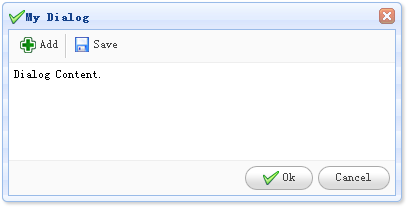
Creating a Dialog
A Dialog is very simple; it can be created from a DIV tag as shown below:
    <div id="dd" class="easyui-dialog" style="padding:5px;width:400px;height:200px;"
            title="My Dialog" iconCls="icon-ok"
            toolbar="#dlg-toolbar" buttons="#dlg-buttons">
        Dialog Content.
    </div>
Preparing the Toolbar and Button
    <div id="dlg-toolbar">
        <a href="../index.html" class="easyui-linkbutton" iconCls="icon-add" plain="true" onclick="javascript:alert('Add')">Add</a>
        <a href="../index.html" class="easyui-linkbutton" iconCls="icon-save" plain="true" onclick="javascript:alert('Save')">Save</a>
    </div>
    <div id="dlg-buttons">
        <a href="../index.html" class="easyui-linkbutton" iconCls="icon-ok" onclick="javascript:alert('Ok')">Ok</a>
        <a href="../index.html" class="easyui-linkbutton" iconCls="icon-cancel" onclick="javascript:$('#dd').dialog('close')">Cancel</a>
    </div>
In the code above, we created a dialog with a toolbar and buttons. This is the standard configuration of dialog, toolbar, content, and buttons.
Download jQuery EasyUI Examples
jeasyui-win-dlg1.zip
Other Extensions