jQuery EasyUI Tree Menu -Creating a Complex Tree Grid
The TreeGrid can display spreadsheets with multiple columns and complex data in a limited space. This tutorial will demonstrate how to arrange table data into split grids and multi-row headers in order to organize common data.
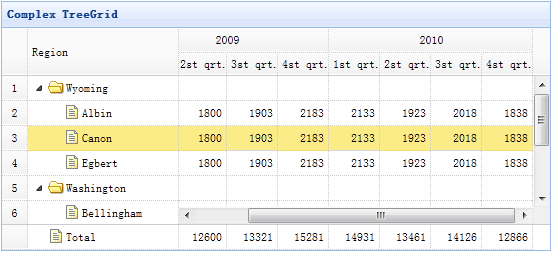
Creating a TreeGrid
    <table title="Complex TreeGrid" class="easyui-treegrid" style="width:550px;height:250px"
            url="data/treegrid2_data.json"
            rownumbers="true" showFooter="true"
            idField="id" treeField="region">
        <thead frozen="true">
            <tr>
                <th field="region" width="150">Region</th>
            </tr>
        </thead>
        <thead>
            <tr>
                <th colspan="4">2009</th>
                <th colspan="4">2010</th>
            </tr>
            <tr>
                <th field="f1" width="50" align="right">1st qrt.</th>
                <th field="f2" width="50" align="right">2st qrt.</th>
                <th field="f3" width="50" align="right">3st qrt.</th>
                <th field="f4" width="50" align="right">4st qrt.</th>
                <th field="f5" width="50" align="right">1st qrt.</th>
                <th field="f6" width="50" align="right">2st qrt.</th>
                <th field="f7" width="50" align="right">3st qrt.</th>
                <th field="f8" width="50" align="right">4st qrt.</th>
            </tr>
        </thead>
    </table>
As you can see, the TreeGrid is used in the same way as the Datagrid. Use the 'frozen' attribute to define frozen columns, and the 'colspan' and 'rowspan' attributes of columns to define multi-row headers.
Download jQuery EasyUI Examples
jeasyui-tree-treegrid2.zip
Other Extensions