ASP.NET MVC Tutorial
ASP.NET is a development framework for creating web pages and websites using HTML, CSS, JavaScript, and server scripts.
ASP.NET supports three different development models:
Web Pages, MVC (Model View Controller), Web Forms.
This tutorial introduces MVC。
| Web Pages | MVC | Web Forms |
MVC Programming Pattern
MVC is one of the three ASP.NET programming models.
MVC is a pattern for creating Web applications using the MVC (Model View Controller) design:
- Model represents the application core (such as a database record list).
- View displays data (database records).
- Controller handles input (writes database records).
The MVC pattern also provides full control over HTML, CSS, and JavaScript.
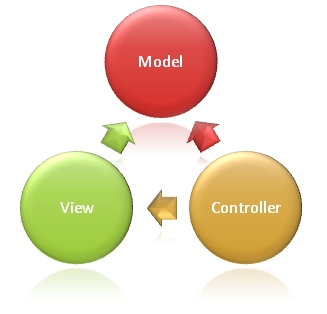 |
The MVC pattern defines Web applications
Business layer (Model logic) Display layer (View logic) Input control (Controller logic) |
Modelis the part of the application used to handle the application data logic.
Typically, model objects are responsible for accessing and storing data in the database.
Viewis the part of the application that handles the display of data.
Typically, views are created based on model data.
Controlleris the part of the application that handles user interaction.
Typically, the controller is responsible for reading data from the view, controlling user input, and sending data to the model.
MVC layering helps manage complex applications, because you can focus on one aspect at a time. For example, you can focus on view design without relying on business logic. It also makes testing the application easier.
MVC layering also simplifies group development. Different developers can work on views, controller logic, and business logic at the same time.
Web Forms vs MVC
The MVC programming model is a lightweight alternative to traditional ASP.NET (Web Forms). It is a lightweight, highly testable framework that also integrates all existing ASP.NET features, such as master pages, security, and authentication.
Visual Studio Express 2012/2010
Visual Studio Express is a free version of Microsoft Visual Studio.
Visual Studio Express is a development tool tailored for MVC (and Web Forms).
Visual Studio Express includes:
- MVC and Web Forms
- Drag-and-drop Web controls and Web components
- Web server language (Razor uses VB or C#)
- Web server (IIS Express)
- Database server (SQL Server Compact)
- Complete Web development framework (ASP.NET)
If you already have Visual Studio Express installed, you will learn more from this tutorial.
If you want to install Visual Studio Express, click one of the following links:
Visual Web Developer 2012(Windows 7 or Windows 8)
Visual Web Developer 2010(Windows Vista or XP)
 |
After you install Visual Studio Express for the first time, you can install patches and service packs by running the installer again, simply by clicking the link again. |
|---|
ASP.NET MVC Reference Manual
At the end of this tutorial, we provide a complete ASP.NET MVC reference manual for you to consult.
Other Extensions