jQuery EasyUI Form Plugin -Datebox Date Box
 jQuery EasyUI Plugin
Extends from $.fn.combo.defaults. Override the default defaults via $.fn.datebox.defaults.
The datebox combines an editable text box with a drop-down calendar panel, from which the user can select a date. The string entered in the text box can be converted into a valid date. The selected date can also be converted into the desired format.
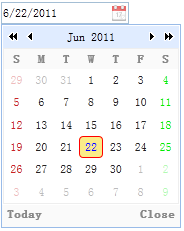
Dependencies
- combo
- calendar
Usage
Create a datebox from markup.
<input id="dd" type="text" class="easyui-datebox" required="required">
Create a datebox using JavaScript.
<input id="dd" type="text">
$('#dd').datebox({
    required:true
});
Properties
These properties extend from combo. Below are the properties added for datebox.
| Name | Type | Description | Default value |
|---|---|---|---|
| panelWidth | number | The width of the drop-down calendar panel. | 180 |
| panelHeight | number | The height of the drop-down calendar panel. | auto |
| currentText | string | The text displayed on the current day button. | Today |
| closeText | string | The text displayed on the close button. | Close |
| okText | string | The text displayed on the OK button. | Ok |
| disabled | boolean | Disable the field when set to true. | false |
| buttons | array | The buttons below the calendar. This property is available since version 1.3.5. Code example:
var buttons = $.extend([], $.fn.datebox.defaults.buttons);
buttons.splice(1, 0, {
    text: 'MyBtn',
    handler: function(target){
        alert('click MyBtn');
    }
});
$('#dd').datebox({
    buttons: buttons
});
|
|
| sharedCalendar | string,selector | A shared calendar used by multiple datebox components. This property is available since version 1.3.5. Code example: <input class="easyui-datebox" sharedCalendar="#sc"> <input class="easyui-datebox" sharedCalendar="#sc"> <div id="sc" class="easyui-calendar"></div> |
null |
| formatter | function | A function for formatting dates. This function has a 'date' parameter and returns a string value. The following example demonstrates how to override the default formatter function.
$.fn.datebox.defaults.formatter = function(date){
    var y = date.getFullYear();
    var m = date.getMonth()+1;
    var d = date.getDate();
    return m+'/'+d+'/'+y;
}
|
|
| parser | function | A function for parsing date strings. This function takes a 'date' string and returns a date value. The following example demonstrates how to override the default parser function.
$.fn.datebox.defaults.parser = function(s){
    var t = Date.parse(s);
    if (!isNaN(t)){
        return new Date(t);
    } else {
        return new Date();
    }
}
|
Events
| Name | Parameters | Description |
|---|---|---|
| onSelect | date | Triggered when the user selects a date. Code example:
$('#dd').datebox({
    onSelect: function(date){
        alert(date.getFullYear()+":"+(date.getMonth()+1)+":"+date.getDate());
    }
});
|
Methods
These methods extend from combo. Below are the methods overridden for datebox.
| Name | Parameters | Description |
|---|---|---|
| options | none | Returns the options object. |
| calendar | none | Get the calendar object. The following example demonstrates how to get the calendar object and then render it again.
// get the calendar object
var c = $('#dd').datebox('calendar');
// set the first day of week to monday
c.calendar({
    firstDay: 1
});
|
| setValue | value | Set the value of the datebox. Code example:
$('#dd').datebox('setValue', '6/1/2012');    // set datebox value
var v = $('#dd').datebox('getValue');    // get datebox value
|
jQuery EasyUI Plugin Other Extensions