jQuery EasyUI DataGrid -Setting Sort
This example demonstrates how to sort the DataGrid by clicking the column headers.
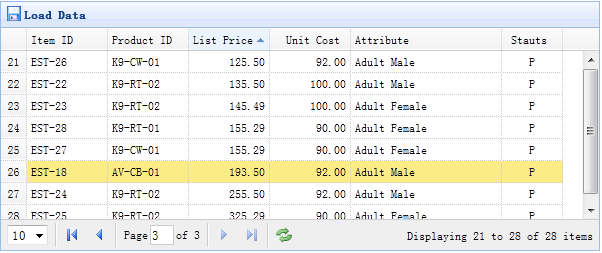
All columns of the DataGrid can be sorted by clicking the column headers. You can define which columns can be sorted. By default, columns cannot be sorted unless you set the sortable property to true.
Create a DataGrid
    <table id="tt" class="easyui-datagrid" style="width:600px;height:250px"
            url="datagrid8_getdata.php"
            title="Load Data" iconCls="icon-save"
            rownumbers="true" pagination="true">
        <thead>
            <tr>
                <th field="itemid" width="80" sortable="true">Item ID</th>
                <th field="productid" width="80" sortable="true">Product ID</th>
                <th field="listprice" width="80" align="right" sortable="true">List Price</th>
                <th field="unitcost" width="80" align="right" sortable="true">Unit Cost</th>
                <th field="attr1" width="150">Attribute</th>
                <th field="status" width="60" align="center">Stauts</th>
            </tr>
        </thead>
    </table>
We define some sortable columns, including itemid, productid, listprice, unitcost, etc. The 'attr1' column and the 'status' column cannot be sorted.
When sorting, the DataGrid will send two parameters to the remote server:
- sort: the field name of the sorted column.
- order: the sort order, which can be 'asc' or 'desc', with the default being 'asc'.
Server-Side Code
    $page = isset($_POST['page']) ? intval($_POST['page']) : 1;
    $rows = isset($_POST['rows']) ? intval($_POST['rows']) : 10;
    $sort = isset($_POST['sort']) ? strval($_POST['sort']) : 'itemid';
    $order = isset($_POST['order']) ? strval($_POST['order']) : 'asc';
    $offset = ($page-1)*$rows;

    $result = array();

    include 'conn.php';

    $rs = mysql_query("select count(*) from item");
    $row = mysql_fetch_row($rs);
    $result["total"] = $row[0];

    $rs = mysql_query("select * from item order by $sort $order limit $offset,$rows");

    $items = array();
    while($row = mysql_fetch_object($rs)){
        array_push($items, $row);
    }
    $result["rows"] = $items;

    echo json_encode($result);
Download jQuery EasyUI Examples
jeasyui-datagrid-datagrid8.zip
Other Extensions