jQuery EasyUI Applications -Creating a CRUD Application with an Expandable Row Detail Edit Form
When the datagrid view is switched to 'detailview', users can expand a row to display some row details below the row. This feature allows you to provide a suitable layout for the edit form placed in the detail row panel. In this tutorial, we use the datagrid component to reduce the space occupied by the edit form.
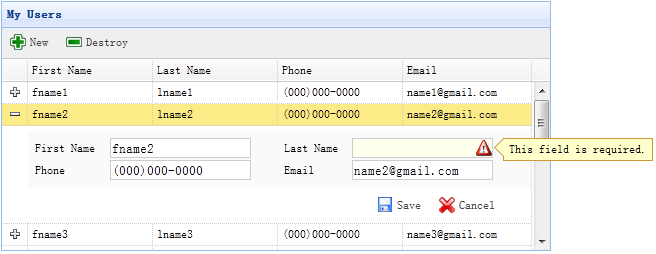
Step 1: Define the DataGrid in HTML Tags
<table id="dg" title="My Users" style="width:550px;height:250px"
        url="get_users.php"
        toolbar="#toolbar"
        fitColumns="true" singleSelect="true">
    <thead>
        <tr>
            <th field="firstname" width="50">First Name</th>
            <th field="lastname" width="50">Last Name</th>
            <th field="phone" width="50">Phone</th>
            <th field="email" width="50">Email</th>
        </tr>
    </thead>
</table>
<div id="toolbar">
    <a href="../index.html" class="easyui-linkbutton" iconCls="icon-add" plain="true" onclick="newItem()">New</a>
    <a href="../index.html" class="easyui-linkbutton" iconCls="icon-remove" plain="true" onclick="destroyItem()">Destroy</a>
</div>
Step 2: Apply the Detail View to the DataGrid
$('#dg').datagrid({
    view: detailview,
    detailFormatter:function(index,row){
        return '<div class="ddv"></div>';
    },
    onExpandRow: function(index,row){
        var ddv = $(this).datagrid('getRowDetail',index).find('div.ddv');
        ddv.panel({
            border:false,
            cache:true,
            href:'show_form.php?index='+index,
            onLoad:function(){
                $('#dg').datagrid('fixDetailRowHeight',index);
                $('#dg').datagrid('selectRow',index);
                $('#dg').datagrid('getRowDetail',index).find('form').form('load',row);
            }
        });
        $('#dg').datagrid('fixDetailRowHeight',index);
    }
});
To apply the detail view to the DataGrid, include the 'datagrid-detailview.js' file in the head of the HTML page.
We use the 'detailFormatter' function to generate row detail content.
In this case, we return an empty <div> for placing the edit form.
When the user clicks the row expand button ('+'), the 'onExpandRow' event will be triggered, and we will load the edit form via AJAX.
Call the 'getRowDetail' method to get the row detail container, so we can find the row detail panel.
Create a panel in the row detail and load the edit form returned from 'show_form.php'.
Step 3: Create the Edit Form
The edit form is loaded from the server.
<form method="post">
    <table class="dv-table" style="width:100%;background:#FAFAFA;padding:5px;margin-top:5px;">
        <tr>
            <td>First Name</td>
            <td><input name="firstname" class="easyui-validatebox" required="true"></input></td>
            <td>Last Name</td>
            <td><input name="lastname" class="easyui-validatebox" required="true"></input></td>
        </tr>
        <tr>
            <td>Phone</td>
            <td><input name="phone"></input></td>
            <td>Email</td>
            <td><input name="email" class="easyui-validatebox" validType="email"></input></td>
        </tr>
    </table>
    <div style="padding:5px 0;text-align:right;padding-right:30px">
        <a href="../index.html" class="easyui-linkbutton" iconCls="icon-save" plain="true" onclick="saveItem(<?php echo $_REQUEST['index'];?>)">Save</a>
        <a href="../index.html" class="easyui-linkbutton" iconCls="icon-cancel" plain="true" onclick="cancelItem(<?php echo $_REQUEST['index'];?>)">Cancel</a>
    </div>
</form>
Step 4: Save or Cancel the Edit
Call the 'saveItem' function to save a user or call the 'cancelItem' function to cancel the edit.
function saveItem(index){
    var row = $('#dg').datagrid('getRows')[index];
    var url = row.isNewRecord ? 'save_user.php' : 'update_user.php?id='+row.id;
    $('#dg').datagrid('getRowDetail',index).find('form').form('submit',{
        url: url,
        onSubmit: function(){
            return $(this).form('validate');
        },
        success: function(data){
            data = eval('('+data+')');
            data.isNewRecord = false;
            $('#dg').datagrid('collapseRow',index);
            $('#dg').datagrid('updateRow',{
                index: index,
                row: data
            });
        }
    });
}
Determine which URL to submit to, then find the form object and call the 'submit' method to submit the form data. When the data is saved successfully, collapse and update the row data.
function cancelItem(index){
    var row = $('#dg').datagrid('getRows')[index];
    if (row.isNewRecord){
        $('#dg').datagrid('deleteRow',index);
    } else {
        $('#dg').datagrid('collapseRow',index);
    }
}
When canceling the edit action, if the row is a new row and has not been saved yet, delete the row directly; otherwise, collapse the row.
Download jQuery EasyUI Examples
jeasyui-app-crud3.zip
Other Extensions