jQuery EasyUI DataGrid -Creating Complex Toolbar
The toolbar of the datagrid can contain buttons and other components. You can simply define the toolbar layout through an existing DIV tag, which will become the content of the datagrid toolbar. This tutorial will show you how to create a complex toolbar for the datagrid component.
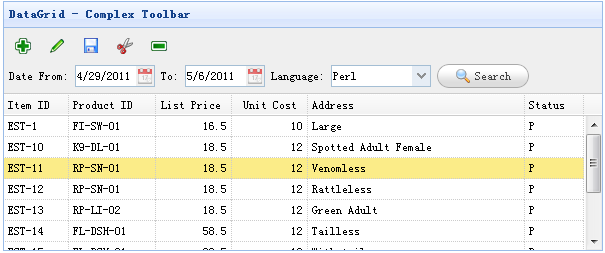
Creating the Toolbar
    <div id="tb" style="padding:5px;height:auto">
        <div style="margin-bottom:5px">
            <a href="../index.html" class="easyui-linkbutton" iconCls="icon-add" plain="true"></a>
            <a href="../index.html" class="easyui-linkbutton" iconCls="icon-edit" plain="true"></a>
            <a href="../index.html" class="easyui-linkbutton" iconCls="icon-save" plain="true"></a>
            <a href="../index.html" class="easyui-linkbutton" iconCls="icon-cut" plain="true"></a>
            <a href="../index.html" class="easyui-linkbutton" iconCls="icon-remove" plain="true"></a>
        </div>
        <div>
            Date From: <input class="easyui-datebox" style="width:80px">
            To: <input class="easyui-datebox" style="width:80px">
            Language:
            <input class="easyui-combobox" style="width:100px"
                    url="data/combobox_data.json"
                    valueField="id" textField="text">
            <a href="../index.html" class="easyui-linkbutton" iconCls="icon-search">Search</a>
        </div>
    </div>
Creating the DataGrid
    <table class="easyui-datagrid" style="width:600px;height:250px"
            url="data/datagrid_data.json"
            title="DataGrid - Complex Toolbar" toolbar="#tb"
            singleSelect="true" fitColumns="true">
        <thead>
            <tr>
                <th field="itemid" width="60">Item ID</th>
                <th field="productid" width="80">Product ID</th>
                <th field="listprice" align="right" width="70">List Price</th>
                <th field="unitcost" align="right" width="70">Unit Cost</th>
                <th field="attr1" width="200">Address</th>
                <th field="status" width="50">Status</th>
            </tr>
        </thead>
    </table>
As you can see, the toolbar of the datagrid is similar to the dialog. We don't need to write any JavaScript code to create a datagrid with a complex toolbar.
Download jQuery EasyUI Examples
jeasyui-datagrid-datagrid19.zip
Other Extensions