TypeScript Tutorial

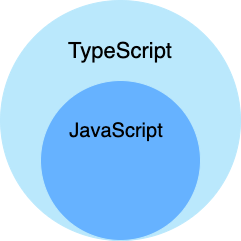
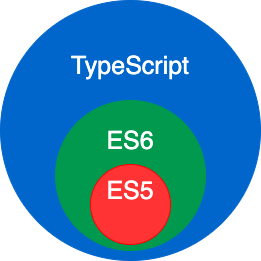
TypeScript is a superset of JavaScript, supporting the ECMAScript 6 standard (ES6 Tutorial)。
TypeScript is a free and open-source programming language developed by Microsoft. It is a superset that adds static type checking on top of JavaScript.
TypeScript is designed for developing large-scale applications. It can be compiled into pure JavaScript, and the compiled JavaScript can run in any browser.
Why Choose TypeScript
TypeScript is an open-source programming language developed by Microsoft. It is a superset of JavaScript.
TypeScript greatly enhances the JavaScript development experience by adding features such as optional static types, interfaces, and enums.
Main Advantages of TypeScript
- Static Type Checking:Detect type errors at compile time, reducing runtime errors
- Powerful IDE Support:Intelligent code completion, navigation, and refactoring
- Better Code Readability:Types themselves are the best documentation
- Modern JavaScript Features:Supports ES6+ syntax, such as arrow functions, modules, classes, etc.
- Progressive Migration:Can gradually migrate existing JavaScript projects to TypeScript
How TypeScript Works
TypeScript cannot run directly in the browser; it needs to be compiled into JavaScript first. This compilation process checks for type errors and converts TypeScript-specific syntax into pure JavaScript.
SVG Diagram: TypeScript Compilation ProcessThe TypeScript compiler (tsc) performs type checking during the compilation process. If type errors are found, it will report an error and stop the compilation. After successful compilation, it generates pure JavaScript code that can run in any browser or Node.js environment.
Language Features
TypeScript is a type-enhanced extension of JavaScript. While maintaining compatibility with the original syntax, it introduces a stronger type system and engineering capabilities.
Core Enhancement Capabilities (TypeScript-specific)
| Feature | Description |
|---|---|
| Type Annotations & Compile-time Checking | Detect type errors during development, improving code reliability |
| Type Inference | No need to explicitly declare types; the compiler can infer them automatically |
| Type Erasure | Remove type information after compilation, outputting pure JavaScript |
| Interface | Used to define object structures, enhancing code constraints |
| Enum | Provides a set of named constants, improving readability |
| Generics | Supports type reuse, enhancing the flexibility of functions and classes |
| Mixin | Implements a composition pattern for multiple inheritance |
| Namespace | Organizes code structure (old approach, modules are now more commonly used) |
| Tuple | Fixed-length arrays with different types |
| Asynchronous (Await) | Provides more intuitive asynchronous flow control |
Syntax Support from ES2015 (Backward Compatible)
TypeScript also supports and compiles down the core features of ECMAScript 2015:
| Feature | Description |
|---|---|
| Class | Object-oriented programming support |
| Module | Supports modular development (import/export) |
| Arrow Functions (=>) | More concise function syntax, binding lexical scope |
| Optional Parameters | Function parameters can be omitted |
| Default Parameters | Provides default values for parameters |
Differences Between JavaScript and TypeScript
TypeScript is a superset of JavaScript. It extends the syntax of JavaScript, so existing JavaScript code can work with TypeScript without any modifications. TypeScript provides compile-time static type checking through type annotations.
TypeScript can handle existing JavaScript code and only compiles the TypeScript code within it.
First TypeScript Example
In the following example, we use TypeScript to output Hello World!:
Other Extensions