jQuery EasyUI Form Plugins -Combogrid
 jQuery EasyUI Plugins
Extends from $.fn.combo.defaults and $.fn.datagrid.defaults. Override the default defaults via $.fn.combogrid.defaults.
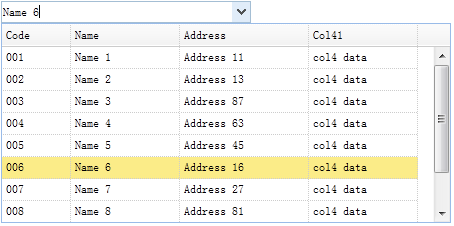
The combogrid combines an editable textbox with a dropdown data grid panel, allowing users to quickly search and select from the dropdown data grid panel. The combogrid provides keyboard navigation support for selecting an item.
Dependencies
- combo
- datagrid
Usage
Create a combogrid
1. Create a combogrid from markup.
<select id="cc" class="easyui-combogrid" name="dept" style="width:250px;"
    data-options="
    panelWidth:450,
    value:'006',
    idField:'code',
    textField:'name',
    url:'datagrid_data.json',
    columns:[[
    {field:'code',title:'Code',width:60},
    {field:'name',title:'Name',width:100},
    {field:'addr',title:'Address',width:120},
    {field:'col4',title:'Col41',width:100}
    ]]
    "></select>
2. Create it from an existing <select> or <input> element using JavaScript.
<input id="cc" name="dept" value="01">
    $('#cc').combogrid({
    panelWidth:450,
    value:'006',
    idField:'code',
    textField:'name',
    url:'datagrid_data.json',
    columns:[[
    {field:'code',title:'Code',width:60},
    {field:'name',title:'Name',width:100},
    {field:'addr',title:'Address',width:120},
    {field:'col4',title:'Col41',width:100}
    ]]
    });
Autocomplete feature
Let's add autocomplete functionality to the combogrid. The dropdown data grid will display possible results based on user input.
$('#cc').combogrid({
    delay: 500,
    mode: 'remote',
    url: 'get_data.php',
    idField: 'id',
    textField: 'name',
    columns: [[
        {field:'code',title:'Code',width:120,sortable:true},
        {field:'name',title:'Name',width:400,sortable:true}
    ]]
});
On the server side, the 'q' parameter must be retrieved first. Users can query the database and then return a JSON-formatted SQL result to the browser.
get_data.php:
$q = isset($_POST['q']) ? $_POST['q'] : ''; // the request parameter
// query database and return JSON result data
$rs = mysql_query("select * from item where name like '$q%'");
echo json_encode(...);
Properties
These properties extend from combo and datagrid. Below are the properties added for the combogrid.
| Name | Type | Description | Default Value |
|---|---|---|---|
| loadMsg | string | The message displayed when the datagrid loads remote data. | null |
| idField | string | The field name of the id. | null |
| textField | string | The field name of the text displayed in the textbox. | null |
| mode | string | Defines how to load datagrid data when the text changes. Set it to 'remote' if the combogrid loads from the server. When set to 'remote' mode, the user's input value will be sent as an HTTP request parameter named 'q' to the server to get new data. | local |
| filter | function(q, row) | Defines how to select local data when 'mode' is set to 'local'. Return true to select that row. Code example:
$('#cc').combogrid({
    filter: function(q, row){
        var opts = $(this).combogrid('options');
        return row[opts.textField].indexOf(q) == 0;
    }
});
|
100 |
Events
These events extend from combo and datagrid.
Methods
These methods extend from combo. The following are the methods added or overridden for the combogrid.
| Name | Parameters | Description |
|---|---|---|
| options | none | Returns the options object. |
| grid | none | Returns the datagrid object. The example below shows how to get the selected row:
var g = $('#cc').combogrid('grid');    // get datagrid object
var r = g.datagrid('getSelected');    // get the selected row
alert(r.name);
|
| setValues | values | Sets the array of component values. Code example:
$('#cc').combogrid('setValues', ['001','007']);
|
| setValue | value | Sets the component value. Code example:
$('#cc').combogrid('setValue', '002');
|
| clear | none | Clears the component value. |
jQuery EasyUI Plugins Other Extensions