jQuery EasyUI Tree Menu -Tree Grid Dynamic Loading
Dynamically loading a tree grid helps load partial row data from the server, avoiding the long wait of loading large data. This tutorial will show you how to create a tree grid (TreeGrid) with dynamic loading features.
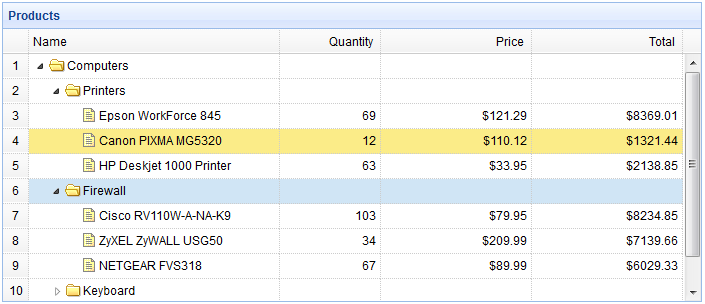
Create a TreeGrid
    <table title="Products" class="easyui-treegrid" style="width:700px;height:300px"
            url="treegrid3_getdata.php"
            rownumbers="true"
            idField="id" treeField="name">
        <thead>
            <tr>
                <th field="name" width="250">Name</th>
                <th field="quantity" width="100" align="right">Quantity</th>
                <th field="price" width="150" align="right" formatter="formatDollar">Price</th>
                <th field="total" width="150" align="right" formatter="formatDollar">Total</th>
            </tr>
        </thead>
    </table>
Server-side Code
treegrid3_getdata.php
$id = isset($_POST['id']) ? intval($_POST['id']) : 0;

include 'conn.php';
$result = array();
$rs = mysql_query("select * from products where parentId=$id");
while($row = mysql_fetch_array($rs)){
    $row['state'] = has_child($row['id']) ? 'closed' : 'open';
    $row['total'] = $row['price']*$row['quantity'];
    array_push($result, $row);
}

echo json_encode($result);

function has_child($id){
    $rs = mysql_query("select count(*) from products where parentId=$id");
    $row = mysql_fetch_array($rs);
    return $row[0] > 0 ? true : false;
}
Download jQuery EasyUI Examples
jeasyui-tree-treegrid3.zip
Other Extensions