jQuery EasyUI DataGrid -Enable Inline Editing
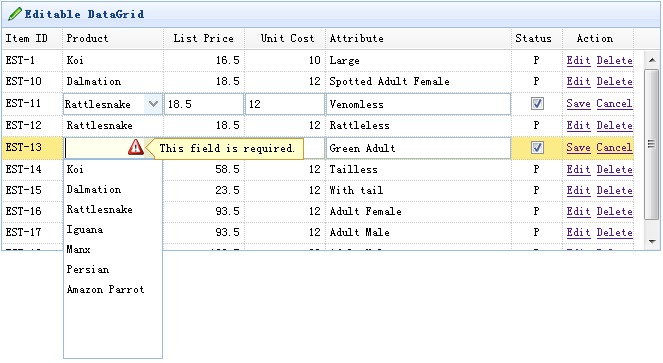
The editable functionality was recently added to the datagrid. It allows users to add a new row to the datagrid. Users can also update one or more rows.
This tutorial shows you how to create a data grid (datagrid) and an inline editor.
Create DataGrid
    $(function(){
        $('#tt').datagrid({
            title:'Editable DataGrid',
            iconCls:'icon-edit',
            width:660,
            height:250,
            singleSelect:true,
            idField:'itemid',
            url:'datagrid_data.json',
            columns:[[
                {field:'itemid',title:'Item ID',width:60},
                {field:'productid',title:'Product',width:100,
                    formatter:function(value){
                        for(var i=0; i<products.length; i++){
                            if (products[i].productid == value) return products[i].name;
                        }
                        return value;
                    },
                    editor:{
                        type:'combobox',
                        options:{
                            valueField:'productid',
                            textField:'name',
                            data:products,
                            required:true
                        }
                    }
                },
                {field:'listprice',title:'List Price',width:80,align:'right',editor:{type:'numberbox',options:{precision:1}}},
                {field:'unitcost',title:'Unit Cost',width:80,align:'right',editor:'numberbox'},
                {field:'attr1',title:'Attribute',width:150,editor:'text'},
                {field:'status',title:'Status',width:50,align:'center',
                    editor:{
                        type:'checkbox',
                        options:{
                            on: 'P',
                            off: ''
                        }
                    }
                },
                {field:'action',title:'Action',width:70,align:'center',
                    formatter:function(value,row,index){
                        if (row.editing){
                            var s = '<a href="../index.html" onclick="saverow(this)">Save</a> ';
                            var c = '<a href="../index.html" onclick="cancelrow(this)">Cancel</a>';
                            return s+c;
                        } else {
                            var e = '<a href="../index.html" onclick="editrow(this)">Edit</a> ';
                            var d = '<a href="../index.html" onclick="deleterow(this)">Delete</a>';
                            return e+d;
                        }
                    }
                }
            ]],
            onBeforeEdit:function(index,row){
                row.editing = true;
                updateActions(index);
            },
            onAfterEdit:function(index,row){
                row.editing = false;
                updateActions(index);
            },
            onCancelEdit:function(index,row){
                row.editing = false;
                updateActions(index);
            }
        });
    });
    function updateActions(index){
        $('#tt').datagrid('updateRow',{
            index: index,
            row:{}
        });
    }
To enable inline editing in the datagrid, you should add an editor property to the columns. The editor tells the datagrid how to edit a field and how to save the field value. As you can see, we define three editors: text, combobox, and checkbox.
    function getRowIndex(target){
        var tr = $(target).closest('tr.datagrid-row');
        return parseInt(tr.attr('datagrid-row-index'));
    }
    function editrow(target){
        $('#tt').datagrid('beginEdit', getRowIndex(target));
    }
    function deleterow(target){
        $.messager.confirm('Confirm','Are you sure?',function(r){
            if (r){
                $('#tt').datagrid('deleteRow', getRowIndex(target));
            }
        });
    }
    function saverow(target){
        $('#tt').datagrid('endEdit', getRowIndex(target));
    }
    function cancelrow(target){
        $('#tt').datagrid('cancelEdit', getRowIndex(target));
    }
Download jQuery EasyUI Examples
jeasyui-datagrid-datagrid12.zip
Other Extensions