jQuery EasyUI Window -Window and Layout
The Layout component can be embedded in a window. We can create a complex layout window without even writing any JavaScript code. The jQuery EasyUI framework handles rendering and resizing in the background for us.
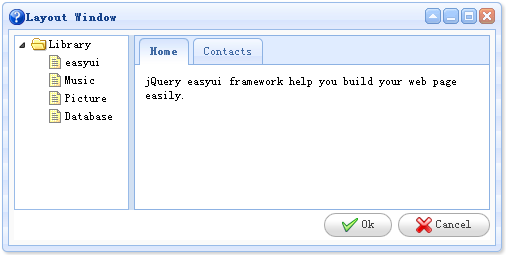
As an example, we create a window that contains two parts, one placed on the left and one placed on the right. On the left side of the window, we create a tree; on the right side of the window, we create a tabs container.
    <div class="easyui-window" title="Layout Window" icon="icon-help" style="width:500px;height:250px;padding:5px;background: #FAFAFA;">
        <div class="easyui-layout" fit="true">
            <div region="west" split="true" style="width:120px;">
                <ul class="easyui-tree">
                    <li>
                        <span>Library</span>
                        <ul>
                            <li><span>easyui</span></li>
                            <li><span>Music</span></li>
                            <li><span>Picture</span></li>
                            <li><span>Database</span></li>
                        </ul>
                    </li>
                </ul>
            </div>
            <div region="center" border="false" border="false">
                <div class="easyui-tabs" fit="true">
                    <div title="Home" style="padding:10px;">
                        jQuery easyui framework help you build your web page easily.
                    </div>
                    <div title="Contacts">
                        No contact data.
                    </div>
                </div>
            </div>
            <div region="south" border="false" style="text-align:right;height:30px;line-height:30px;">
                <a class="easyui-linkbutton" icon="icon-ok" href="#">Ok</a>
                <a class="easyui-linkbutton" icon="icon-cancel" href="#">Cancel</a>
            </div>
        </div>
    </div>
Look at the code above — we only used HTML markup, and a complex layout window will be displayed. This is the jQuery EasyUI framework: simple and powerful.
Download jQuery EasyUI Examples
jeasyui-win-win3.zip
Other Extensions