jQuery EasyUI Drag and Drop -Create a Drag-and-Drop Shopping Cart
If you can simply implement drag and drop in your web application, you will know something special. With jQuery EasyUI, we can simply implement drag and drop functionality in web applications.
In this tutorial, we will show you how to create a shopping cart page that allows users to drag and drop products they want to buy. The items and prices in the shopping cart will be updated.
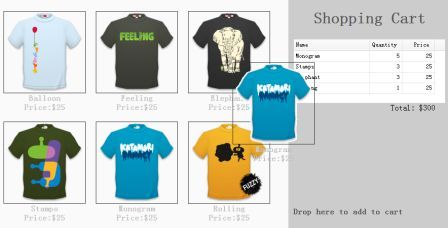
Display Products on the Page
    <ul class="products">
        <li>
            <a href="../index.html" class="item">
                <img src="images/shirt1.gif.html"/>
                <div>
                    <p>Balloon</p>
                    <p>Price:$25</p>
                </div>
            </a>
        </li>
        <li>
            <a href="../index.html" class="item">
                <img src="images/shirt2.gif.html"/>
                <div>
                    <p>Feeling</p>
                    <p>Price:$25</p>
                </div>
            </a>
        </li>
        <!-- other products -->
    </ul>
As you can see from the code above, we add a <ul> element containing some <li> elements to display products. All products have name and price attributes, which are contained in <p> elements.
Create the Shopping Cart
    <div class="cart">
        <h1>Shopping Cart</h1>
        <table id="cartcontent" style="width:300px;height:auto;">
            <thead>
                <tr>
                    <th field="name" width=140>Name</th>
                    <th field="quantity" width=60 align="right">Quantity</th>
                    <th field="price" width=60 align="right">Price</th>
                </tr>
            </thead>
        </table>
        <p class="total">Total: $0</p>
        <h2>Drop here to add to cart</h2>
    </div>
We use a data grid (datagrid) to display the items in the shopping cart.
Drag Cloned Products
    $('.item').draggable({
        revert:true,
        proxy:'clone',
        onStartDrag:function(){
            $(this).draggable('options').cursor = 'not-allowed';
            $(this).draggable('proxy').css('z-index',10);
        },
        onStopDrag:function(){
            $(this).draggable('options').cursor='move';
        }
    });
Please note that we set the value of the draggable attribute from 'proxy' to 'clone', so the dragged element will be produced by cloning.
Drop Selected Products into the Shopping Cart
    $('.cart').droppable({
        onDragEnter:function(e,source){
            $(source).draggable('options').cursor='auto';
        },
        onDragLeave:function(e,source){
            $(source).draggable('options').cursor='not-allowed';
        },
        onDrop:function(e,source){
            var name = $(source).find('p:eq(0)').html();
            var price = $(source).find('p:eq(1)').html();
            addProduct(name, parseFloat(price.split('$')[1]));
        }
    });
    var data = {"total":0,"rows":[]};
    var totalCost = 0;
    function addProduct(name,price){
        function add(){
            for(var i=0; i<data.total; i++){
                var row = data.rows[i];
                if (row.name == name){
                    row.quantity += 1;
                    return;
                }
            }
            data.total += 1;
            data.rows.push({
                name:name,
                quantity:1,
                price:price
            });
        }
        add();
        totalCost += price;
        $('#cartcontent').datagrid('loadData', data);
        $('div.cart .total').html('Total: $'+totalCost);
    }
Whenever a product is dropped, we first get the product name and price, then call the 'addProduct' function to update the shopping cart.
Download jQuery EasyUI Examples
jeasyui-dd-shopping.zip
Other Extensions