jQuery EasyUI Layout -Creating Tabs
This tutorial will show you how to use easyui to create a Tabs component. Tabs has multiple panels that can be dynamically added or removed. You can use Tabs to display different entities on the same page.
Tabs displays only one panel at a time, and each panel has a title, icon, and close button. When a Tabs is selected, the content of the corresponding panel will be displayed.
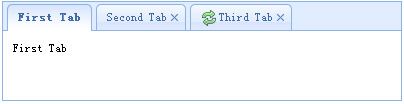
Create Tabs from HTML markup, including a DIV container and several DIV panels.
    <div class="easyui-tabs" style="width:400px;height:100px;">
        <div title="First Tab" style="padding:10px;">
            First Tab
        </div>
        <div title="Second Tab" closable="true" style="padding:10px;">
            Second Tab
        </div>
        <div title="Third Tab" iconCls="icon-reload" closable="true" style="padding:10px;">
            Third Tab
        </div>
    </div>
We create a Tabs component with three panels; the second and third panels can be closed by clicking the close button.
Download jQuery EasyUI Examples
jeasyui-layout-tabs1.zip
Other Extensions