jQuery EasyUI Application -Create a CRUD DataGrid
In the previous chapter, we used the dialog component to create a CRUD application to create and edit user information. In this tutorial, we will show you how to create a CRUD DataGrid. We will useEditable DataGrid pluginto complete these CRUD operations.
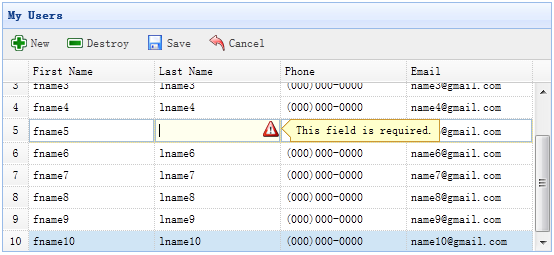
Step 1: Define the DataGrid in the HTML tag
<table id="dg" title="My Users" style="width:550px;height:250px"
        toolbar="#toolbar" idField="id"
        rownumbers="true" fitColumns="true" singleSelect="true">
    <thead>
        <tr>
            <th field="firstname" width="50" editor="{type:'validatebox',options:{required:true}}">First Name</th>
            <th field="lastname" width="50" editor="{type:'validatebox',options:{required:true}}">Last Name</th>
            <th field="phone" width="50" editor="text">Phone</th>
            <th field="email" width="50" editor="{type:'validatebox',options:{validType:'email'}}">Email</th>
        </tr>
    </thead>
</table>
<div id="toolbar">
    <a href="../index.html" class="easyui-linkbutton" iconCls="icon-add" plain="true" onclick="javascript:$('#dg').edatagrid('addRow')">New</a>
    <a href="../index.html" class="easyui-linkbutton" iconCls="icon-remove" plain="true" onclick="javascript:$('#dg').edatagrid('destroyRow')">Destroy</a>
    <a href="../index.html" class="easyui-linkbutton" iconCls="icon-save" plain="true" onclick="javascript:$('#dg').edatagrid('saveRow')">Save</a>
    <a href="../index.html" class="easyui-linkbutton" iconCls="icon-undo" plain="true" onclick="javascript:$('#dg').edatagrid('cancelRow')">Cancel</a>
</div>
Step 2: Use the Editable DataGrid
$('#dg').edatagrid({
    url: 'get_users.php',
    saveUrl: 'save_user.php',
    updateUrl: 'update_user.php',
    destroyUrl: 'destroy_user.php'
});
We should provide the 'url', 'saveUrl', 'updateUrl', and 'destroyUrl' properties to edit the DataGrid:
- url: Retrieve user data from the server side.
- saveUrl: Save new user data.
- updateUrl: Update existing user data.
- destroyUrl: Delete existing user data.
Step 3: Write server-side processing code
Save a new user (save_user.php):
$firstname = $_REQUEST['firstname'];
$lastname = $_REQUEST['lastname'];
$phone = $_REQUEST['phone'];
$email = $_REQUEST['email'];

include 'conn.php';

$sql = "insert into users(firstname,lastname,phone,email) values('$firstname','$lastname','$phone','$email')";
@mysql_query($sql);
echo json_encode(array(
    'id' => mysql_insert_id(),
    'firstname' => $firstname,
    'lastname' => $lastname,
    'phone' => $phone,
    'email' => $email
));
Update an existing user (update_user.php):
$id = intval($_REQUEST['id']);
$firstname = $_REQUEST['firstname'];
$lastname = $_REQUEST['lastname'];
$phone = $_REQUEST['phone'];
$email = $_REQUEST['email'];

include 'conn.php';

$sql="update users set firstname='$firstname',lastname='$lastname',phone='$phone',email='$email' where id=$id";
@mysql_query($sql);
echo json_encode(array(
    'id' => $id,
    'firstname' => $firstname,
    'lastname' => $lastname,
    'phone' => $phone,
    'email' => $email
));
Delete an existing user (destroy_user.php):
$id = intval($_REQUEST['id']);

include 'conn.php';

$sql = "delete from users where id=$id";
@mysql_query($sql);
echo json_encode(array('success'=>true));
Download jQuery EasyUI Examples
jeasyui-app-crud2.zip
Other Extensions