jQuery EasyUI Data Grid -Setting Frozen Columns
This example demonstrates how to freeze some columns. When the user moves the horizontal scroll bar on the grid, the frozen columns cannot scroll out of view.
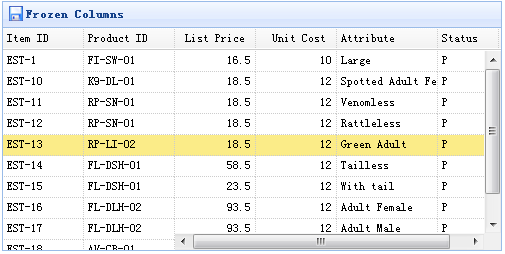
To freeze columns, you need to define the frozenColumns property. The frozenColumn property is the same as the columns property.
    $('#tt').datagrid({
        title:'Frozen Columns',
        iconCls:'icon-save',
        width:500,
        height:250,
        url:'data/datagrid_data.json',
        frozenColumns:[[
            {field:'itemid',title:'Item ID',width:80},
            {field:'productid',title:'Product ID',width:80},
        ]],
        columns:[[
            {field:'listprice',title:'List Price',width:80,align:'right'},
            {field:'unitcost',title:'Unit Cost',width:80,align:'right'},
            {field:'attr1',title:'Attribute',width:100},
            {field:'status',title:'Status',width:60}
        ]]
    });
You do not need to write any JavaScript code, so you can create a data grid (datagrid) component as shown below:
    <table id="tt" title="Frozen Columns" class="easyui-datagrid" style="width:500px;height:250px"
            url="data/datagrid_data.json"
            singleSelect="true" iconCls="icon-save">
        <thead frozen="true">
            <tr>
                <th field="itemid" width="80">Item ID</th>
                <th field="productid" width="80">Product ID</th>
            </tr>
        </thead>
        <thead>
            <tr>
                <th field="listprice" width="80" align="right">List Price</th>
                <th field="unitcost" width="80" align="right">Unit Cost</th>
                <th field="attr1" width="150">Attribute</th>
                <th field="status" width="60" align="center">Stauts</th>
            </tr>
        </thead>
    </table>
Download jQuery EasyUI Examples
jeasyui-datagrid-datagrid5.zip
Other Extensions