jQuery EasyUI Tree Menu -Tree Menu Loading Parent/Child Nodes
The usual way to represent a tree node is to store a parentid in each node. This is also known as the adjacency list model. Directly loading this data into the tree menu (Tree) is not allowed. However, we can convert it into the standard tree menu (Tree) data format before loading it into the tree menu. The Tree plugin provides a 'loadFilter' option function that can accomplish this. It provides an opportunity to change any incoming data. This tutorial shows you how to use the 'loadFilter' function to load parent/child nodes into the tree menu (Tree).
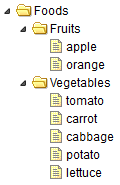
Parent/Child Node Data
    [
    {"id":1,"parendId":0,"name":"Foods"},
    {"id":2,"parentId":1,"name":"Fruits"},
    {"id":3,"parentId":1,"name":"Vegetables"},
    {"id":4,"parentId":2,"name":"apple"},
    {"id":5,"parentId":2,"name":"orange"},
    {"id":6,"parentId":3,"name":"tomato"},
    {"id":7,"parentId":3,"name":"carrot"},
    {"id":8,"parentId":3,"name":"cabbage"},
    {"id":9,"parentId":3,"name":"potato"},
    {"id":10,"parentId":3,"name":"lettuce"}
    ]
Create a Tree Menu (Tree) using 'loadFilter'
    $('#tt').tree({
        url: 'data/tree6_data.json',
        loadFilter: function(rows){
            return convert(rows);
        }
    });
Implementation of the Conversion
    function convert(rows){
        function exists(rows, parentId){
            for(var i=0; i<rows.length; i++){
                if (rows[i].id == parentId) return true;
            }
            return false;
        }

        var nodes = [];
        // get the top level nodes
        for(var i=0; i<rows.length; i++){
            var row = rows[i];
            if (!exists(rows, row.parentId)){
                nodes.push({
                    id:row.id,
                    text:row.name
                });
            }
        }

        var toDo = [];
        for(var i=0; i<nodes.length; i++){
            toDo.push(nodes[i]);
        }
        while(toDo.length){
            var node = toDo.shift();    // the parent node
            // get the children nodes
            for(var i=0; i<rows.length; i++){
                var row = rows[i];
                if (row.parentId == node.id){
                    var child = {id:row.id,text:row.name};
                    if (node.children){
                        node.children.push(child);
                    } else {
                        node.children = [child];
                    }
                    toDo.push(child);
                }
            }
        }
        return nodes;
    }
Download jQuery EasyUI Examples
jeasyui-tree-tree6.zip
Other Extensions