jQuery EasyUI Data Grid -Expand Row Details
The data grid (datagrid) can change its view to display different effects. Using the detail view, the data grid (datagrid) can display expand buttons ("+" or "-") on the left side of the data rows. Users can expand a row to show additional details.
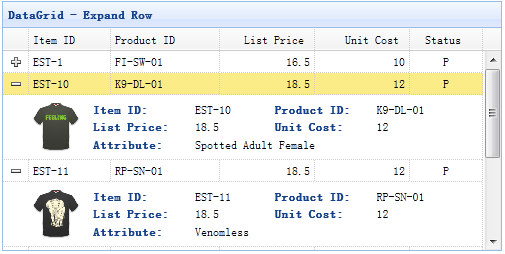
Step 1: Create a Data Grid (DataGrid)
    <table id="dg" style="width:500px;height:250px"
            url="datagrid8_getdata.php"
            pagination="true" sortName="itemid" sortOrder="desc"
            title="DataGrid - Expand Row"
            singleSelect="true" fitColumns="true">
        <thead>
            <tr>
                <th field="itemid" width="60">Item ID</th>
                <th field="productid" width="80">Product ID</th>
                <th field="listprice" align="right" width="70">List Price</th>
                <th field="unitcost" align="right" width="70">Unit Cost</th>
                <th field="status" width="50" align="center">Status</th>
            </tr>
        </thead>
    </table>
Step 2: Set the Detail View for the Data Grid (DataGrid)
To use the detail view, remember to reference the view script file in the page header.
<script type="text/javascript" src="http://www.w3cschool.cc/try/jeasyui/datagrid-detailview.js"></script>
$('#dg').datagrid({
    view: detailview,
    detailFormatter:function(index,row){
        return '<div class="ddv" style="padding:5px 0"></div>';
    },
    onExpandRow: function(index,row){
        var ddv = $(this).datagrid('getRowDetail',index).find('div.ddv');
        ddv.panel({
            border:false,
            cache:false,
            href:'datagrid21_getdetail.php?itemid='+row.itemid,
            onLoad:function(){
                $('#dg').datagrid('fixDetailRowHeight',index);
            }
        });
        $('#dg').datagrid('fixDetailRowHeight',index);
    }
});
We define the 'detailFormatter' function to tell the data grid (datagrid) how to render the detail view. In this case, we return a simple '<div>' element that will act as a container for the detail content. Note that the detail content is empty. When the user clicks the expand button ('+'), the onExpandRow event will be triggered. So we can write some code to load the ajax detail content. Finally, we call the 'fixDetailRowHeight' method to fix the row height when the detail content is loaded.
Step 3: Server-side Code
<?php
include_once 'conn.php';
$itemid = mysql_real_escape_string($_REQUEST['itemid']);
$rs = mysql_query("select * from item where itemid='$itemid'");
$item = mysql_fetch_array($rs);
?>
<table class="dv-table" border="0" style="width:100%;">
<tr>
<td rowspan="3" style="width:60px">
<?php
$aa = explode('-',$itemid);
$serno = $aa[1];
$img = "images/shirt$serno.gif";
echo "<img src=\"$img\" style=\"width:60px;margin-right:20px\" />";
?>
</td>
<td class="dv-label">Item ID: </td>
<td><?php echo $item['itemid'];?></td>
<td class="dv-label">Product ID:</td>
<td><?php echo $item['productid'];?></td>
</tr>
<tr>
<td class="dv-label">List Price: </td>
<td><?php echo $item['listprice'];?></td>
<td class="dv-label">Unit Cost:</td>
<td><?php echo $item['unitcost'];?></td>
</tr>
<tr>
<td class="dv-label">Attribute: </td>
<td colspan="3"><?php echo $item['attr1'];?></td>
</tr>
</table>
Download jQuery EasyUI Examples
jeasyui-datagrid-datagrid21.zip
Other Extensions