jQuery EasyUI Form Plugin -Datetimebox Date Time Box
 jQuery EasyUI Plugins
Extends from $.fn.datebox.defaults. Override the default defaults via $.fn.datetimebox.defaults.
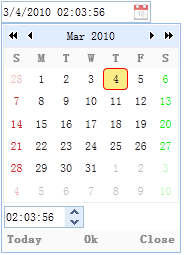
Similar to the datebox, the datetimebox allows users to select a date and time to be displayed with the specified format. It adds a timespinner component to the dropdown panel.
Dependencies
- datebox
- timespinner
Usage
Create a datetimebox from markup.
<input class="easyui-datetimebox" name="birthday"
    data-options="required:true,showSeconds:false" value="3/4/2010 2:3" style="width:150px">
Create a datetimebox using JavaScript.
<input id="dt" type="text" name="birthday">
$('#dt').datetimebox({
    value: '3/4/2010 2:3',
    required: true,
    showSeconds: false
});
Properties
The properties extend from datebox. The following are the added properties for datetimebox.
| Name | Type | Description | Default Value |
|---|---|---|---|
| showSeconds | boolean | Defines whether to display the seconds information. | true |
| timeSeparator | string | The time separator between hours, minutes, and seconds. This property is available since version 1.3. | : |
Methods
The methods extend from datebox. The following are the rewritten methods for datetimebox.
| Name | Parameters | Description |
|---|---|---|
| options | none | Return the options object. |
| spinner | none | Return the timespinner object. |
| setValue | value | Set the value of the datetimebox. Code example:
$('#dt').datetimebox('setValue', '6/1/2012 12:30:56');    // set datetimebox value
var v = $('#dt').datetimebox('getValue');        // get datetimebox value
alert(v);
|
jQuery EasyUI Plugins Other Extensions