jQuery EasyUI Form Plugin -Calendar
 jQuery EasyUI Plugin
Override the default settings via $.fn.calendar.defaults.
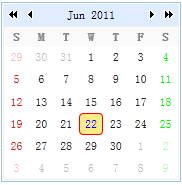
The calendar displays a one-month calendar that allows users to select a date, and allows moving to the previous month and next month. By default, the first day of each week is set to Sunday. This can be changed by setting the value of the 'firstDay' property.
Usage
Create a calendar from markup.
<div id="cc" class="easyui-calendar" style="width:180px;height:180px;"></div>
Create a calendar using JavaScript.
<div id="cc" style="width:180px;height:180px;"></div>
$('#cc').calendar({
    current:new Date()
});
Properties
| Name | Type | Description | Default Value |
|---|---|---|---|
| width | number | The width of the calendar component. | 180 |
| height | number | The height of the calendar component. | 180 |
| fit | boolean | When set to true, sets the size of the calendar to fit its parent container. | false |
| border | boolean | Defines whether to show the border. | true |
| firstDay | number | Defines the first day of the week. Sunday is 0, Monday is 1, ... | 0 |
| weeks | array | Displays the list of weekdays. | ['S','M','T','W','T','F','S'] |
| months | array | Displays the list of months. | ['Jan', 'Feb', 'Mar', 'Apr', 'May', 'Jun', 'Jul', 'Aug', 'Sep', 'Oct', 'Nov', 'Dec'] |
| year | number | The year of the calendar. The following example demonstrates how to create a calendar using the specified year and month.<div class="easyui-calendar" data-options="year:2012,month:6" /> |
Current year (4 digits) |
| month | number | The month of the calendar. | Current month (starting from 1) |
| current | Date | The current date. | Current date |
Events
| Name | Parameters | Description |
|---|---|---|
| onSelect | date | Triggered when the user selects a date. Code example:
$('#cc').calendar({
    onSelect: function(date){
        alert(date.getFullYear()+":"+(date.getMonth()+1)+":"+date.getDate());
    }
});
|
Methods
| Name | Parameters | Description |
|---|---|---|
| options | none | Returns the options object. |
| resize | none | Resizes the calendar. |
| moveTo | date | Moves the calendar to a specified date. Code example:
$('#cc').calendar('moveTo', new Date(2012, 6, 1));
|
jQuery EasyUI Plugin Other Extensions