jQuery EasyUI Form Plugin -Combotree
 jQuery EasyUI Plugins
Extends from $.fn.combo.defaults and $.fn.tree.defaults. Override the default defaults via $.fn.combotree.defaults.
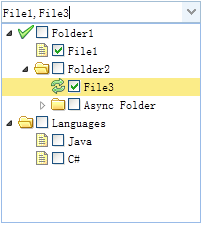
The combotree combines a selection control with a drop-down tree. It is similar to a combobox, except that the list is replaced with a tree component. The combotree supports a tree with tree-state checkboxes for multiple selection.
Dependencies
- combo
- tree
Usage
Create a combotree from markup.
<select id="cc" class="easyui-combotree" style="width:200px;"
    data-options="url:'get_data.php',required:true">
</select>
Create a combotree using JavaScript.
<input id="cc" value="01">
$('#cc').combotree({
    url: 'get_data.php',
    required: true
});
Properties
These properties extend from combo and tree. Below are the properties added or overridden for combotree.
| Name | Type | Description | Default Value |
|---|---|---|---|
| editable | boolean | Defines whether the user can directly enter text into the text field. | false |
Events
These events extend from combo and tree.
Methods
These methods extend from combo. Below are the methods added or overridden for combotree.
| Name | Parameters | Description |
|---|---|---|
| options | none | Returns the options object. |
| tree | none | Returns the tree object. The example below demonstrates how to get the selected tree node.
var t = $('#cc').combotree('tree');    // get the tree object
var n = t.tree('getSelected');        // get selected node
alert(n.text);
|
| loadData | data | Remember the local tree data. Code example:
$('#cc').combotree('loadData', [{
    id: 1,
    text: 'Languages',
    children: [{
        id: 11,
        text: 'Java'
    },{
        id: 12,
        text: 'C++'
    }]
}]);
|
| reload | url | Request remote tree data again. Pass the 'url' parameter to override the original URL value. |
| clear | none | Clear the component's value. |
| setValues | values | Set the array of values for the component. Code example:
$('#cc').combotree('setValues', [1,3,21]);
|
| setValue | value | Set the component's value. Code example:
$('#cc').combotree('setValue', 6);
|
jQuery EasyUI Plugins Other Extensions