jQuery EasyUI Menu & Button Plugin -Menubutton
 jQuery EasyUI Plugins
Extends from $.fn.linkbutton.defaults. Override the default defaults via $.fn.menubutton.defaults.
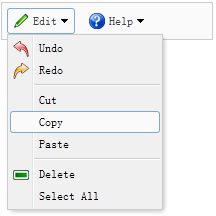
The menubutton is part of a drop-down menu. It is related to the linkbutton and the menu. It displays the linkbutton and hides the menu. When the user clicks or moves the mouse over the linkbutton, the menu is displayed to allow the user to click on it.
Dependencies
- menu
- linkbutton
Usage
Usually, the menubutton is created declaratively from markup.
<a href="#" id="mb" class="easyui-menubutton"
    data-options="menu:'#mm',iconCls:'icon-edit'">Edit</a>
<div id="mm" style="width:150px;">
    <div data-options="iconCls:'icon-undo'">Undo</div>
    <div data-options="iconCls:'icon-redo'">Redo</div>
    <div class="menu-sep"></div>
    <div>Cut</div>
    <div>Copy</div>
    <div>Paste</div>
    <div class="menu-sep"></div>
    <div data-options="iconCls:'icon-remove'">Delete</div>
    <div>Select All</div>
</div>
Create a menubutton using JavaScript.
<a href="#" id="mb">Edit</a>
<div id="mm" style="width:150px">
...
</div>
$('#mb').menubutton({
    iconCls: 'icon-edit',
    menu: '#mm'
});
Properties
The properties extend from linkbutton. The following are the properties added for menubutton.
| Name | Type | Description | Default Value |
|---|---|---|---|
| plain | boolean | If set to true, a simple effect is displayed. | true |
| menu | string | The selector used to create the corresponding menu. | null |
| duration | number | The duration in milliseconds to display the menu when hovering over the button. | 100 |
Methods
The methods are inherited from linkbutton. The following are the methods added or overridden by menubutton.
| Name | Parameters | Description |
|---|---|---|
| options | none | Returns the options object. |
| disable | none | Disable the menubutton. |
| enable | none | Enable the menubutton. |
| destroy | none | Destroy the menubutton. |
jQuery EasyUI Plugins Other Extensions