jQuery EasyUI Layout Plugin -Layout
 jQuery EasyUI Plugins
Override the default defaults via $.fn.layout.defaults.
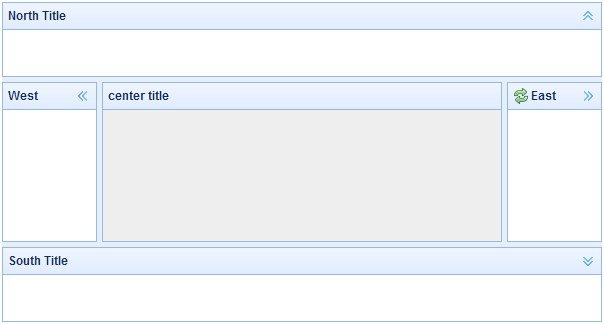
The layout is a container with five regions (north, south, east, west, and center). The center region panel is required, while the edge region panels are optional. Each edge region panel can be resized by dragging its border, and can also be collapsed by clicking the collapse trigger. Layouts can be nested, so users can create complex layouts.
Dependencies
- panel
- resizable
Usage
Create a Layout
1. Create a layout via markup.
Add the 'easyui-layout' class to a <div> tag.
<div id="cc" class="easyui-layout" style="width:600px;height:400px;">
    <div data-options="region:'north',title:'North Title',split:true" style="height:100px;"></div>
    <div data-options="region:'south',title:'South Title',split:true" style="height:100px;"></div>
    <div data-options="region:'east',title:'East',split:true" style="width:100px;"></div>
    <div data-options="region:'west',title:'West',split:true" style="width:100px;"></div>
    <div data-options="region:'center',title:'center title'" style="padding:5px;background:#eee;"></div>
</div>
2. Create a layout on the entire page.
<body class="easyui-layout">
    <div data-options="region:'north',title:'North Title',split:true" style="height:100px;"></div>
    <div data-options="region:'south',title:'South Title',split:true" style="height:100px;"></div>
    <div data-options="region:'east',title:'East',split:true" style="width:100px;"></div>
    <div data-options="region:'west',title:'West',split:true" style="width:100px;"></div>
    <div data-options="region:'center',title:'center title'" style="padding:5px;background:#eee;"></div>
</body>
3. Create a nested layout.
Note that the west region panel of the inner layout is collapsed.
<body class="easyui-layout">
    <div data-options="region:'north'" style="height:100px"></div>
    <div data-options="region:'center'">
        <div class="easyui-layout" data-options="fit:true">
            <div data-options="region:'west',collapsed:true" style="width:180px"></div>
            <div data-options="region:'center'"></div>
        </div>
    </div>
</body>
4. Load content via ajax.
The layout is created based on the panel. Each region panel provides built-in support for dynamically loading content from a URL. Using dynamic loading, users can make their layout pages display faster.
<body class="easyui-layout">
    <div data-options="region:'west',href:'west_content.php'" style="width:180px" ></div>
    <div data-options="region:'center',href:'center_content.php'" ></div>
</body>
Collapse Layout Panel
$('#cc').layout();
// collapse the west panel
$('#cc').layout('collapse','west');
Add a west region panel with a tool button
$('#cc').layout('add',{
    region: 'west',
    width: 180,
    title: 'West Title',
    split: true,
    tools: [{
        iconCls:'icon-add',
        handler:function(){alert('add')}
    },{
        iconCls:'icon-remove',
        handler:function(){alert('remove')}
    }]
});
Layout Options
| Name | Type | Description | Default Value |
|---|---|---|---|
| fit | boolean | When set to true, the layout's size is set to fit its parent container. When creating a layout on the 'body' tag, it will automatically maximize to the full size of the entire page. | false |
Region Panel Options
Region Panel Options are defined in the panel component. The following are some common and new properties:
| Name | Type | Description | Default Value |
|---|---|---|---|
| title | string | The title text of the layout panel. | null |
| region | string | Defines the position of the layout panel. Its value is one of the following: north, south, east, west, center. | |
| border | boolean | When set to true, the border of the layout panel is displayed. | true |
| split | boolean | When set to true, the split bar is displayed, which users can use to change the size of the panel. | false |
| iconCls | string | A CSS class that displays an icon in the panel header. | null |
| href | string | The URL to load data from a remote site. | null |
| collapsible | boolean | Defines whether the collapsible button is displayed. | true |
| minWidth | number | The minimum width of the panel. | 10 |
| minHeight | number | The minimum height of the panel. | 10 |
| maxWidth | number | The maximum width of the panel. | 10000 |
| maxHeight | number | The maximum height of the panel. | 10000 |
Methods
| Name | Parameter | Description |
|---|---|---|
| resize | none | Set the size of the layout. |
| panel | region | Return the specified panel. Possible values of the 'region' parameter are: 'north', 'south', 'east', 'west', 'center'. |
| collapse | region | Collapse the specified panel. Possible values of the 'region' parameter are: 'north', 'south', 'east', 'west'. |
| expand | region | Expand the specified panel. Possible values of the 'region' parameter are: 'north', 'south', 'east', 'west'. |
| add | options | Add a specified panel. The options parameter is a configuration object. For more details, refer to the tab panel properties. |
| remove | region | Remove the specified panel. Possible values of the 'region' parameter are: 'north', 'south', 'east', 'west'. |
jQuery EasyUI Plugins Other Extensions