jQuery EasyUI Basic Plugin -Tooltip
 jQuery EasyUI Plugins
Override the default defaults via $.fn.tooltip.defaults.
When the user moves the mouse pointer over an element, a tooltip window appears to display additional information. The tip content can contain any HTML element from the page or generated via ajax.
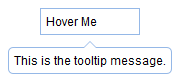
Usage
Create a Tooltip
1. Create a tooltip from markup, add the 'easyui-tooltip' class to the element, no JavaScript code is required.
<a href="../index.html" title="This is the tooltip message." class="easyui-tooltip">Hover me</a>
2. Create a tooltip using JavaScript.
<a id="dd" href="#">Click here</a>
$('#dd').tooltip({
    position: 'right',
    content: '<span style="color:#fff">This is the tooltip message.</span>',
    onShow: function(){
        $(this).tooltip('tip').css({
            backgroundColor: '#666',
            borderColor: '#666'
        });
    }
});
Properties
| Name | Type | Description | Default Value |
|---|---|---|---|
| position | string | Position of the tooltip. Possible values: 'left', 'right', 'top', 'bottom'. | bottom |
| content | string | Content of the tooltip. | null |
| trackMouse | boolean | If set to true, the tooltip moves with the mouse. | false |
| deltaX | number | Horizontal distance of the tooltip position. | 0 |
| deltaY | number | Vertical distance of the tooltip position. | 0 |
| showEvent | string | Event that triggers the tooltip to appear. | mouseenter |
| hideEvent | string | Event that triggers the tooltip to disappear. | mouseleave |
| showDelay | number | Time delay to show the tooltip. | 200 |
| hideDelay | number | Time delay to hide the tooltip. | 100 |
Events
| Name | Parameters | Description |
|---|---|---|
| onShow | e | Triggered when the tooltip is shown. |
| onHide | e | Triggered when the tooltip is hidden. |
| onUpdate | content | Triggered when the tooltip content is updated. |
| onPosition | left,top | Triggered when the tooltip position changes. |
| onDestroy | none | Triggered when the tooltip is destroyed. |
Methods
| Name | Parameters | Description |
|---|---|---|
| options | none | Returns the options property. |
| tip | none | Returns the tip object. |
| arrow | none | Returns the arrow object. |
| show | e | Show the tooltip. |
| hide | e | Hide the tooltip. |
| update | content | Update the tooltip content. |
| reposition | none | Reset the tooltip position. |
| destroy | none | Destroy the tooltip. |
jQuery EasyUI Plugins Other Extensions