jQuery EasyUI Extension -Editable DataGrid
 jQuery EasyUI Extension
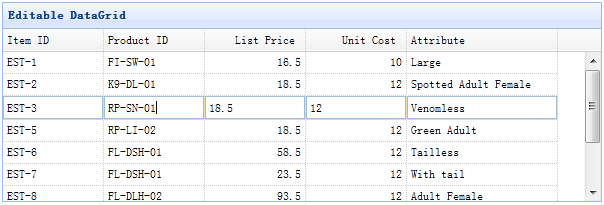
Usage
Create a data grid (datagrid) in HTML tags
    <table id="tt" style="width:600px;height:200px"
            title="Editable DataGrid"
            singleSelect="true">
        <thead>
            <tr>
                <th field="itemid" width="100" editor="{type:'validatebox',options:{required:true}}">Item ID</th>
                <th field="productid" width="100" editor="text">Product ID</th>
                <th field="listprice" width="100" align="right" editor="{type:'numberbox',options:{precision:1}}">List Price</th>
                <th field="unitcost" width="100" align="right" editor="numberbox">Unit Cost</th>
                <th field="attr1" width="150" editor="text">Attribute</th>
            </tr>
        </thead>
    </table>
Make the data grid (datagrid) editable
$('#tt').edatagrid({
    url: 'datagrid_data.json',
    saveUrl: ...,
    updateUrl: ...,
    destroyUrl: ...
});
Now you can double-click a data grid row to start editing. You can also set the saveUrl, updateUrl, destroyUrl properties to automatically synchronize data between the client and the server.
Properties
These properties extend from the data grid (datagrid). The following are properties added for the editable data grid (edatagrid).
| Name | Type | Description | Default Value |
|---|---|---|---|
| destroyMsg | object | The confirmation dialog message to display when destroying a row. |
destroyMsg:{
    norecord:{    // when no record is selected
        title:'Warning',
        msg:'No record is selected.'
    },
    confirm:{    // when select a row
        title:'Confirm',
        msg:'Are you sure you want to delete?'
    }
}
|
| autoSave | boolean | When set to true, the edited row is automatically saved when clicking outside the data grid. | false |
| url | string | A URL to retrieve data from the server. | null |
| saveUrl | string | A URL to save data to the server and return the added row. | null |
| updateUrl | string | A URL to update data on the server and return the updated row. | null |
| destroyUrl | string | A URL to send the 'id' parameter to the server to destroy the row. | null |
| tree | selector | Displays the tree selector of the corresponding tree component. | null |
| treeUrl | string | A URL to retrieve the tree data. | null |
| treeDndUrl | string | A URL to handle drag and drop operations. | null |
| treeTextField | string | Defines the text field name of the tree. | name |
| treeParentField | string | Defines the parent node field name of the tree. | parentId |
Events
These events extend from the data grid (datagrid). The following are events added for the editable data grid (edatagrid).
| Name | Parameters | Description |
|---|---|---|
| onAdd | index,row | Triggered when a new row is added. |
| onEdit | index,row | Triggered when a row is edited. |
| onBeforeSave | index | Triggered before a row is saved; return false to cancel the save action. |
| onSave | index,row | Triggered when a row is saved. |
| onDestroy | index,row | Triggered when a row is destroyed. |
| onError | index,row | Triggered when a server error occurs. The server should return a row with the 'isError' property set to true to indicate that an error occurred. Code example: //server side code echo json_encode(array( 'isError' => true, 'msg' => 'error message.' ));
//client side code
$('#dg').edatagrid({
    onError: function(index,row){
        alert(row.msg);
    }
});
|
Methods
These methods extend from the data grid (datagrid). The following are methods added or overridden for the editable data grid (edatagrid).
| Name | Parameters | Description |
|---|---|---|
| options | none | Returns the options object. |
| enableEditing | none | Enable data grid (datagrid) editing. |
| disableEditing | none | Disable data grid (datagrid) editing. |
| editRow | index | Edit the specified row. |
| addRow | index | Add a new row at the specified row index. If the index parameter is not specified, append a new row to the last position. Code example:
// append an empty row
$('#dg').edatagrid('addRow');

// append an empty row as first row
$('#dg').edatagrid('addRow',0);

// insert a row with default values
$('#dg').edatagrid('addRow',{
    index: 2,
    row:{
        name:'name1',
        addr:'addr1'
    }
});
|
| saveRow | none | Save the edited row and post it to the server. |
| cancelRow | none | Cancel editing the row. |
| destroyRow | index | Destroy the currently selected row. If the index parameter is not specified, destroy all selected rows. Code example:
// destroy all the selected rows
$('#dg').edatagrid('destroyRow');

// destroy the first row
$('#dg').edatagrid('destroyRow', 0);

// destroy the specified rows
$('#dg').edatagrid('destroyRow', [3,4,5]);
|
Download jQuery EasyUI Examples
jquery-easyui-edatagrid.zip
jQuery EasyUI Extension Other Extensions