jQuery EasyUI Extension -DataGrid View
 jQuery EasyUI Extension
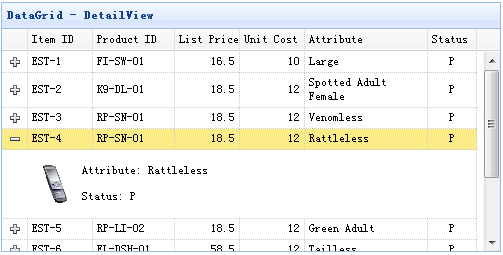
DataGrid DetailView
Usage
Step 1: Create an HTML page
    <head>
        <script type="text/javascript" src="datagrid-detailview.js.html"></script>
    </head>
    <body>
        <table id="tt"></table>
    </body>
Step 2: Create a DataGrid
    $('#tt').datagrid({
        title:'DataGrid - DetailView',
        width:500,
        height:250,
        remoteSort:false,
        singleSelect:true,
        nowrap:false,
        fitColumns:true,
        url:'datagrid_data.json',
        columns:[[
            {field:'itemid',title:'Item ID',width:80},
            {field:'productid',title:'Product ID',width:100,sortable:true},
            {field:'listprice',title:'List Price',width:80,align:'right',sortable:true},
            {field:'unitcost',title:'Unit Cost',width:80,align:'right',sortable:true},
            {field:'attr1',title:'Attribute',width:150,sortable:true},
            {field:'status',title:'Status',width:60,align:'center'}
        ]],
        view: detailview,
        detailFormatter: function(rowIndex, rowData){
            return '<table><tr>' +
                    '<td rowspan=2 style="border:0"><img src="images/index.html' + rowData.itemid + '.png" style="height:50px;"></td>' +
                    '<td style="border:0">' +
                    '<p>Attribute: ' + rowData.attr1 + '</p>' +
                    '<p>Status: ' + rowData.status + '</p>' +
                    '</td>' +
                    '</tr></table>';
        }
    });
Properties
| Name |
Type |
Description |
Default Value |
| detailFormatter |
function(index,row) |
A formatting function that returns the detail content of a row. |
|
Events
| Name |
Parameters |
Description |
| onExpandRow |
index,row |
Triggered when a row is expanded. |
| onCollapseRow |
index,row |
Triggered when a row is collapsed. |
Methods
| Name |
Parameters |
Description |
| fixDetailRowHeight |
index |
Fix the height of the detail row. |
| getExpander |
index |
Get the row expand object. |
| getRowDetail |
index |
Get the row detail container. |
| expandRow |
index |
Expand a row. |
| collapseRow |
index |
Collapse a row. |
DataGrid GroupView
Usage
Step 1: Create an HTML page
    <head>
        <script type="text/javascript" src="datagrid-groupview.js.html"></script>
    </head>
    <body>
        <table id="tt"></table>
    </body>
Step 2: Create a DataGrid
    $('#tt').datagrid({
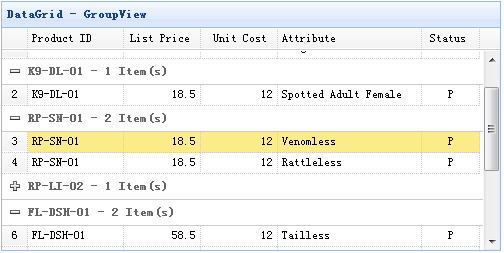
        title:'DataGrid - GroupView',
        width:500,
        height:250,
        rownumbers:true,
        remoteSort:false,
        nowrap:false,
        fitColumns:true,
        url:'datagrid_data.json',
        columns:[[
            {field:'productid',title:'Product ID',width:100,sortable:true},
            {field:'listprice',title:'List Price',width:80,align:'right',sortable:true},
            {field:'unitcost',title:'Unit Cost',width:80,align:'right',sortable:true},
            {field:'attr1',title:'Attribute',width:150,sortable:true},
            {field:'status',title:'Status',width:60,align:'center'}
        ]],
        groupField:'productid',
        view: groupview,
        groupFormatter:function(value, rows){
            return value + ' - ' + rows.length + ' Item(s)';
        }
    });
Properties
| Name |
Type |
Description |
Default |
| groupField |
string |
Indicates the field to be grouped. |
|
| groupFormatter |
function(value,rows) |
A formatting function that returns the group content.
The value parameter indicates the group value defined by the 'groupField' property.
The rows parameter indicates the data rows according to the specified group value. |
|
Methods
| Name |
Parameters |
Description |
| expandGroup |
groupIndex |
Expand a group. |
| collapseGroup |
groupIndex |
Collapse a group. |
DataGrid BufferView
Step 1: Include the 'datagrid-bufferview.js' file
    <head>
        <script type="text/javascript" src="datagrid-bufferview.js.html"></script>
    </head>
Step 2: Create a DataGrid
    <table id="tt" class="easyui-datagrid" style="width:700px;height:250px"
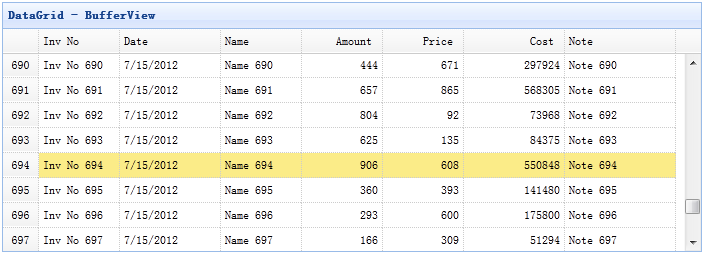
            title="DataGrid - BufferView"
            data-options="url:'get_data.php',view:bufferview,rownumbers:true,singleSelect:true,autoRowHeight:false,pageSize:50">
        <thead>
            <tr>
                <th field="inv" width="80">Inv No</th>
                <th field="date" width="100">Date</th>
                <th field="name" width="80">Name</th>
                <th field="amount" width="80" align="right">Amount</th>
                <th field="price" width="80" align="right">Price</th>
                <th field="cost" width="100" align="right">Cost</th>
                <th field="note" width="110">Note</th>
            </tr>
        </thead>
    </table>
DataGrid VirtualScrollView
Step 1: Include the 'datagrid-scrollview.js' file
    <head>
        <script type="text/javascript" src="datagrid-scrollview.js.html"></script>
    </head>
Step 2: Create a DataGrid with the virtual scroll view
    <table id="tt" class="easyui-datagrid" style="width:700px;height:250px"
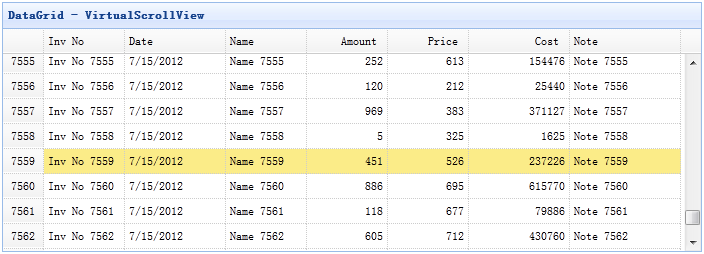
            title="DataGrid - VirtualScrollView"
            data-options="url:'get_data.php',view:scrollview,rownumbers:true,singleSelect:true,autoRowHeight:false,pageSize:50">
        <thead>
            <tr>
                <th field="inv" width="80">Inv No</th>
                <th field="date" width="100">Date</th>
                <th field="name" width="80">Name</th>
                <th field="amount" width="80" align="right">Amount</th>
                <th field="price" width="80" align="right">Price</th>
                <th field="cost" width="100" align="right">Cost</th>
                <th field="note" width="110">Note</th>
            </tr>
        </thead>
    </table>
Download jQuery EasyUI Examples
jquery-easyui-datagridview.zip
jQuery EasyUI Extension Other Extensions