jQuery EasyUI Extensions -RTL Support (RTL support)
 jQuery EasyUI Extensions
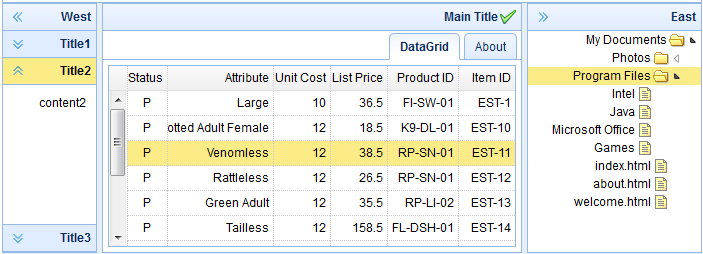
Include RTL Files
To enable RTL functionality, you need to include the 'easyui-rtl.css' and 'easyui-rtl.js' files.
<link rel="stylesheet" type="text/css" href="http://www.w3cschool.cc/try/jeasyui/themes/default/easyui.css">
<link rel="stylesheet" type="text/css" href="easyui-rtl.css.html">
<script type="text/javascript" src="http://code.jquery.com/jquery-1.8.0.min.js"></script>
<script type="text/javascript" src="http://www.w3cschool.cc/try/jeasyui/jquery.easyui.min.js"></script>
<script type="text/javascript" src="easyui-rtl.js.html"></script>
Add RTL Attribute
Remember to add the 'dir' attribute with a value of 'rtl' to the <body> tag.
    <body dir="rtl">
        <div class="easyui-accordion" data-options="fit:true,border:false">
            <div title="Title1" style="padding:10px;">
                content1
            </div>
            <div title="Title2" data-options="selected:true" style="padding:10px;">
                content2
            </div>
            <div title="Title3" style="padding:10px">
                content3
            </div>
        </div>
    </body>
Download jQuery EasyUI Examples
jquery-easyui-rtl.zip
jQuery EasyUI Extensions Other Extensions