jQuery EasyUI Extension -DataGrid Row Filter (DataGrid Filter Row)
 jQuery EasyUI Extension
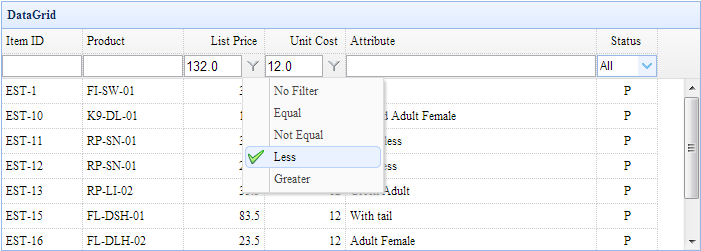
Usage
Include the 'datagrid-filter.js' file
<script type="text/javascript" src="datagrid-filter.js.html"></script>
Enable Filtering (Filter)
var dg = $('#dg');
dg.datagrid();    // create datagrid
dg.datagrid('enableFilter');    // enable filter
Properties
These properties extend from the datagrid. The following are the properties added to the datagrid.
| Name | Type | Description | Default Value |
|---|---|---|---|
| filterMenuIconCls | string | The icon class of the filter menu item (indicating the item to use). | icon-ok |
| filterBtnIconCls | string | The icon class of the filter button. | icon-filter |
| filterBtnPosition | string | The position of the filter button. Possible values are 'left' and 'right'. | right |
| filterPosition | string | The position of the filter bar relative to the columns. Possible values are 'top' and 'bottom'. | bottom |
| remoteFilter | boolean | If set to true, remote filtering is performed. When enabled, the 'filterRules' parameter will be sent to the remote server. The value of the 'filterRules' parameter is obtained by the 'filterStringify' function. |
false |
| filterDelay | number | The delay for performing filtering from the last key input event in the 'text' filter component. | 400 |
| filterRules | array | The definition of filter rules. Each rule contains the 'field', 'op', and 'value' properties. | [] |
| filterStringify | function | The function that stringifies the filter rules. |
function(data){
    return JSON.stringify(data);
}
|
Methods
The following methods extend from the datagrid.
| Name | Parameters | Description |
|---|---|---|
| enableFilter | filters | Create and enable the filter functionality. The 'filters' parameter is an array of filter configurations. Each item contains the following properties: 1) field: the field for which a rule needs to be defined. 2) type: The filter type. Possible values: label, text, textarea, checkbox, numberbox, validatebox, datebox, combobox, combotree. 3) options: The options for the filter type. 4) op: The filter operation. Possible values: contains, equal, notequal, beginwith, endwith, less, lessorequal, greater, greaterorequal. Code example:
$('#dg').datagrid('enableFilter');
$('#dg').datagrid('enableFilter', [{
    field:'listprice',
    type:'numberbox',
    options:{precision:1},
    op:['equal','notequal','less','greater']
}]);
|
| addFilterRule | param | Add a filter rule.
$('#dg').datagrid('addFilterRule', {
    field: 'desp',
    op: 'contains',
    value: 'easyui'
});
|
| removeFilterRule | field | Remove filter rules. If the 'field' parameter is not specified, remove all filter rules. |
| doFilter | none | Perform filtering based on the filter rules. |
| getFilterComponent | field | Get the filter component on the specified field. |
Download jQuery EasyUI Examples
jquery-easyui-datagrid-filter.zip
jQuery EasyUI Extension Other Extensions