Ollama Model Library and Model Selection
This chapter will horizontally review how to read the Ollama model library, the positioning of mainstream model families, and the trade-offs of quantization precision, ultimately giving you a practical method for selecting models by task.
If the model is chosen correctly, half of the performance problems no longer exist.
How to Read the Model Library: Capability Tag System
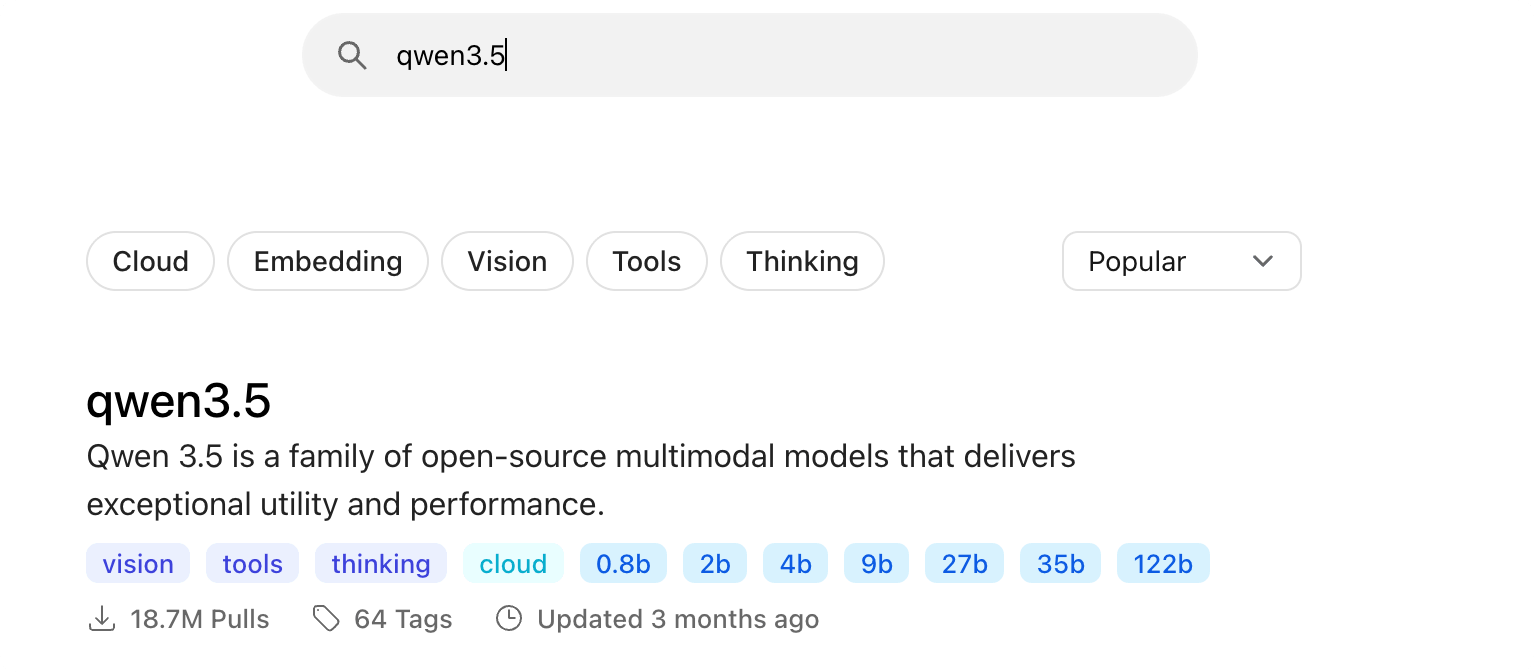
Ollama model library (ollama.com/search) uses a tagging system to label each model's capabilities. The first step in selecting a model is to filter by tags.
| Tag | Meaning | Typical Use |
|---|---|---|
| vision | Supports image input | Image Q&A, screenshot understanding, document recognition |
| tools | Supports tool calling | Agent, function calling, automation |
| thinking | Supports thinking mode | Mathematics, logic, complex reasoning |
| embedding | Text to vector | RAG, semantic search, knowledge base |
| cloud | Runs in the cloud, no local compute required | Call large models when local configuration is insufficient |
Taking qwen3.5 used in this tutorial as an example, it carries the vision, tools, and thinking tags simultaneously in the model library, making it an "all-rounder". This is also why the entire book chooses it as the test model.
Each model page also lists all tags, download size, context window, input types, and update time. Spending one minute reading them before downloading can save a lot of trial-and-error time.
Overview of Mainstream Model Families
Ollama is not a model, but a platform for running various open-source models. Below are several of the most common families currently:
| Family | Producer | Positioning & Features | Suitable Scenarios |
|---|---|---|---|
| Qwen (Tongyi Qianwen) | Alibaba | Complete range of sizes, strong Chinese capability, full multimodal and tool calling support | Chinese tasks, general development, examples in this tutorial |
| DeepSeek | DeepSeek | The reasoning series (R1) excels in chain-of-thought | Mathematics, logic, tasks requiring deep reasoning |
| Gemma | Excellent performance in lightweight sizes, multimodal | Low-spec devices, lightweight tasks | |
| Llama | Meta | Broadest ecosystem, abundant community resources | General tasks, English scenarios |
| GPT-OSS | OpenAI | OpenAI's open-source series, supports thinking levels | General tasks, Agent experiments |
| Mistral | Mistral AI | Representative of the European camp, efficient small models | Lightweight deployment, multilingual |
Model iteration speed is measured in weeks; specific available sizes and capabilities are subject to the real-time pages of the model library. The selection mindset outlives specific conclusions: first determine the task and capability tags, then look at the match between size and hardware.
Quantization Precision: Trade-off Between Size and Quality
Quantization is a technique that compresses model weights from high-precision decimals into low-bit-width storage. It is the key to "running large models on small GPUs".
For different quantized versions of the same model, the relationship between size and quality is roughly as follows:
| Precision | Relative Size | Quality Performance | Applicable Scenarios |
|---|---|---|---|
| fp16 / fp32 | Baseline (largest) | Lossless | Original weights before training and quantization |
| q8_0 | About 1/2 | Almost lossless | Preferred when VRAM is abundant |
| q4_K_M | About 1/4 | Slight decrease, best cost-performance | Choice for the vast majority of local deployments |
| q4_K_S | Slightly smaller than q4_K_M | A bit lower than q4_K_M | Extreme VRAM optimization |
Models in the model library are already quantized by default (commonly q4_K_M), ready to use after download, no need to worry about it yourself.
To confirm the actual precision of a local model, you can query the quantization level using the show series commands or the API; if you want to compress an fp16 model into a small size yourself, just use the quantize parameter of the create command. The next Modelfile chapter has a complete demonstration.
Selecting Models by Task
Turn "model selection" into a classification problem: first determine the task, then compare with recommendations.
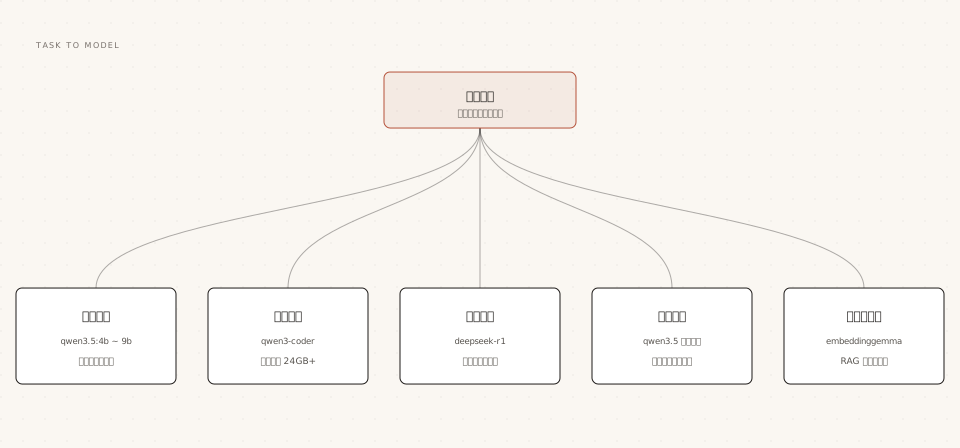
| Task | Recommended Model | Hardware Reference | Remarks |
|---|---|---|---|
| Everyday conversation, writing | qwen3.5:4b ~ 9b | Runs with 16GB RAM | Best cost-performance choice, full capability tags |
| Code generation | qwen3-coder | 24GB or more VRAM recommended | Requires 64K context when used with coding tools |
| Mathematics, logical reasoning | deepseek-r1 / qwen3.5 thinking mode | Regular configuration according to size | More stable but slower after enabling think |
| Image viewing, screenshot understanding | qwen3.5 (native vision) | Same as conversation size | Pass image path directly on command line |
| RAG, semantic search | embeddinggemma / qwen3-embedding | Small size, low requirements | Embedding models cannot be used for chat |
Embedding models and generative models are two different things: the former only converts text into vectors for retrieval and similarity computation, and does not output text answers. When building a knowledge base, you need both; don't mix them up.
Matching Size with Hardware
The elimination method is more useful than memorization: first use a rough rule to determine whether it can run, then fine-tune.
Rough rule: the model download size is approximately equal to the minimum RAM/VRAM requirement. For actual operation, reserve an additional 1-2GB overhead; the larger the context window, the more you need to add.
| Your available RAM / VRAM | Maximum size that can run | Recommendation |
|---|---|---|
| 8GB | qwen3.5:0.8b ~ 2b | Experience-oriented, accept the capability ceiling |
| 16GB | qwen3.5:4b ~ 9b | Sweet spot for daily use |
| 8GB VRAM (dedicated GPU) | qwen3.5:9b | Keep 100% GPU for speed |
| 24GB VRAM | qwen3.5:27b / qwen3-coder | Advanced development and coding tasks |
| 48GB VRAM or above | 35b+ and multi-GPU combinations | Default context also increases automatically |
Once it is running, useollama psVerification: If the PROCESSOR column shows 100% GPU, it means everything is in VRAM; if a CPU/GPU mixed ratio appears, it means VRAM is insufficient and the model is split, causing a noticeable speed drop. In this case, you should switch to a smaller size rather than tough it out.
Cloud Models and Retirement Mechanism
When local compute is insufficient but you still want to use very large models, Ollama provides a third path: cloud models with the cloud tag.
Examples
ollama signin
# Run cloud models like local models, no need to download weights
ollama run qwen3.5:cloud
Cloud models are used in exactly the same way as local models: the same commands, the same API, the same tool integrations, except that inference happens on Ollama's servers.
Note that cloud models have a retirement mechanism: the official team periodically takes down old models and provides recommended replacements, notifying users via email and official website announcements. Automated workflows that depend on a cloud model should pay attention to such notices.
Other ExtensionsLocal models are completely unaffected by the retirement mechanism. Weights downloaded to disk can always be used, which is also the feature that makes pure local solutions most reassuring for teams.