Ollama Privatization and Team Deployment
A server with a GPU can become a shared model service for the entire team: containerized orchestration, LAN sharing, reverse proxy, and model distribution. This article pieces these together into a complete team deployment solution.
Establish the core understanding first: Ollama itself has no authentication mechanism; the security boundary must be built with a reverse proxy and network policies.
Team Deployment Topology Overview
The recommended standard topology is three-tiered: member traffic first reaches the reverse proxy, and after the proxy completes authentication, it forwards to the Ollama service that only listens on the local loopback.
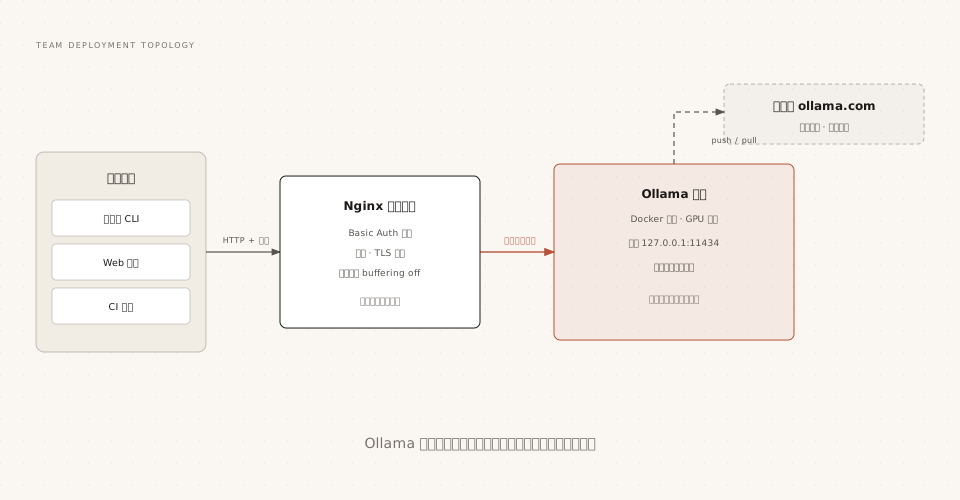
The key design of this structure is that Ollama only listens on 127.0.0.1, so all external access must go through the proxy, making the authentication entry point unique and controllable.
Docker and Compose Orchestration
Prefer Docker for server deployment, and use Compose to solidify configuration in team scenarios:
# 文件路径:docker-compose.yml
services:
  ollama:
    image: ollama/ollama          # AMD 显卡改用 ollama/ollama:rocm
    container_name: ollama
    restart: unless-stopped
    volumes:
      - ollama:/root/.ollama      # 模型持久化,升级镜像不丢模型
    ports:
      - "127.0.0.1:11434:11434"   # 只暴露给本机,交给 Nginx 对外
    # NVIDIA GPU 直通(需要先装好 NVIDIA Container Toolkit)
    deploy:
      resources:
        reservations:
          devices:
            - driver: nvidia
              count: all
              capabilities: [gpu]

volumes:
  ollama:
Docker-related commands:
# 启动 / 查看日志 / 升级
docker compose up -d
docker compose logs -f ollama
docker compose pull && docker compose up -d
Note that the ports mapping is written as 127.0.0.1:11434:11434 rather than 11434:11434: the former restricts the port to the local loopback, so external access can only go through Nginx; the latter is equivalent to directly exposing the unauthenticated service to the network interface, which is the most common source of team security incidents.
Sharing One Model Server on a LAN
When a small team does not want to set up a proxy, the lowest-cost sharing method is to let Ollama listen directly on the intranet:
# 服务器端:监听所有网卡
OLLAMA_HOST=0.0.0.0:11434 ollama serve
On member machines, point OLLAMA_HOST to the server, and the local ollama command will operate the remote service:
# 成员电脑:CLI 与 SDK 都认这个变量
export OLLAMA_HOST=http://192.168.1.100:11434

# 之后所有命令都作用在服务器上
ollama run qwen3.5
For capacity planning in multi-user sharing, directly refer to the formula in the configuration section: the number of concurrent requests multiplied by context length determines VRAM usage. For a team of 10, it is not recommended to set NUM_PARALLEL to 10; queuing is often more graceful than exhausting VRAM.
Reverse Proxy and Tunnels
Nginx Reverse Proxy (Recommended)
# 文件路径:/etc/nginx/conf.d/ollama.conf
server {
    listen 80;
    server_name model.example.com;   # 换成你的域名或内网 IP

    location / {
        proxy_pass http://localhost:11434;
        proxy_set_header Host localhost:11434;
        # Ollama 流式响应为 NDJSON,建议关闭缓冲避免"卡顿"
        proxy_buffering off;
    }
}
Temporary Tunnels: ngrok and Cloudflare Tunnel
For demos or remote joint debugging, you can use tunnels to temporarily expose the local service to the public internet:
# ngrok
ngrok http 11434 --host-header="localhost:11434"

# Cloudflare Tunnel
cloudflared tunnel --url http://localhost:11434 --http-host-header="localhost:11434"
A tunnel is equivalent to exposing the unauthenticated service to the public internet. It is recommended only for short-term demos, and should be shut down immediately after use. For long-term external access, use the authenticated Nginx solution.
Authentication: Building Your Own Security Boundary
Ollama has no built-in account system. Team deployment must build its own authentication. There are three common paths:
| Solution | Approach | Applicable to |
|---|---|---|
| Nginx Basic Auth | htpasswd generates a password file, unified verification at the proxy layer | Small teams, can be implemented in ten minutes |
| API Gateway | Gateways such as Kong, APISIX for API Key issuance, rate limiting, and audit | Multi-team sharing, requires metering |
| Network Isolation | Ollama only enters the intranet or VPN subnet, not exposed to the public internet | Environments with enterprise network control |
Take the most common Nginx Basic Auth as an example:
# 生成密码文件
sudo htpasswd -c /etc/nginx/.htpasswd zhangsan

# Nginx location 块中追加两行:
# auth_basic "Ollama API";
# auth_basic_user_file /etc/nginx/.htpasswd;
The above authentication solutions come from common community practices rather than official Ollama features. When choosing, follow the team's existing infrastructure. There is only one principle: do not expose 11434 directly in an untrusted network.
Private Model Distribution and Version Management
Good team-customized models need a distribution mechanism. Ollama's approach is namespaces plus pushing.
The process has four steps: register an account on ollama.com; bind the local public key (~/.ollama/id_ed25519.pub) on the official website settings page; copy the model to a name with the username; push.
# 复制成带命名空间的名字,用 tag 标版本
ollama cp example-helper myteam/example-helper:v1

# 推送到 ollama.com
ollama push myteam/example-helper:v1

# 成员拉取使用(私有模型需登录授权账号)
ollama run myteam/example-helper:v1
Version management is expressed with tags: v1, v2 are independent of each other, and rolling back is just switching back to the old tag.
A fully offline intranet alternative also exists: put the customized Modelfile and weight files into an internal code repository or file service, and members run create locally to build. Ollama currently does not provide a server for self-hosted private registries, so cross-network distribution mainly takes these two forms.
Monitoring and Operations
Daily operations for self-hosted services revolve around three things: the service is alive, resources are sufficient, and errors are traceable.
The official leverage points are ollama ps (model loading and VRAM), logs (locations in the configuration section summary table), and the API's usage field (token-level timing statistics).
Community solutions fill in the gap in metric-based monitoring: the open-source Ollama exporter can expose metrics such as request count and token throughput to Prometheus, and use Grafana for dashboards. When requirements are simple, a script that periodically polls /api/ps and alerts on log keywords is also sufficient.
Most monitoring solutions are community-maintained; confirm the supported Ollama version before selection. This article does not lock down specific project names; you can also build your own following the "metric exposure - time-series database - dashboard" trio approach.
Introduction to Kubernetes Deployment
Teams with existing K8s infrastructure can run Ollama in a cluster using a Deployment. There are three key points: use PVC for model data persistence, use resource scheduling declarations for GPU nodes, and expose the service through an in-cluster Service.
# 骨架示意:Deployment + GPU 资源声明
apiVersion: apps/v1
kind: Deployment
metadata:
  name: ollama
spec:
  replicas: 1
  template:
    spec:
      containers:
        - name: ollama
          image: ollama/ollama
          ports:
            - containerPort: 11434
          volumeMounts:
            - name: models          # 模型持久化,避免 Pod 重建重新拉取
              mountPath: /root/.ollama
          resources:
            limits:
              nvidia.com/gpu: 1    # 声明 GPU,配合集群 GPU 调度
      volumes:
        - name: models
          persistentVolumeClaim:
            claimName: ollama-models
Ollama has not published an official Helm Chart; cluster deployment mostly relies on community Charts or self-developed manifests. The benefits of moving to K8s lie mainly in scheduling and self-healing. If you only have one GPU server, Docker Compose is usually a more worry-free choice.