Ollama Six Model Capabilities in Practice
Streaming output, thinking mode, structured output, visual understanding, vector embeddings, tool calling, plus web search, form the complete landscape of Ollama's model capabilities.
This chapter uses the official Python library to practice each capability one by one; all examples can be run directly.
First, we need to install the Ollama Python SDK.
You can install it with pip:
pip install ollama
Make sure Python 3.x is installed in your environment, and that your network can access the local Ollama service.
Before using the Python SDK, make sure the local Ollama service is running.
You can start it using the command-line tool:
ollama serve
Once the local service is running, the Python SDK will communicate with it to perform model inference and other tasks.
Capability 1: Streaming Output
Streaming makes the answer appear word by word on the interface; it's the foundation of the chat application experience.
In the SDK, set stream to True, then iterate over each chunk:
Example
# Enable streaming, receive responses chunk by chunk
stream = chat(
model='qwen3.5',
messages=[{'role': 'user', 'content': 'Introduce Python Tutorial in three sentences'}],
stream=True,
)
# Print chunk by chunk while concatenating the full content
content = ''
for chunk in stream:
print(chunk.message.content, end='', flush=True)
content += chunk.message.content
# The concatenated content can be used to save history or archive to storage
Key point: each streaming chunk is only a "fragment"; you must accumulate the full content on the client side yourself. When adding this round's answer to the conversation history later, use the concatenated full text.
Capability 2: Thinking Mode
Reasoning models first output a thinking process before giving the answer. In the SDK, this is controlled via the think parameter, and the thinking and body text belong to two separate fields.
Example
response = chat(
model='qwen3.5',
messages=[{'role': 'user', 'content': 'Which is bigger, 9.9 or 9.11?'}],
think=True,
stream=False,
)
# The thinking process and final answer belong to two separate fields
print('Thinking:', response.message.thinking)
print('Answer:', response.message.content)
In streaming scenarios, thinking and content appear alternately in chunks; use a state machine to switch rendering areas:
Example
stream = chat(
model='qwen3.5',
messages=[{'role': 'user', 'content': 'What is 17 times 23?'}],
think=True,
stream=True,
)
in_thinking = False
for chunk in stream:
if chunk.message.thinking:
if not in_thinking:
in_thinking = True
print('[Thinking]', end='', flush=True)
print(chunk.message.thinking, end='', flush=True)
elif chunk.message.content:
if in_thinking:
in_thinking = False
print('\n'[Answer]', end='', flush=True)
print(chunk.message.content, end='', flush=True)
UI implementation suggestion: render thinking as a collapsible gray area, render content as body text; the gpt-oss series only accepts three thinking effort levels — low / medium / high — passing a boolean value is invalid.
Capability 3: Structured Output
Structured output makes the model return data that strictly conforms to a JSON Schema; combined with Pydantic validation, it's the standard way for programs to consume model output.
Example
from pydantic import BaseModel
# Define the expected data structure with Pydantic
class Site(BaseModel):
name: str
category: str
free: bool
response = chat(
model='qwen3.5',
messages=[{'role': 'user', 'content': 'Introduce Python Tutorial'}],
format=Site.model_json_schema(),
)
# The returned content is a JSON string conforming to the schema; validate and parse it directly
site = Site.model_validate_json(response.message.content)
print(site.name, site.category, site.free)
This pattern is the cornerstone of all data extraction applications: extracting fields from resumes, pulling key information from tickets, and extracting information from images (combined with vision capabilities) all use it.
Two stability tips: set the temperature in options to 0; also describe the meaning of the fields in the prompt, providing dual constraints with the schema.
Capability 4: Visual Understanding
Multimodal models (such as qwen3.5) can accept images. The SDK supports passing file paths directly, which is much more convenient than base64 encoding in the REST API.
Example
response = chat(
model='qwen3.5',
messages=[{
'role': 'user',
'content': 'What page is this screenshot? List the main features.',
'images': ['screenshot.png'],
}],
)
print(response.message.content)
Combining vision with structured output enables "image-to-data":
Example
from pydantic import BaseModel
# Define the target structure to extract from the image
class Receipt(BaseModel):
merchant: str
total: float
date: str
response = chat(
model='qwen3.5',
messages=[{
'role': 'user',
'content': 'Extract the merchant, amount, and date from this receipt photo',
'images': ['receipt.jpg'],
}],
format=Receipt.model_json_schema(),
options={'temperature': 0},
)
print(Receipt.model_validate_json(response.message.content))
Capability 5: Vector Embeddings
The embed interface produces text vectors in batch; combined with cosine similarity, it can implement a minimal viable semantic search.
Example
# Generate document vectors in batch
docs = [
'Python is an interpreted language',
'JavaScript mainly runs in the browser',
'EXAMPLE provides free programming tutorials',
]
result = ollama.embed(model='embeddinggemma', input=docs)
vectors = result['embeddings']
print(len(vectors), len(vectors[0])) # 3 vectors and their dimensions
# Compute cosine similarity between the query vector and document vectors to sort and retrieve results
query = ollama.embed(model='embeddinggemma', input='Is learning Python hard?')
Indexing and querying must use the same embedding model; otherwise the vector spaces are inconsistent and retrieval results are meaningless. The complete knowledge base implementation is covered in the RAG project chapter.
Capability 6: Tool Calling
Tool calling teaches the model to "call for help": when it determines external information is needed, it returns tool_calls; the program executes the actual functions, and after the results are passed back, the model summarizes and answers.
First look at the complete Agent loop sequence to understand how messages flow between the four parties:
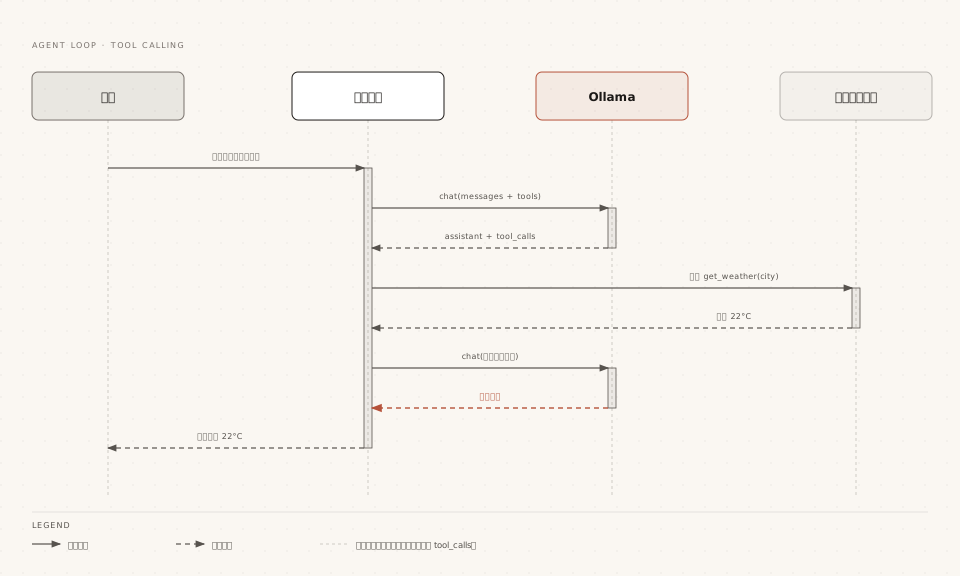
The Python SDK allows passing functions directly as tools; the function signature and docstring are automatically parsed into a schema:
Example
# Local tool function: the docstring becomes the tool description the model sees
def get_weather(city: str) -> str:
"""Query the current temperature of the specified city
Args:
city: city name
Returns:
Current temperature description
"""
temperatures = {"Beijing": "22°C", "Shanghai": "26°C", "New York": "18°C"}
return temperatures.get(city, "Unknown city")
messages = [{'role': 'user', 'content': 'What's the temperature in New York now?'}]
# Agent loop: iterate until the model no longer requests tools
while True:
response = chat(
model='qwen3.5',
messages=messages,
tools=[get_weather],
)
# Append the model message (including tool_calls) to the history
messages.append(response.message)
if not response.message.tool_calls:
# No more tool requests; output the final answer
print(response.message.content)
break
# Has tool requests: execute them and pass back results with the tool role
for call in response.message.tool_calls:
result = get_weather(**call.function.arguments)
messages.append({
'role': 'tool',
'tool_name': call.function.name,
'content': result,
})
Three engineering points: first, each response.message must be appended back to messages as-is, and tool results are passed back with the tool role; second, with parallel tool calls, the model may return multiple tool_calls at once — execute and append them one by one; third, in real projects, tool results can be very long, so be careful to truncate them to protect the context window.
Capability 7: Web Search
Ollama officially provides two web interfaces, web_search and web_fetch, which can be mounted as tools for the model to answer new information beyond its training data.
Example
# Mount web access as a tool
available_tools = {'web_search': web_search, 'web_fetch': web_fetch}
messages = [{'role': 'user', 'content': "What new features does Ollama have recently?"}]
while True:
response = chat(
model='qwen3.5',
messages=messages,
tools=[web_search, web_fetch],
think=True,
)
messages.append(response.message)
if not response.message.tool_calls:
print(response.message.content)
break
for call in response.message.tool_calls:
func = available_tools.get(call.function.name)
if func:
# Tool results can be very long; truncate to protect the context
result = str(func(**call.function.arguments))
messages.append({
'role': 'tool',
'tool_name': call.function.name,
'content': result[:2000],
})
Other ExtensionsThe web interfaces require creating an API Key on ollama.com; search results can easily be thousands of tokens, so the official recommendation is to set the context to 32K or higher for such Agent scenarios. There is also a ready-made MCP Server implementation that can integrate with tools like Cline and Codex; see the ecosystem chapter for integration details.