Ollama Introduction
Ollama is an open-source large language model (LLM) platform that allows users to easily run, manage, and interact with large language models locally.
Ollama provides a simple way to load and use various pre-trained language models, supporting multiple natural language processing tasks such as text generation, translation, code writing, and question answering.
Ollama's characteristic is that it not only provides ready-made models and toolsets, but also offers convenient interfaces and APIs, making tasks from text generation and dialogue systems to semantic analysis quick to implement.
Unlike other NLP frameworks, Ollama aims to simplify user workflows, making machine learning no longer a field only accessible to developers with deep technical backgrounds.
Ollama supports multiple hardware acceleration options, including pure CPU inference and various underlying computing architectures (such as Apple Silicon), enabling better utilization of different types of hardware resources.

Ollama is a local model runtime environment composed of four parts.
| Component | Description | Where |
|---|---|---|
| Command-line tool | Entry point for all daily operations such as run, pull, list | The ollama command in the system PATH |
| Background service | Runs persistently, responsible for model loading and inference, and provides a REST API externally | Local port 11434 |
| Model library | Official distribution channels for various open-source models, classified by capability tags | ollama.com/library |
| Local storage | Downloaded model weights and configurations | The .ollama folder in the user directory |
The new version also provides two more user-friendly entry points: typing ollama directly opens an interactive menu, and using ollama launch connects local models to tools such as Claude Code and VS Code with one click.
Core Features and Characteristics
-
Support for Multiple Pre-trained Language Models
Ollama provides a variety of out-of-the-box pre-trained models, including common large language models such as GPT and BERT. Users can easily load and use these models for tasks like text generation, sentiment analysis, and question answering. -
Easy Integration and Use
Ollama provides a command-line tool (CLI) and Python SDK, simplifying integration with other projects and services. Developers do not need to worry about complex dependencies or configurations and can quickly integrate Ollama into existing applications. -
Local Deployment and Offline Use
Unlike some cloud-based NLP services, Ollama allows developers to run models in local computing environments. This means it can eliminate dependence on external servers, ensure data privacy, and for high-concurrency requests, offline deployment can provide lower latency and greater controllability. -
Support for Model Fine-tuning and Customization
Users can not only use the pre-trained models provided by Ollama, but also fine-tune models on this basis. According to their specific needs, developers can retrain models with their own collected data to optimize model performance and accuracy. -
Performance Optimization
Ollama focuses on performance, provides an efficient inference mechanism, supports batch processing, and effectively manages memory and computing resources. This allows it to remain efficient when processing large-scale data. -
Cross-platform Support
Ollama supports running on multiple operating systems, including Windows, macOS, and Linux. This ensures a consistent experience whether developers are debugging in a local environment or enterprises are deploying in production. -
Open Source and Community Support
Ollama is an open-source project, meaning developers can view the source code, modify and optimize it, and contribute to the project. In addition, Ollama has an active community, where developers can get help and exchange experiences with others.
Application Scenarios
-
Content Creation:
Helps writers, journalists, and marketers quickly generate high-quality content, such as blog posts, ad copy, and more. -
Programming Assistance::
Helps developers generate code, debug programs, or optimize code structures. -
Education and Research:
Assists students and researchers in learning, writing, and research, such as generating paper abstracts or answering questions. -
Cross-language Communication:
Provides high-quality translation capabilities to help users break language barriers. -
Personal Assistant:
Acts as an intelligent assistant to help users complete daily tasks, such as writing emails, generating to-do lists, and more.
Why Run Large Models Locally
Running locally is not about nostalgia; it is based on four solid reasons.
Privacy: Data never leaves the device. For content that cannot leave the local machine, such as contract drafts, medical records, and private code, you always have to weigh the risks before using cloud APIs, whereas local inference naturally avoids this problem.
Cost: No per-Token billing. Downloading a model only costs disk space and electricity once, and the marginal cost approaches zero under heavy use, which is especially friendly for scenarios that require batch text processing.
Offline: No dependence on the network. In intranet environments, server rooms, or on airplanes, as long as the device is there, the model is there; this is a hard requirement for on-site deployment and areas with poor connectivity.
Controllability: Versions and behavior are predictable. Local models do not quietly upgrade and change their behavior; the output formats verified today will not change tomorrow. For production systems, this matters more than being "more powerful."
Of course, to be honest: the capability ceiling of local open-source models is currently still lower than cloud flagship models. Choosing a local solution is about being "good enough, controllable, and cheap," not "all-capable."
Differences from Cloud APIs and Applicable Scenarios
Putting the two approaches side by side, the selection criteria become clear.
| Dimension | Ollama Local | Cloud API (OpenAI, Claude, etc.) |
|---|---|---|
| Data Location | Never leaves the local machine | Uploaded to the provider's servers |
| Compute Source | Your own CPU / GPU | Provider's data center |
| Cost Model | One-time download, free to use | Continuous per-Token billing |
| Model Strength | Constrained by local hardware | Best flagship models available |
| Offline Availability | Fully available | Unavailable |
| Getting Started Cost | Install software once, configure hardware once | Ready to use after registration, but need to manage keys and bills |
The applicable scenarios also become clear: choose local for privacy-sensitive, high-frequency calls, offline environments, and learning and development validation; choose cloud APIs when you need top-tier model capabilities, burst elastic traffic, or don't have your own GPU.
The two are not enemies; mature products often use a hybrid architecture: daily requests go local, and a few difficult tasks are forwarded to the cloud.
Comparison with Other Local Solutions
Running large models locally is not limited to Ollama; each common solution has its own audience.
| Solution | Positioning | Ease of Getting Started | Target Audience |
|---|---|---|---|
| Ollama | A runtime that runs models with a single command + local API service | Low | Most developers, teams that want quick integration |
| llama.cpp | The high-performance inference engine itself, with many parameters and fine-grained control | High | Users who want to dig into inference details and customize deployment |
| LM Studio | A desktop application with a graphical interface, with built-in model browsing and downloading | Low | Users who prefer a graphical interface and do not want to use the command line |
| vLLM | A high-throughput, production-grade inference service for GPU servers | High | Teams with high-concurrency online services and abundant compute resources |
| GPT4All | A lightweight desktop application, focused on local document conversation | Low | Ordinary users without a technical background |
Their relationship is worth mentioning: Ollama's underlying inference capability comes from llama.cpp, which can be understood as an "easy-to-use wrapper + service-oriented + model library ecosystem" built on top of llama.cpp.
This tutorial chooses Ollama as the main line because of its balance: minimal commands, full coverage of three platforms, and the most complete API and tool ecosystem. The comparison is based on public information and the project status as of August 2026; all solutions are evolving rapidly.
Local Models vs Ollama Cloud
The previous comparisons were all about "other providers' clouds." Ollama itself also provides a cloud solution, which completes the three ways to use large models.
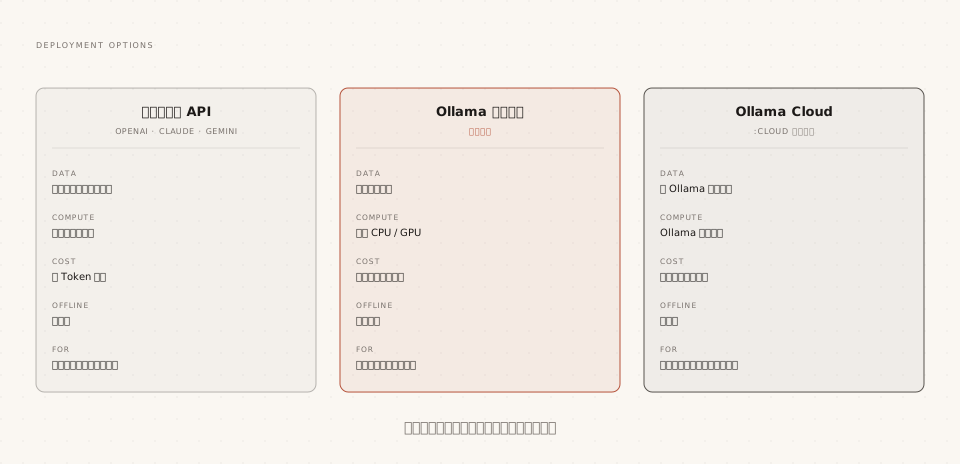
The experience of using Ollama Cloud is almost the same as local: add the `:cloud` suffix to the model name, log in to your account, and run it directly. Local commands, APIs, and tool integrations work as-is, except that inference is transparently forwarded to Ollama's servers.
Examples
ollama signin
# Run cloud models like local models, no need to download weights
ollama run qwen3.5:cloud
Its value lies in two scenarios: ultra-large models that your local compute power can't handle, and "testing whether a bigger model is worth it" before buying a new computer.
Cloud models have a retirement mechanism: the official team periodically takes down old cloud models and announces replacements. Automation workflows that depend on them need to watch for notices; local models stay on your disk forever, unaffected. This topic is fully covered in the Cloud Hybrid Deployment chapter.
Hardware Requirements and Expectations
One last thing: evaluate your own machine. Ollama is surprisingly forgiving about hardware requirements—it can run on pure CPU alone, just with an order-of-magnitude difference in speed.
With a discrete GPU (NVIDIA, AMD) or Apple Silicon chip, inference is GPU-accelerated, and generation speed is usually several to dozens of times faster than with pure CPU.
The default context window size is automatically tiered by Ollama based on VRAM:
| VRAM size | Default context length |
|---|---|
| Less than 24GiB | 4K |
| 24 ~ 48GiB | 32K |
| 48GiB and above | 256K |
Now look at the expected matching between parameter scale and device (using the qwen3.5 family as an example):https://ollama.com/library/qwen3.5):
| Model spec | Download size | Recommended configuration | Experience expectation |
|---|---|---|---|
| qwen3.5:latest | About 6.6GB | 16GB RAM or 8GB VRAM | Default spec, balanced quality and speed |
| qwen3.5:0.8b | About 1.0GB | 8GB RAM is enough | Verification environments, lightweight conversations |
| qwen3.5:4b | About 3.4GB | 16GB RAM | The sweet spot for daily use |
| qwen3.5:9b is equivalent to qwen3.5:latest | About 6.6GB | 16GB RAM or 8GB VRAM | Default spec, balanced quality and speed |
| qwen3.5:27b | About 17GB | 24GB VRAM | High-demand tasks like long documents and code |
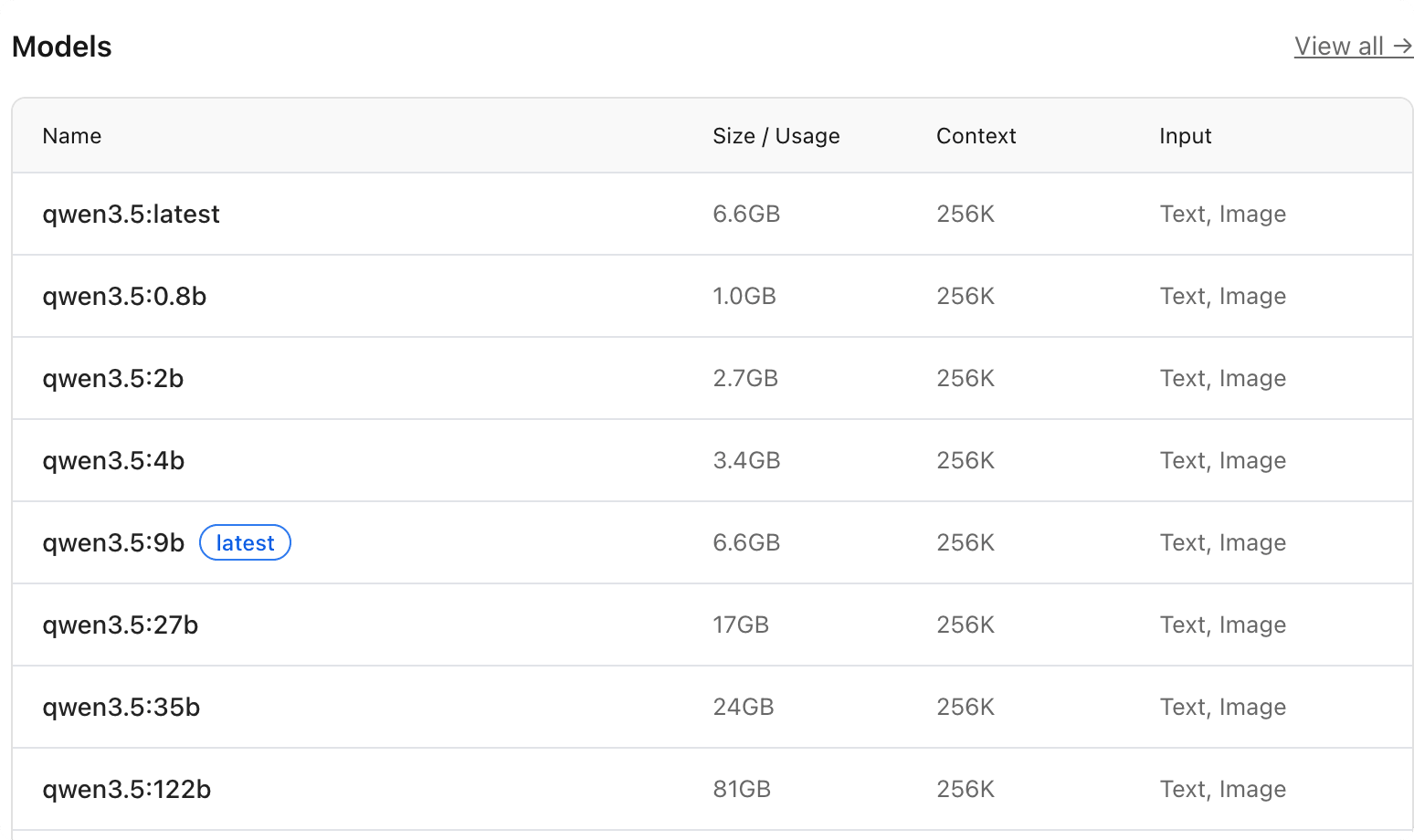
After the model is running, use theollama pscommand to check the PROCESSOR column to confirm whether the model is truly running entirely on the GPU. This verification step will be used repeatedly in the Model Management chapter.
Other extensionsDon't be discouraged if your configuration is truly limited: the 0.8b spec is enough to run through the vast majority of command demos in this tutorial; and when you genuinely need a larger model, there's the `:cloud` route that requires no hardware.