Ollama REST API Programming Access
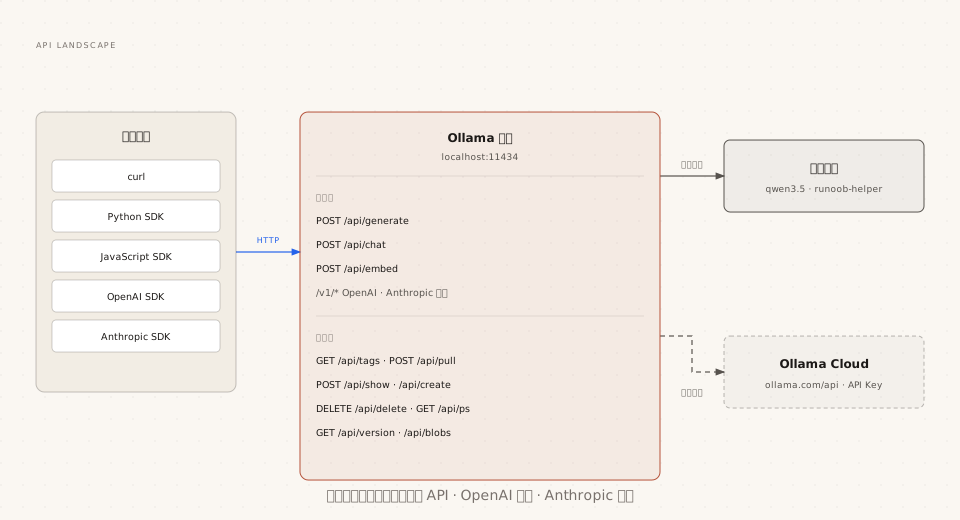
After installation, Ollama provides a complete REST API on local port 11434, covering text generation, chat, vector embeddings, and model management, as well as two compatible protocols: OpenAI and Anthropic.
This article explains the core APIs one by one: request structure, streaming processing, usage statistics, and error handling, allowing any language to integrate with local models.
Two Base URLs and Authentication Methods
Ollama's API has two endpoints: local and cloud, with different authentication rules.
| Endpoint | Base URL | Authentication |
|---|---|---|
| Local Service | http://localhost:11434/api | No authentication required |
| Local Service (Compatible Protocol) | http://localhost:11434/v1 | No authentication required, api_key can be filled arbitrarily |
| Ollama Cloud | https://ollama.com/api | Authorization: Bearer + API Key |
Local services require no authentication by default and work out of the box; when directly connecting to Ollama's cloud API at ollama.com, first create an API Key on the official website settings page and include it in the request header.
Text Generation: /api/generate
generate is the most basic single-turn generation API; just pass the model name and prompt:
Example
"model": "qwen3.5",
"prompt": "Introduce Python in one sentence",
"stream": false
}'
When stream is set to false, a single JSON object is returned:
{
  "model": "qwen3.5",
  "created_at": "2026-08-29T03:20:00.499127Z",
  "response": "Example是一个面向编程初学者的免费中文教程网站。",
  "done": true,
  "total_duration": 10706818083,
  "load_duration": 6338219291,
  "prompt_eval_count": 26,
  "prompt_eval_duration": 130079000,
  "eval_count": 42,
  "eval_duration": 4232710000
}
Common parameters are as follows:
| Parameter | Description |
|---|---|
| model | Required, model name |
| prompt | Prompt; can be left empty to preload the model |
| stream | Default true returns streaming; when false, returns the complete result at once |
| system | Temporarily specify a system prompt, overriding the setting in Modelfile |
| options | Generation parameters object, e.g., temperature, num_ctx (same as Modelfile parameters) |
| format | "json" or a full JSON Schema, forces structured output |
| keep_alive | Duration for the model to stay resident after the request, e.g., "10m", -1 for permanent residency, 0 for immediate unload |
| raw | When true, skips template assembly and directly uses the full prompt you provide |
| suffix | Text to be appended after the model output, for text completion scenarios |
| images | Base64 image array, used with multimodal models |
Two practical tips: sending an empty prompt can preload the model into memory, eliminating the loading wait for the first request; setting keep_alive to 0 along with an empty prompt can immediately unload the model and release VRAM.
Example
curl http://localhost:11434/api/generate -d '{"model": "qwen3.5"}'
# Immediately unload model, release VRAM
curl http://localhost:11434/api/generate -d '{"model": "qwen3.5", "keep_alive": 0}'
Chat Generation: /api/chat
chat is a multi-turn conversation API; the message history is maintained by the caller, which is the essential difference from generate.
Example
"model": "qwen3.5",
"messages": [
{ "role": "user", "content": "What is Python?" },
{ "role": "assistant", "content": "A Chinese tutorial website for beginners." },
{ "role": "user", "content": "Is it free? Answer in one sentence" }
],
"stream": false
}'
Fields supported by the message object:
| Field | Description |
|---|---|
| role | Four roles: system / user / assistant / tool |
| content | Message content |
| images | Optional, base64 image list (multimodal models) |
| thinking | Optional, the reasoning process of thinking models (used with the think parameter) |
| tool_calls | Optional, the list of tools that the model requests to call (see the tool calling section for hands-on practice) |
The correct way for multi-turn conversation: append the assistant message returned by the model in each round back to the messages array, then send it with the new question; the model can then "remember" the full context.
Since messages are fully managed by you, the history can be persisted to a database, compressed via summarization, or restored across sessions — the problem mentioned in Part 5 of "command line exits lose memory" now has an engineering solution here.
Vector Embeddings: /api/embed
The embed API converts text into vectors, serving as the raw material workshop for RAG and semantic search.
Example
curl http://localhost:11434/api/embed -d '{
"model": "embeddinggemma",
"input": "EXAMPLE is a programming tutorial website"
}'
# Batch: pass an array to input, returns multiple vectors at once
curl http://localhost:11434/api/embed -d '{
"model": "embeddinggemma",
"input": ["first text", "second text", "third text"]
}'
The embeddings in the response is a 2D array, with each vector already L2-normalized (unit length), so cosine similarity can be directly used for comparison.
Two noteworthy parameters: dimensions can specify the output vector dimension (when supported by the model, reducing dimensions saves storage); truncate defaults to true and automatically truncates overly long text, and setting it to false will raise an error when the text is too long.
Streaming vs Non-streaming: How to Handle Responses
Generation APIs return streaming by default, in NDJSON format: each line is an independent JSON object.
{"model":"qwen3.5","created_at":"...","response":"EXAMPLE","done":false}
{"model":"qwen3.5","created_at":"...","response":"(Example)","done":false}
{"model":"qwen3.5","created_at":"...","response":"是编程初学者的入门网站。","done":false}
{"model":"qwen3.5","created_at":"...","response":"","done":true,"done_reason":"stop"}
The client reads line by line and concatenates the response fields to form the complete answer; the concatenation process can be rendered in real time on the interface.
Trade-offs between the two modes:
| Mode | Advantage | Use case |
|---|---|---|
| Streaming (default) | Low time-to-first-token, can display in real time | Chat interfaces, long-text generation |
| Non-streaming stream:false | Get the complete result at once, simple to process | Batch processing, structured output, script calls |
In streaming mode, errors may occur midway through the output; at that point the HTTP status code can no longer be changed. The error will appear as a line {"error": "..."} at the end of the data stream, and the client should check this line when parsing.
Usage Statistics and Error Handling
Each generation response ends with performance statistics fields, providing first-hand data for evaluating inference overhead.
| Field | Meaning |
|---|---|
| total_duration | Total request time (nanoseconds) |
| load_duration | Model load time (noticeable on first request) |
| prompt_eval_count | Number of tokens consumed by input |
| prompt_eval_duration | Input processing time |
| eval_count | Number of tokens generated by output |
| eval_duration | Output generation time |
The formula for generation speed (token/s): eval_count / eval_duration * 10^9; all time units are nanoseconds.
In terms of error handling, the API uses standard HTTP status codes to express results:
| Status code | Meaning |
|---|---|
| 200 | Success |
| 400 | Request error (missing parameters, invalid JSON, etc.) |
| 404 | Model does not exist (run ollama pull first or check the name) |
| 429 | Rate limited due to too frequent requests |
| 500 | Internal server error |
| 502 | Gateway error (e.g., cloud model unreachable) |
The error response body is fixed to the {"error": "error description"} structure; clients can simply extract the error field uniformly.
Model Management API Overview
The API provides a counterpart for every model management operation available in the command line, suitable for building admin dashboards or automation scripts.
| Endpoint | Method | Purpose |
|---|---|---|
| /api/tags | GET | List local models (including parameter count, quantization level) |
| /api/show | POST | View model details, capabilities, template |
| /api/pull | POST | Pull a model, returns download progress streaming |
| /api/push | POST | Push model to model library |
| /api/copy | POST | Copy model (source / destination) |
| /api/delete | DELETE | Delete a model |
| /api/create | POST | Create a model (including quantization, corresponding to Modelfile capabilities) |
| /api/ps | GET | View currently loaded models and VRAM usage |
| /api/version | GET | Query Ollama version |
Taking /api/tags as an example, the response contains specification details for each model:
{
  "models": [
    {
      "name": "qwen3.5:latest",
      "size": 6600000000,
      "details": {
        "family": "qwen3.5",
        "parameter_size": "9B",
        "quantization_level": "Q4_K_M"
      }
    }
  ]
}
Fields such as quantization_level and parameter_size can be directly used to build a model selector interface.
OpenAI Compatible Interface
For existing OpenAI applications to switch to local models, usually you only need to change one base_url.
Example
-H "Content-Type: application/json" \
-d '{
"model": "qwen3.5",
"messages": [{ "role": "user", "content": "Introduce Python in one sentence" }]
}'
Compatibility covers five endpoints:
| Endpoint | Description |
|---|---|
| /v1/chat/completions | Chat completions, supporting streaming, vision, tools, and JSON mode |
| /v1/completions | Text completions |
| /v1/responses | Responses API (non-stateful mode) |
| /v1/embeddings | Vector embeddings |
| /v1/models | Model list |
Pay attention to two common differences:
First, the OpenAI protocol has no num_ctx concept. When you need to change the context, first create a model with PARAMETER num_ctx and then call it under a new name (you can use the Modelfile from Part 7 or borrow a name with cp).
Second, some fields are not yet supported: tool_choice, logit_bias, n, logprobs, etc. Before migrating, it is recommended to check the manual's support list.
Anthropic Compatible Interface
Ollama also provides an Anthropic Messages API compatibility layer, allowing tools such as Claude Code to directly use local models.
Example
-H "Content-Type: application/json" \
-H "anthropic-version: 2023-06-01" \
-d '{
"model": "qwen3.5",
"max_tokens": 1024,
"messages": [{ "role": "user", "content": "Introduce Python in one sentence" }]
}'
When integrating tools like Claude Code, you only need to set two environment variables:
Example
export ANTHROPIC_BASE_URL=http://localhost:11434
claude --model qwen3.5
Note the capability boundaries: Anthropic features such as forced tool_choice, prompt caching, batch interface, and PDF input are not yet supported; token count is approximate.
Other extensions