Ollama Tools and Editor Integrations
Ollama maintains an official integration directory: terminal coding agents, mainstream IDEs, desktop assistants, and automation platforms can all directly use local models.
In this section, we will useollama launchOne-click integration, or manually configuring environment variables, to plug local models into your daily toolchain.

Integration Ecosystem Overview
Official integrations are divided into three categories by use case, covering everything from coding to daily assistants.
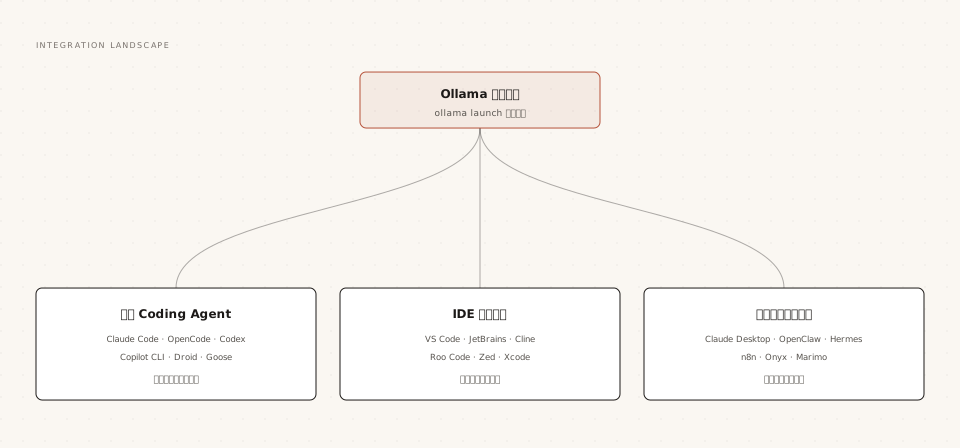
All integrations essentially follow the same path: point the tool's model requests to localhost:11434, or to OpenAI/Anthropic-compatible APIs.
ollama launch: One-Click Integration
launch is the unified entry point for integrations, interactively completing four steps: "select tool, select model, write config, start."
Example
ollama launch
# Directly start a specified integration with a specified model
ollama launch claude --model qwen3.5
# Generate configuration only, do not start
ollama launch droid --config
For non-interactive scenarios like scripts and CI, use --yes to skip all selectors; the model must be specified with --model:
Example
# Arguments after "--" are passed as-is to Claude Code itself
ollama launch claude --model qwen3.5 --yes -- -p "What does this repository do?"
Terminal Coding Agents
Terminal coding agents are currently the most active integration category; Ollama connects to them via each vendor's compatibility protocol.
| Tool | Description |
|---|---|
| Claude Code | Anthropic's coding agent, connected via the Anthropic-compatible API, supports tool calling, subtasks, and web search |
| OpenCode | Open-source coding agent; edits, runs, and iterates on code |
| Codex | OpenAI's coding assistant, available as both CLI and desktop versions |
| Copilot CLI | GitHub's command-line coding assistant |
| Droid | AI coding agent by Factory |
| Goose | Open-source automation agent with MCP extension support |
| DeepSeek Harness | DeepSeek's open-source agent framework with subtasks and web search |
| Cline CLI | Cline's command-line form |
Claude Code Integration Guide
Using the most representative Claude Code as an example, the one-click method is the launch command above; manual configuration only requires two environment variables:
Example
export ANTHROPIC_AUTH_TOKEN=ollama
export ANTHROPIC_API_KEY=""
export ANTHROPIC_BASE_URL=http://localhost:11434
# Start with any local model
claude --model qwen3.5
After integration, Claude Code's chat, file editing, command execution, vision input, and web search can all use local or cloud Ollama models.
The hard requirement for running coding agents is the context window: tool outputs and code files can easily run to tens of thousands of tokens. The official recommendation is to set the context above 64K; the last section of this chapter provides the setup method.
IDEs and Editors
VS Code Official Extension
Ollama provides an official extension for VS Code, connecting local models to VS Code Chat.
Complete the integration in three steps:
Step 1: Install the Ollama extension from the marketplace; it discovers the service on localhost:11434 by default.
Step 2: Open the Chat panel, find the Ollama section in the model selector below the input box, and choose a model.
Step 3: Chat and ask questions directly; local models can participate in coding Q&A.
Example
ollama pull qwen3.5
# Cloud models require login; local models require no account
ollama signin
If the model doesn't appear in the selector, troubleshoot in order: confirm Ollama is running, confirm ollama list shows the model, run Ollama: Refresh Models in the command palette, and then use Ollama: Diagnose Models to check the diagnostic output.
Other Editors
| Tool | Form | Description |
|---|---|---|
| JetBrains | Plugin | Use Ollama models in JetBrains IntelliJ IDEs |
| Cline / Roo Code | VS Code plugin | Agent-style coding plugin with custom model endpoint support |
| Zed | Built-in configuration | High-performance editor with native support for custom model providers |
| Xcode | Built-in configuration | Apple platform development tools connecting to local models |
Desktop Assistants and Automation
Local models can not only write code but also serve as daily assistants and automation engines.
| Tool | Role |
|---|---|
| Claude Desktop | Anthropic desktop assistant, supports local and cloud Ollama models |
| OpenClaw | Personal assistant connected to messaging apps, handles daily tasks |
| Hermes / Hermes Desktop | Open-source agent with self-improvement skills and memory capabilities |
| n8n | Visual workflow platform that embeds Ollama into automation pipelines |
| Onyx | Enterprise knowledge base Q&A platform (RAG scenarios) |
| Marimo | Reactive Python notebook, models can be called within cells |
Context Tuning for Agent Scenarios
If an integrated tool is slow or gives irrelevant answers, it's likely the context window is too small.
Web content returned by tools, entire code files, and multi-turn agent history all compete for the context window; the default 4K is far from enough. The official recommendation is at least 64,000 tokens for web search, agents, and coding tools.
Choose any one of three setup methods:
Example
# Method 2: Set globally when starting the service
OLLAMA_CONTEXT_LENGTH=64000 ollama serve
# Method 3: Embed into a dedicated model using a Modelfile
PARAMETER num_ctx 65536
After setting it, verify with the CONTEXT column of ollama ps, then check the PROCESSOR column to confirm VRAM can still hold it.
Classic Open Source Ecosystem Status
Beyond the official integration directory, the community ecosystem also has a number of open-source projects that work widely with Ollama.
| Project | Role | Status |
|---|---|---|
| LangChain / LlamaIndex | LLM application development framework with built-in Ollama integration classes | Community-maintained; commonly used for RAG development |
| Open WebUI | Self-hosted ChatGPT-like web UI, one-click connection to local Ollama | Community-maintained; commonly used for internal team sharing |
| Continue | Open-source AI coding assistant plugin | Community-maintained; supports custom model endpoints |